
.fs-cmsfilter_active span { color: black; }
table of contents

Transform complex support workflows

Deploy AI inside your existing support stack and prove business impact quickly.
Book a demo

AI governance checklist for CTOs, CISOs and AI teams: A complete guide

AI arrived in most companies before the rules did. Employees use AI assistants on personal accounts, SaaS vendors switch on AI features by default, and teams start building agents that read and write inside business systems. A policy document alone does not govern any of it. An AI governance checklist does, because it turns principles into specific controls that a CTO, a CISO and an AI team can assign, verify and prove.
AI Support Agents

This guide explains what AI governance is, why a checklist matters, who owns it, and what prompted the rules in the first place. At its center is a 10-part AI governance checklist mapped to the layers of your stack, followed by the KPIs that show whether governance is working.

What is AI governance?

AI governance is the set of roles, policies, processes and technical controls that decide which AI an organization uses, who may use it, for what purpose, with which data, and how the organization proves those decisions were followed.

It covers three kinds of AI:

  • AI employees use, such as AI assistants, AI chat and AI features inside SaaS tools.
  • AI the company builds, such as internal applications and AI agents.
  • AI the company buys, such as vendor products with AI inside.

Good governance answers five questions for each: who owns it, what it is allowed to do, what data it can touch, how the rules are enforced, and what evidence shows they held.

Read a deeper introduction to AI governance.

Importance of an AI governance checklist

A checklist turns governance from intent into work that can be assigned and checked.

  • It makes ownership concrete. Every line has an owner, so nothing falls between security, IT, legal and the business.
  • It closes gaps policies leave open. A policy says “protect sensitive data.” A checklist asks whether PII is redacted before every model call.
  • It produces evidence. Each item has proof attached, so audits and security questionnaires take hours rather than weeks.
  • It scales. The same checklist applies to every new tool, model and agent, so the twentieth approval is as rigorous as the first.
  • It aligns teams. CTOs, CISOs and AI teams work from one list instead of three separate ones.

The strategic case for AI governance

AI governance is often framed as a cost. In practice it is what lets a company use AI at scale.

  • Faster adoption. When approved AI is easy to use and the rules are clear, teams stop waiting for exceptions and stop working around policy.
  • Lower risk. IBM found 80% of employees use unsanctioned AI tools, and puts the additional cost of a shadow AI breach at $670K (IBM, 2025).
  • Lower cost. Governance consolidates scattered subscriptions and makes spend visible. A publicly traded autonomous vehicle company with ~1,500 employees consolidated 12 AI tools into OrgLogic, cut AI spend 70%, and reduced shadow AI by 91%, with engineers adopting in 2 weeks.
  • Shorter sales cycles. Customers, and the sales teams answering them, now ask how your AI handles their data. A governed program answers the security questionnaire with evidence.
  • Regulatory readiness. EU AI Act obligations are phasing in, and US states are passing their own AI laws. Controls built now are cheaper than controls retrofitted later.
  • Safe room for agents. AI agents that act inside CRM, ticketing and code systems need owners and permission scopes before they can leave the pilot stage.

Who owns AI governance in an organization?

AI governance works best as a shared program with one accountable sponsor and clear lanes.
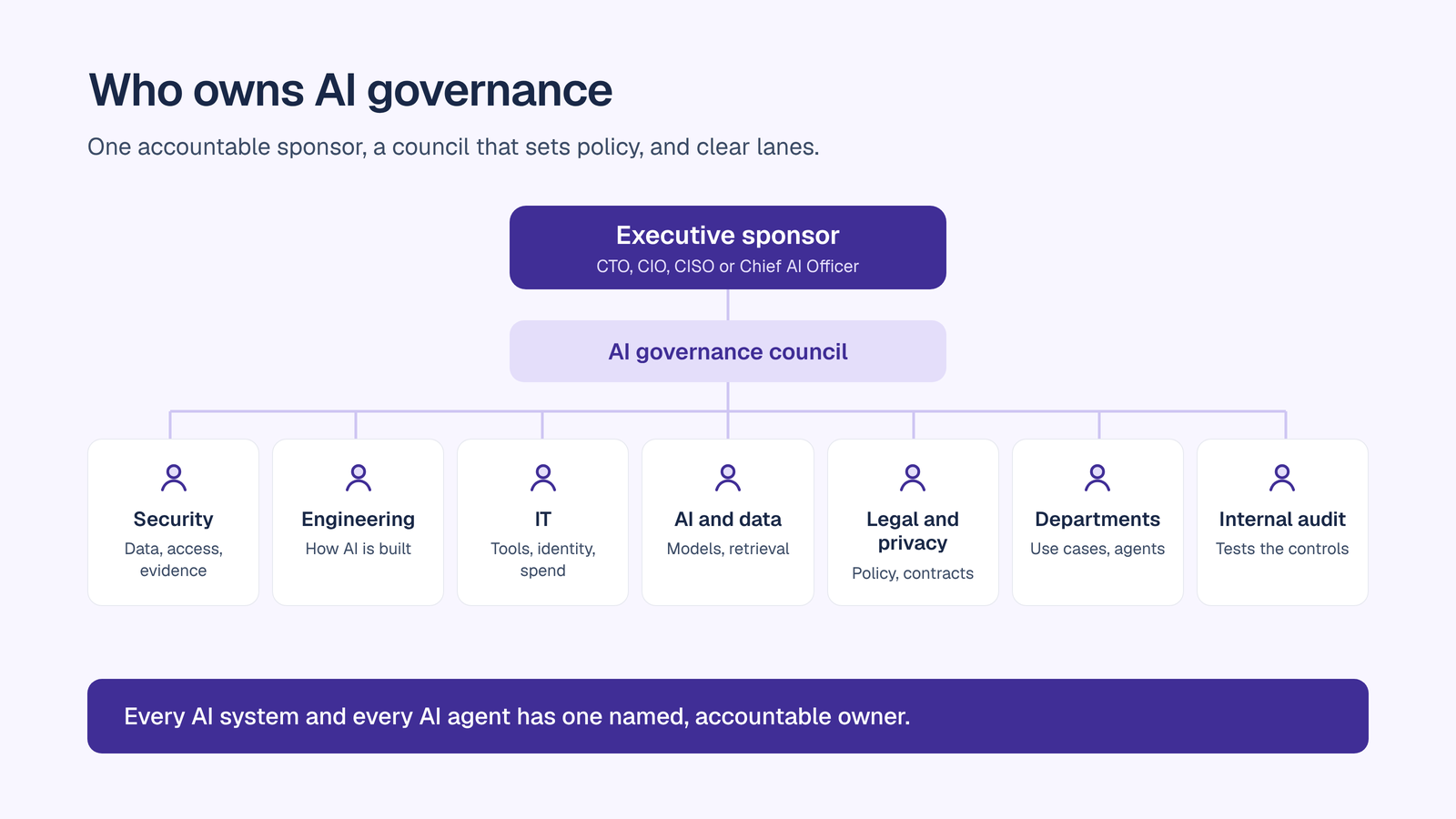
  • Executive sponsor. Usually the CTO, CIO, CISO or Chief AI Officer. Owns the program, breaks ties and reports to the board.
  • AI governance council. Security, IT, legal, privacy, HR, data and AI, and business leaders. Sets policy, approves high-risk use cases and reviews metrics.
  • CISO and security team. Own data protection, access control, monitoring, incident response and audit evidence.
  • CTO and engineering. Own how AI is built (AI for product and engineering teams): agent design, model integration, secure development and release controls.
  • Head of IT. Owns approved tools, identity, provisioning, vendor management and spend (AI for IT and security teams).
  • Head of AI or VP Data and AI. Owns model choice (AI for data and analytics teams), knowledge and retrieval quality, and the AI roadmap.
  • Legal and privacy. Own the acceptable use policy, regulatory mapping, contracts and data processing terms (AI for legal teams).
  • Department leaders. Own their use cases (see solutions by team), and act as accountable managers for the agents their teams run.
  • Internal audit. Tests that controls work as described.

The single most important rule: every AI system and every AI agent has one named, accountable owner.

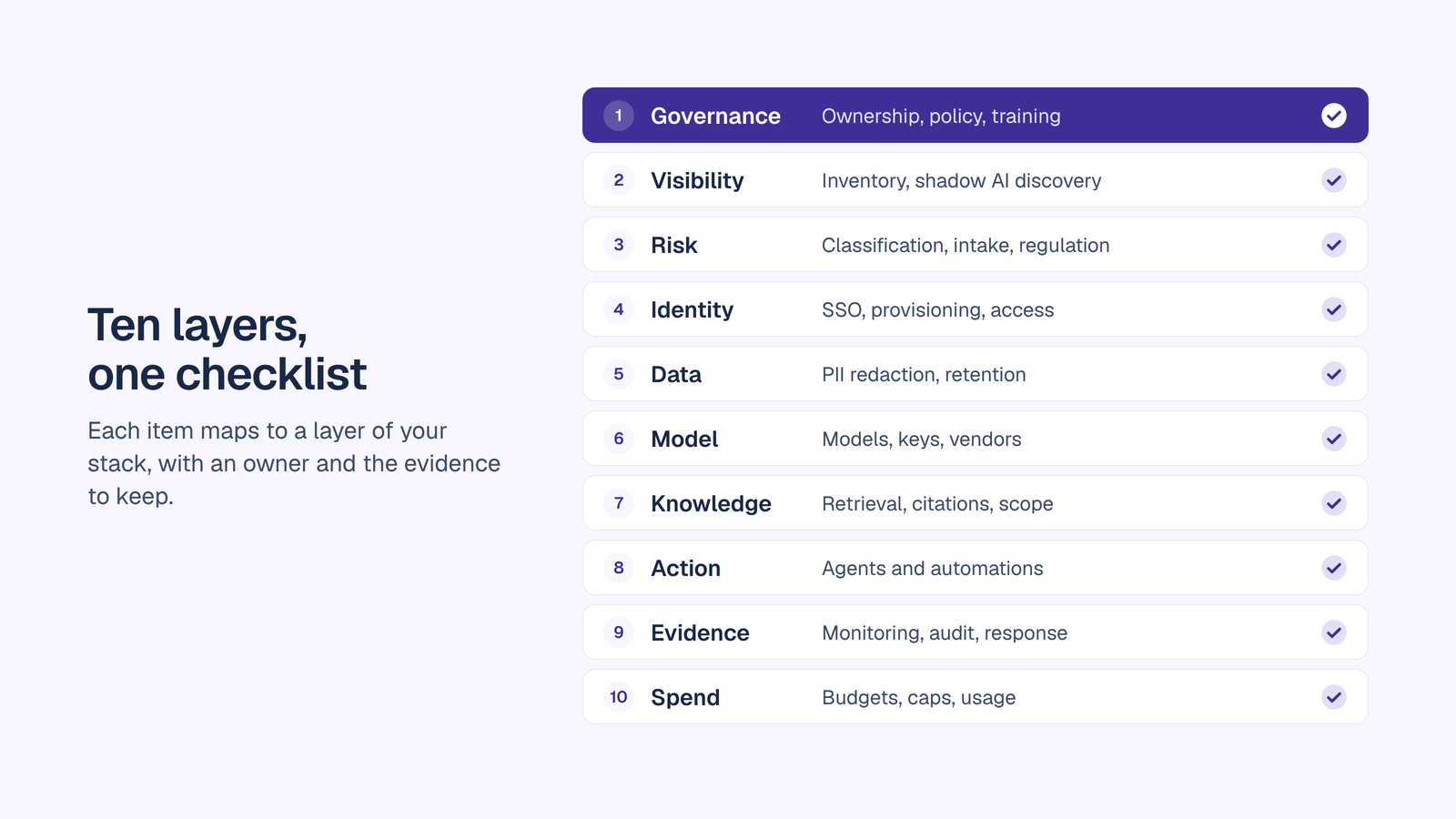
The AI governance checklist that maps to your stack

Each item below maps to a layer of your stack, names who usually owns it, lists what to check, and says what evidence to keep. The last line in each item shows how OrgLogic covers it.
1. Ownership, policy and training (governance layer)

Owner: executive sponsor and AI governance council.

Without ownership, every other control drifts. This layer sets who decides, what the rules are, and how people learn them.

Checklist

  • An executive sponsor is named, and the AI governance council has a written charter and meeting cadence.
  • A short acceptable use policy covers approved tools, prohibited uses, data rules and how to request exceptions.
  • Every AI system and agent has a named, accountable owner on record.
  • Decision rights are written down: who approves new tools, new models, new agents and exceptions.
  • Role-based training exists for users, agent builders, approvers and administrators, and completion is tracked.
  • The policy is reviewed at least once a year and after any significant incident.

‍
Evidence to keep:
council charter and minutes, the current policy with version history, the owner register, and training completion records.

In OrgLogic: every agent has a named manager, accountable for re-authentication, rejected proposals and spend, and the manager’s ID is recorded on every audit line the agent produces. Organization roles (Admin, Member) and Space roles (Owner, Member) make decision rights explicit.

2. AI inventory and shadow AI discovery (visibility layer)

Owner: CISO and Head of IT.

You cannot govern AI you cannot see. The inventory is the foundation for risk classification, monitoring and cost control.

Checklist

  • A register lists every AI tool, AI feature, model, internal application and agent, with its owner, users, data types and vendor.
  • Discovery covers personal accounts, browser extensions and AI features inside SaaS products, not only purchased tools.
  • Agents built outside your main platform are registered with an owner, team, environment and access scope.
  • The inventory is refreshed on a schedule and whenever a new tool is approved.
  • Employees have a sanctioned AI option that is better than what they find on their own, so usage moves into view.
  • Shadow AI trends are tracked over time, not measured once.


Evidence to keep:
the AI register, discovery reports, and the trend in unsanctioned AI use.

In OrgLogic: for AI that runs through OrgLogic, a usage dashboard shows messages, users, Spaces, agents deployed, Skills, connectors and cost. An External Agent Registry records agents built elsewhere, with name, owner, team, framework, environment, version, access scope and status. See how to find what is running in the shadow AI detection guide and shadow AI detection tools.

3. Risk classification, intake and regulatory mapping (risk layer)

Owner: AI governance council, with legal and security.

Not every AI use carries the same risk. Classification lets low-risk use move fast and puts scrutiny where it belongs.

Checklist

  • Every use case is rated on data sensitivity, decision impact, autonomy and regulatory exposure.
  • A risk tier sets the review depth, from self-service approval to full council review.
  • New tools, models and agents enter through one intake path, with a target turnaround per tier.
  • Each use case is mapped to the obligations that apply, such as the EU AI Act, HIPAA, GDPR or sector rules.
  • High-risk systems have documented human oversight and a named reviewer.
  • Risk ratings are revisited when a system’s data, users or autonomy change.


Evidence to keep:
the intake log, risk ratings with rationale, approval records and the regulatory mapping.

In OrgLogic: agent approval workflows run on every plan. Admins control which agents are available to which teams, and which models are available per organization and per team. For the frameworks behind this layer, see the enterprise AI security guide.

4. Identity and access (identity layer)

Owner: Head of IT and CISO.

AI inherits the identity layer. If anyone can sign in or anyone can see everything, every downstream control is weaker.

Checklist

  • AI tools use single sign-on, and accounts are provisioned and deprovisioned automatically.
  • Personal-account use of AI for company work is replaced by company-managed accounts.
  • Roles separate administrators, owners and members, with least privilege by default.
  • Team boundaries are explicit, so each team’s knowledge and agents are visible only to the people who should see them.
  • Access reviews run on a schedule, and departed users lose access the same day.
  • Domain verification prevents look-alike sign-ups outside your control.


Evidence to keep:
SSO and provisioning configuration, role assignments, access review records and deprovisioning logs.

In OrgLogic: SSO with SAML, Okta and Azure AD, SCIM provisioning and domain verification are available on Enterprise. Each team works in its own Space, and admins set whether new Spaces are open or restricted by default. Every person also has a Private Space for individual work.

5. Data protection (data layer)

Owner: CISO and privacy.

Data protection is where AI governance most often fails in practice, through a paste into the wrong tool.

Checklist

  • Your data classification scheme states which classes of data may be used with which AI.
  • PII is detected and redacted before any prompt reaches a model, not after.
  • Content policies block prohibited data types and uses.
  • A contractual commitment that customer data is not used for training is in place with every AI vendor and model provider.
  • Retention is configured to match your data retention policy.
  • Encryption covers data in transit and at rest.


Evidence to keep:
the data classification mapping, redaction configuration and reports, vendor contracts and retention settings.

In OrgLogic: PII is auto-detected and redacted before the model on every call from every Space, and redaction is configurable. Organization-level guardrails set content policies. No training on customer data is a contractual guarantee for OrgLogic-provisioned models and BYOK alike. Retention is admin-configurable, with TLS 1.3 in transit and AES-256 at rest.

6. Models, keys and vendors (model layer)

Owner: Head of AI, Head of IT and procurement.

Model choice is now a governance decision. The model, the key and the vendor each carry their own risk.

Checklist

  • An approved model list states which models may be used, by whom and for which data.
  • Model API keys are held and managed centrally, not in individual accounts.
  • Data flows directly to the model provider under your own agreement wherever possible.
  • Each AI vendor has a data processing agreement, security certifications and a documented review.
  • You can switch models without migrating data or retraining users.
  • Model changes by providers are monitored, because behavior can change without a release on your side.


Evidence to keep:
the approved model list, key management records, vendor reviews and certificates.

In OrgLogic: all frontier models are available, plus any model you bring via BYOK. BYOK is admin-configured, end users are never prompted for keys, and data flows directly to model providers so OrgLogic never sees it, at zero surcharge. Admins set model availability per organization and per team. Read more on multi-model AI chat.

7. Knowledge and retrieval (knowledge layer)

Owner: Head of AI and data owners.

AI answers are only as trustworthy as the knowledge behind them, and only as safe as the boundaries around it.

Checklist

  • Knowledge is organized by scope, with clear boundaries between personal, team and organization knowledge.
  • Every knowledge source has an owner who keeps it current.
  • AI answers cite the source document and show how fresh it is.
  • The system says “I don’t know” when retrieval comes back thin, rather than guessing.
  • AI tools outside your main platform, such as a separate enterprise search tool, get company knowledge only through governed, read-only access.
  • Every retrieval is logged.


Evidence to keep:
the knowledge source register, scope assignments and retrieval logs.

In OrgLogic: the Company Brain holds knowledge at user, Space and organization level, and OrgLogic controls access at that level. Answers cite specific documents and passages, show when the source was last synced, and decline to guess when retrieval comes back thin. The Company Brain is callable over MCP from Claude, ChatGPT and any MCP-capable client, returns only what each user is already entitled to retrieve, and admins can disable, restrict or monitor MCP connections across the organization.

8. AI agents and automations (action layer)

Owner: CTO, engineering and the department that runs each agent.

Agents move AI from answering to acting. That makes permission scope and the ability to stop an agent essential.

Checklist

  • Every agent has a named, accountable owner.
  • Each agent gets read or write access per connected system, limited to what its job needs.
  • Agents that change knowledge or records do so through an approval step where the risk warrants it.
  • Agent configuration changes are reviewed before they go live.
  • You can pause an agent or revoke its credentials in seconds.
  • Agents built outside your main platform are registered and governed with the same rules.


Evidence to keep:
the agent register with owners and scopes, approval records, change history and revocation logs.

In OrgLogic: AI agents own their own connections, with read or write scope per agent per connector, revocable in seconds. Each agent’s permission to edit knowledge is set individually: propose for approval, or read only. Builder changes stay drafts until published, and an agent can be paused in any Space. External agents routed through the AI Gateway get one credential each with one-click revoke, in observe or block mode. For design guidance, read how to build an AI agent.

9. Monitoring, audit trail and incident response (evidence layer)

Owner: CISO and internal audit.

Evidence is what turns governance from a claim into a fact. Monitoring is what lets you act before a small issue becomes an incident.

Checklist

  • Every AI interaction is logged with the user, team, agent, accountable owner, model, sources and cost.
  • Logs are searchable and exportable in a format an auditor can use.
  • Access to sensitive logs is separated from general admin rights, and every export is itself logged.
  • Alerts fire on policy violations, unusual volumes and blocked actions.
  • An AI incident runbook defines how to pause an agent, revoke access, block a model and notify stakeholders.
  • High-risk systems are reviewed monthly, and the full inventory each quarter.


Evidence to keep:
audit logs and exports, alert history, the incident runbook and incident reviews.

In OrgLogic: every thread message, agent action and MCP retrieval is logged with organization, Space, thread, actor, agent, agent manager, model, sources and cost, and is searchable and exportable. Private Space activity is logged too, and is available by compliance export under a role granted separately from Admin, with every export audited. See the AI audit trail.

10. Cost and usage controls (spend layer)

Owner: Head of IT and finance.

Uncontrolled AI spend is a governance failure too. It hides shadow AI, makes budgeting impossible and erodes trust in the program.

Checklist

  • AI spend is attributed by team, user, model and agent.
  • Budgets exist per team, with alerts before limits and hard caps at limits.
  • Individual users have spend limits and a way to request more.
  • Duplicate subscriptions are consolidated into approved tools, a job operations teams often drive.
  • Seat pricing and model usage are tracked separately, so each is visible.
  • Spend is reviewed monthly against value and adoption.


Evidence to keep:
cost reports, budget settings and consolidation records.

In OrgLogic: per-team budget controls include spending limits, alerts and hard caps. Cost analytics show spend per team, user, model and agent in real time, and admins can set an organization monthly limit and per-user limits. Model usage is billed at zero surcharge with your own keys, or at cost plus 6% for OrgLogic-provisioned usage. See AI cost management.
What prompted AI governance policies?

AI governance policies grew out of a run of public incidents, the rapid spread of unsanctioned AI, and new regulation.

  • Confidential data in public AI tools. In April 2023, Samsung engineers uploaded internal source code to ChatGPT. The following month, Samsung restricted employee use of generative AI tools.
  • AI output used without verification. In June 2023, a US federal court in Mata v. Avianca sanctioned lawyers who filed a brief containing fabricated case citations generated by ChatGPT.
  • Liability for what AI says. In February 2024, a Canadian tribunal held Air Canada responsible for incorrect fare information its website chatbot gave a customer, and rejected the argument that the chatbot was responsible for its own statements.
  • Shadow AI at scale. IBM found 80% of employees use unsanctioned AI tools (IBM, 2025).
  • Regulation with deadlines. The EU AI Act entered into force on 1 August 2024. Its prohibitions applied from 2 February 2025, transparency obligations under Article 50 took effect on 2 August 2026, and high-risk obligations for Annex III systems apply from 2 December 2027 after deferral under the Digital Omnibus (Regulation (EU) 2026/1744). Texas’s Responsible Artificial Intelligence Governance Act took effect on 1 January 2026.
  • Agents that act. As AI moved from answering questions to taking actions in business systems, the question shifted from “what did it say” to “what did it do, and who approved it.”

Who actually sets the rules for AI governance?

Rules come from five layers, and your checklist has to satisfy all of them.

  1. Lawmakers and regulators. The EU AI Act sets risk-based obligations. In the US, rules come from states, such as Texas’s AI law, Colorado’s AI law (currently being reworked) and New York City’s Local Law 144 on automated hiring tools, and from sector regulators, such as the New York Department of Financial Services, the NAIC for insurers, the FDA for AI-enabled medical devices, and HIPAA enforcement for health data. The FTC also acts against deceptive or unfair AI practices.
  2. Standards bodies. NIST publishes the voluntary AI Risk Management Framework, ISO/IEC 42001 defines a certifiable AI management system, and OWASP’s Top 10 for LLM Applications sets the security baseline for LLM applications.
  3. Customers and auditors. Security questionnaires, data processing agreements and SOC 2 reviews increasingly set concrete requirements for how vendors use AI.
  4. Model providers. Each provider’s usage policies and terms set limits on how its models may be used.
  5. Your own board and AI governance council. They turn all of the above into internal policy, decide risk appetite, and approve exceptions.

The KPI framework for AI governance success

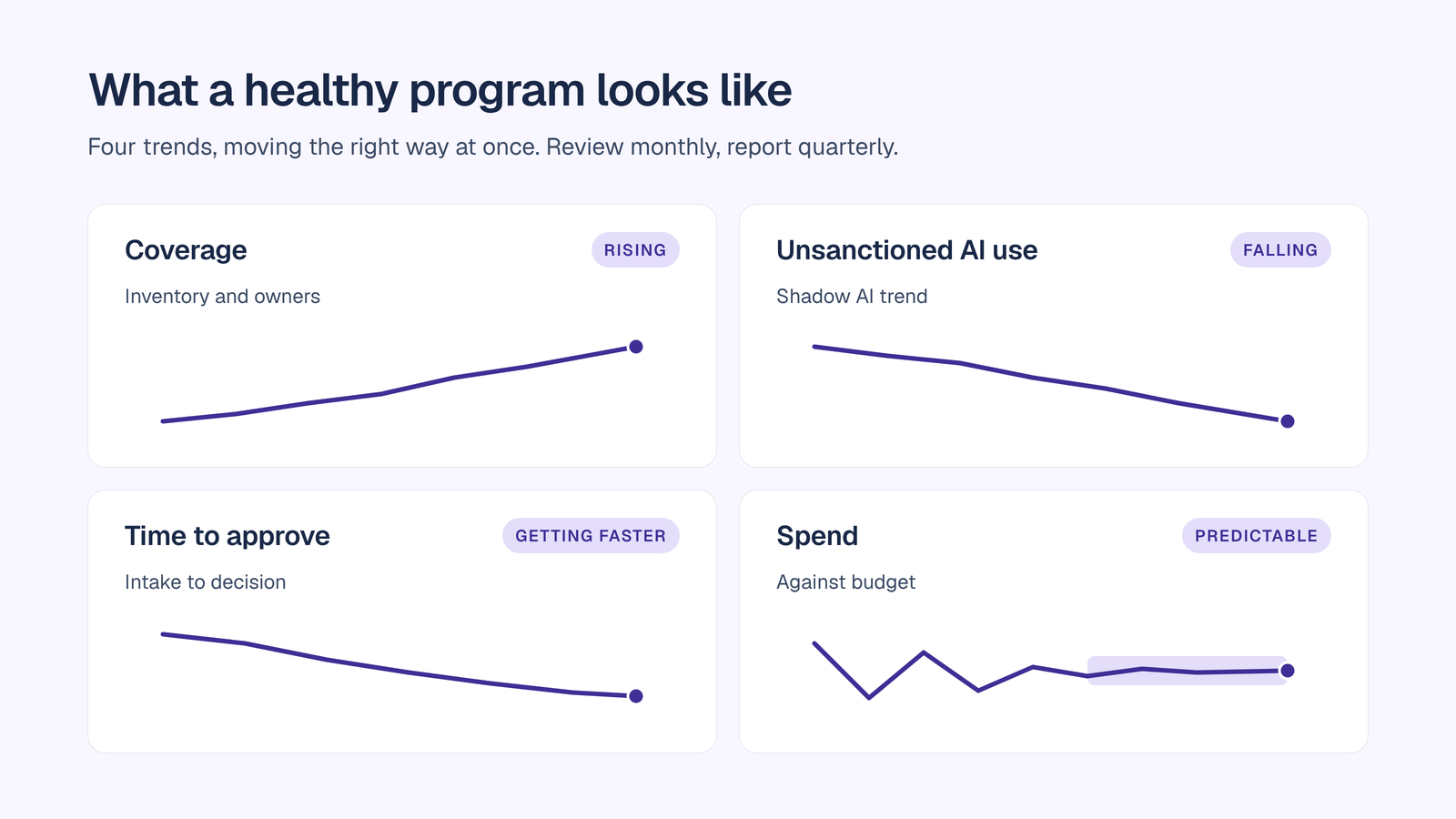
Track a small set of KPIs across six areas, review them monthly, and report them to the council each quarter.

Coverage

  • Inventory coverage: the share of AI tools, models and agents in use that appear in the register.
  • Ownership coverage: the share of AI systems and agents with a named, accountable owner. The goal is every one.
  • Sanctioned usage share: the share of AI usage that runs through approved tools.

Control

  • Controls in force: the share of AI use covered by PII redaction, audit logging and budget caps.
  • Agent scope hygiene: the share of agents with permissions reviewed in the last quarter.
  • Access review completion: the share of scheduled AI access reviews completed on time.

Risk

  • Unsanctioned AI trend: the change in shadow AI use over time.
  • Policy violations and blocked actions: counted by team and type, and trending down.
  • PII redaction events: counted by team and data type, to show where sensitive data is flowing.
  • AI incidents: the count, severity and time to contain.

Efficiency

  • Time to approve: the median time from intake to decision, by risk tier.
  • Evidence turnaround: the time to answer an audit request or security questionnaire about AI.

Adoption

  • Weekly active users on sanctioned AI.
  • Agents in production, and the work they handle.
  • Training completion by role.

Cost

  • Spend against budget by team, model and agent.
  • Tools consolidated into approved platforms.
  • Cost per active user over time.

A healthy program shows coverage rising, unsanctioned use falling, approvals getting faster and spend becoming predictable, all at once. For the rollout plan behind these numbers, read the AI implementation strategy guide.
Conclusion

An AI governance checklist works when every line has an owner, a control and a piece of evidence. Start with ownership and an inventory, classify by risk, enforce controls at the identity, data, model, knowledge, agent and spend layers, and keep evidence exportable from day one. Then track the KPIs so the council can see governance working, not just hear about it.

OrgLogic is the governed AI workspace where teams and their AI agents work together on shared company knowledge, and it covers the checklist above on every plan, including Free:

  • Ownership: every agent has a named, accountable manager, and agent approval workflows are built in.
  • Data protection: PII is redacted before every model call, and no training on customer data is a contractual guarantee.
  • Model control: BYOK means data flows directly to model providers and OrgLogic never sees it, with model availability set per team.
  • Grounded knowledge: the Company Brain cites the source and its freshness, says “I don’t know” when it should, and serves each user only what they are entitled to.
  • Agent control: read or write access per agent per connector, revocable in seconds.
  • Evidence: every thread message, agent action and MCP retrieval is logged, searchable and exportable.
  • Spend control: per-team budgets with alerts and hard caps, and cost visible by team, user, model and agent.
  • Enterprise readiness: SSO, SCIM, VPC and on-prem deployment on Enterprise, with SOC 2 Type II, ISO 27001, HIPAA with a BAA, and GDPR.

Seats are $8 per month on annual billing, and up to 25 users are free. See pricing.

Further reading:
‍
‍Best AI governance tools‍

What is shadow AI

Enterprise AI workspace checklist

‍AI for IT and security teams

‍AI for legal teams

‍AI for finance teams

‍OrgLogic vs Claude Enterprise and OrgLogic vs Glean.
FAQ

What is an AI governance checklist?

An AI governance checklist is a list of specific controls, each with an owner and evidence, that an organization uses to govern the AI it uses, builds and buys. It covers ownership, inventory, risk classification, identity, data protection, models, knowledge, agents, monitoring and cost.

What should be included in an AI governance checklist?

A complete checklist covers ten areas: ownership, policy and training; AI inventory and shadow AI discovery; risk classification and regulatory mapping; identity and access; data protection; models, keys and vendors; knowledge and retrieval; AI agents; monitoring, audit trail and incident response; and cost controls.

Who is responsible for AI governance?

An executive sponsor, usually the CTO, CIO, CISO or Chief AI Officer, owns the program, supported by an AI governance council with security, IT, legal, privacy, HR and business leaders. Every AI system and agent also needs its own named, accountable owner.

How often should an AI governance checklist be reviewed?

Review high-risk AI systems monthly, the full AI inventory and access each quarter, and the policy at least once a year. Review it again after any significant incident, new regulation or major new AI tool.

What KPIs measure AI governance success?

Useful KPIs include inventory and ownership coverage, the share of AI use on sanctioned tools, the trend in unsanctioned AI, policy violations, PII redaction events, time to approve new use cases, audit evidence turnaround, adoption of sanctioned AI, and spend against budget.

What is the difference between AI governance and AI security?

AI governance decides which AI is allowed, who owns it and how compliance is proven. AI security protects AI systems and data from attack and misuse. The two share controls such as access limits, PII redaction and audit logs, and most enterprises need both.

How does OrgLogic help with an AI governance checklist?

OrgLogic covers the checklist on every plan, including Free. It redacts PII before every model call, uses BYOK so data flows directly to model providers, gives every agent an accountable manager and per-connector permissions, caps spend per team, and logs every thread message, agent action and MCP retrieval in an exportable audit trail.

‍

table of contents

Common questions

How is OrgLogic different from ChatGPT Enterprise or Microsoft Copilot?

Single-model AI tools lock you into one provider at $25-60/seat. OrgLogic is a multi-model AI workspace with named Agents that act in your systems (Salesforce, Jira, Confluence, ServiceNow), packaged Skills for domain expertise, and full governance at $8/seat. You get every model, not just one.

What does BYOK mean and how does it work?

Bring Your Own Key means you connect your own API keys from OpenAI, Anthropic, Google, or any provider. Your data flows directly to the model provider. OrgLogic never sees, stores, or processes your prompts or responses. Zero surcharge on your own keys. This is the #1 requirement for security teams evaluating enterprise AI platforms.

What are Agents and Skills? How are they different from a chatbot?

An Agent is a named AI worker with a defined job, connected to your systems via Connectors. A Skill is packaged expertise that teaches an Agent how to do specific work consistently. Unlike a generic chatbot, a Deal Prep Agent with a Salesforce Connector pulls real CRM data and produces structured call briefs. Skills are reusable across Agents, versioned, and authored in plain language.

What AI governance controls does OrgLogic provide?

Every Workspace includes per-Agent Connector permissions (each Agent gets scoped access, not blanket access), Agent-level audit trails, automatic PII redaction, per-team budget controls, model-level access controls, and configurable guardrails. Governance is the default environment on every plan, including Free. SOC 2 Type II, ISO 27001, HIPAA, and GDPR compliant.

How does pricing work? What does $8/seat cover?

The Free plan covers 25 users with $500 in credits ($20 per active user, pooled). The Business plan is $8/seat/month (annual) or $10 monthly. The seat fee covers the full platform: Agents, Skills, Connectors, governance dashboard, 5 surfaces, and all features. Model usage is separate: BYOK at zero surcharge, or OrgLogic-managed models at cost + 6%.

How do you solve the shadow AI problem?

80% of employees already use AI tools without IT approval. OrgLogic replaces fragmented, ungoverned tools with one AI workspace employees actually want to use, available on web, Slack, Teams, Chrome, and API. One customer, a regulated tech company with 1,500 employees, reduced shadow AI by 91% within 6 weeks while cutting AI spend by 70%.

What systems does OrgLogic connect to?

OrgLogic Connectors integrate with Salesforce, Jira, Confluence, ServiceNow, SharePoint, Google Workspace, Slack, SAP, and more via custom APIs. Each Connector has per-Agent permission scopes controlled by IT, so your Deal Prep Agent only accesses the Salesforce objects you approve. The Connector library is growing and new integrations ship regularly.

How fast can we deploy OrgLogic?

Self-serve signup takes 30 seconds. Connect your API keys in 2 minutes. Deploy pre-built Agents for sales, support, engineering, HR, and legal on day one. The Free plan (25 users, full governance) lets you pilot without procurement. One customer had engineers adopting within 2 weeks across Slack and Chrome. Enterprise plans add SSO/SCIM, VPC, and on-prem deployment.