Multi modal AI for enterprise teams
Drop in a contract, a chart, a screenshot or a long filing. OrgLogic reads documents and images, searches the web with citations and generates images, on every frontier model, in shared Spaces where every file becomes team knowledge and every message is logged.
Free for up to 25 users. Governance on every plan. BYOK at zero surcharge
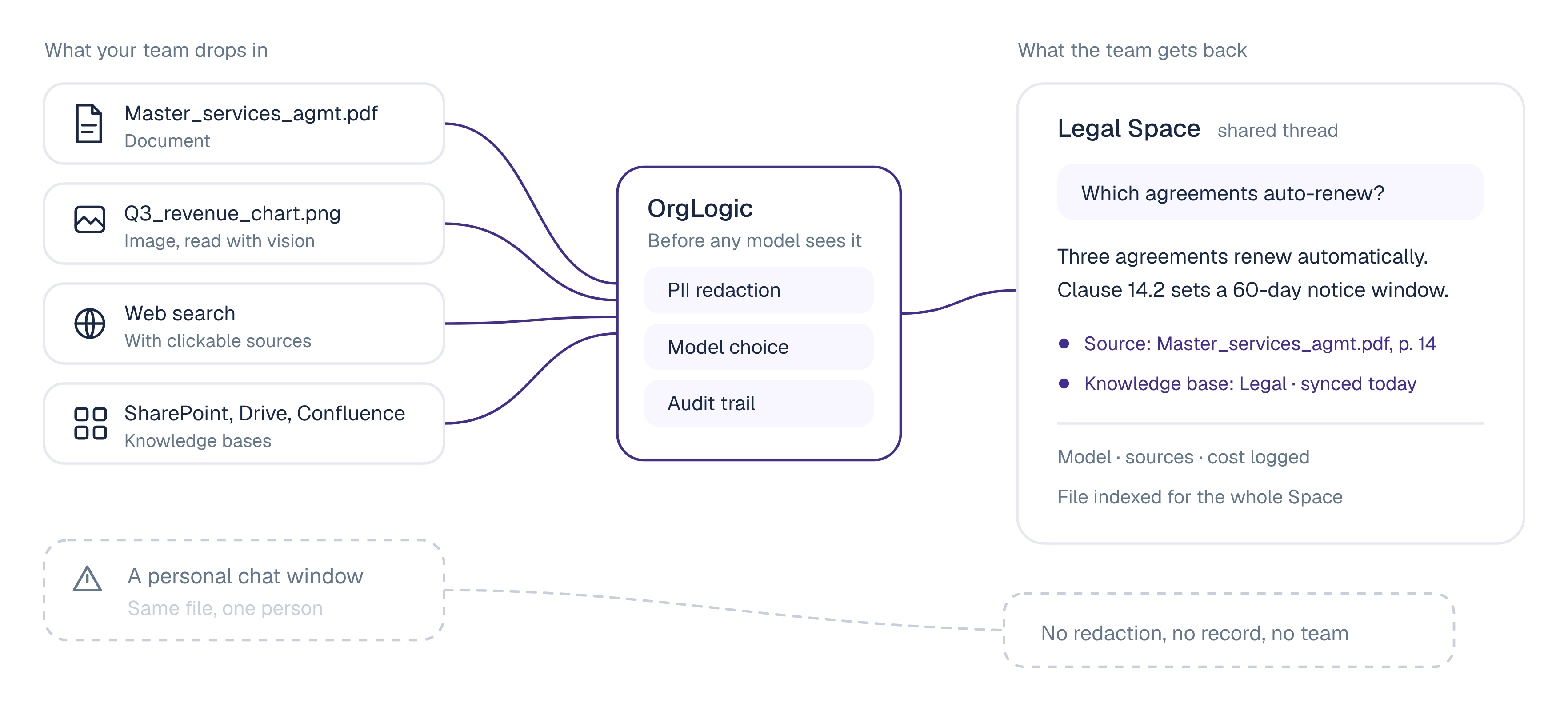
Multimodal AI is AI that works across more than one kind of input and output: text, documents, images and more. Instead of describing a chart, you upload the chart. Instead of pasting a contract into a prompt, you attach the PDF and ask about clause 14.
For an enterprise, the model is the easy part. The hard part is where the files go, who can see the answer, and whether anyone can prove what was sent to which model.
The problem
Your people already upload board decks, signed contracts, claims photos and dashboard screenshots to AI, mostly in personal chat windows IT never approved. IBM found 80% of employees use unsanctioned AI tools (IBM, 2025). That is single-player AI, and files make it worse.
The shift
Upload documents and images
Yes, in one person's window
Yes, in shared Space threads
Files become team knowledge
No
Indexed into the Space's knowledge base
Model choice
One vendor's models
Every frontier model, switch mid-thread, smart routing
PII redaction before the model
Not under your control
Pre-model on every call, configurable
Your own model keys
Not available
BYOK on every plan, zero surcharge
Audit trail IT can export
None
Every thread message and agent action logged
Central model and budget controls
None
Per organization and per team
Agents that work from your files
Personal only
Named Space members with an accountable manager
How it works
OrgLogic is the governed AI workspace where teams and their AI agents work together on shared company knowledge. Multimodal is built into every thread.
Drag and drop every common file type, from PDFs to spreadsheets. Text is extracted, and long documents are indexed and retrieved by passage, so a question about one clause pulls that clause.
Vision reads charts, scanned forms, screenshots and whiteboard photos. Ask what changed between two dashboard captures, or what the chart on page 12 actually shows.
Toggle web search in the composer. Results are injected as context and every answer carries clickable sources.
Knowledge bases mix uploaded files, pasted text, websites, connected app data and thread content. Connect Confluence, Google Drive, SharePoint, Notion and more, and ask across all of it.
Multimodal and multi-model
Multimodal is what the AI can read and produce. Multi-model is which AI does the work. Your team gets both in the same thread, so a scanned contract and its redline do not have to go to the same model.
Plus any model you bring with your own keys.
Read the file with one model, draft with another, without starting over.
Sends each task to the optimal model automatically.
IT decides which models each team can use.
Built for teams
Work happens in Spaces, where a team, its knowledge and its AI agents share threads. Every person also has a Private Space for their own work.
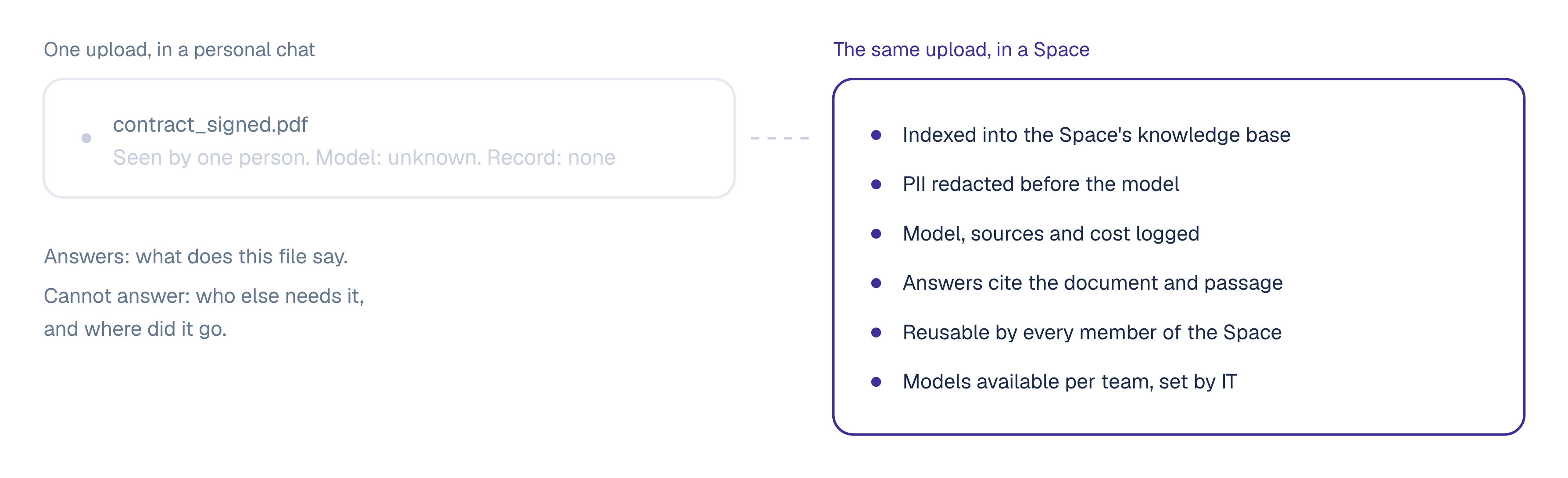
A file posted in a Space thread is indexed into the Space's knowledge base. The next person asks about it without uploading it again.
Pin a contract summary, a chart read-out or a generated image, and it is indexed into the Space's knowledge.
Every agent message carries the agent name, the model and the sources it used.
Named agents work from the files and knowledge bases their Space grants them, on a mention, a schedule or an event, each with an accountable manager.
On the web, in Slack, in Microsoft Teams and in Chrome.
The Company Brain is callable over MCP from Claude, ChatGPT and any MCP client, serving each user what they are entitled to, with citations.
Governance
On every plan, including Free, and enforceable on all traffic that flows through OrgLogic.
Auto-detected, configurable, and applied pre-model on every call from every Space.
An admin connects your model keys once. Data flows directly to the model providers, and end users are never prompted for keys.
Every thread message, agent action and MCP retrieval logged with Space, actor, agent, manager, model, sources and cost. Searchable and exportable.
Contractual. Data goes to providers by API only, is not retained beyond the response, and every provider is under a DPA prohibiting training.
Decide which models are available per organization and per team.
Per-team spending limits with alerts and hard caps, and real-time cost by team, user, model and agent.
Use cases
Paste a screenshot of an error or a dashboard and ask what changed. A scheduled agent can post its findings to the team thread.
Ask across policy manuals and SOPs with citations, with a HIPAA BAA available and PII redaction before the model.
Generate image concepts in the thread and share the strongest into the team Space for review.
Attach a contract set and ask which agreements auto-renew. The answer cites the document and passage, and stays in the Legal Space for the next review.
Put a damage photo next to the policy document and ask what the policy covers, with the clause cited.
Upload a quarterly report and ask what the revenue chart shows against last quarter. Export the thread to PDF for the close file.
In practice
A publicly traded autonomous vehicle company with ~1,500 employees consolidated 12 AI tools into OrgLogic, cut AI spend 70%, and reduced shadow AI by 91%, with engineers adopting in 2 weeks.
FAQ
Multi modal AI, usually written multimodal AI, is AI that works across more than one type of input and output, such as text, documents and images. In OrgLogic, a team can upload documents and images, search the web with citations and generate images in the same governed thread.
Multimodal describes the types of content AI can read and produce. Multi-model describes using several AI models and choosing the right one per task. OrgLogic is both: every frontier model with mid-thread switching and smart routing, plus document, image and web input in every thread.
All common file types, by drag and drop. Text is extracted from documents, long documents are indexed and retrieved by passage, and images are read with vision.
Yes. Image generation is available in the thread, and any generated image can be pinned and shared into a Space.
No. OrgLogic contractually guarantees no training on customer data. Data goes to model providers by API only, is not retained beyond the time needed to generate a response, and every provider is under a DPA prohibiting training, for provisioned models and BYOK alike.
Yes. A file posted in a Space thread is indexed into that Space's knowledge base, so every member can ask about it without uploading it again. Personal work stays in each person's Private Space until they choose to share it.
Free for up to 25 users with governance on. Standard is $8 per seat per month billed annually, or $10 monthly. Enterprise is custom with a 100-seat minimum. Model usage is separate: BYOK at zero surcharge, or OrgLogic-provisioned models at cost plus 6%.