
No-code AI agent builder
Describe what the agent should do in one field and OrgLogic assembles it: a name, a job, the team it belongs to, the systems it can reach and the human accountable for it. No code, no prompt engineering, and no agent that reaches anything it was not scoped to reach.
Free 25 users · $500 in credits · No credit card required
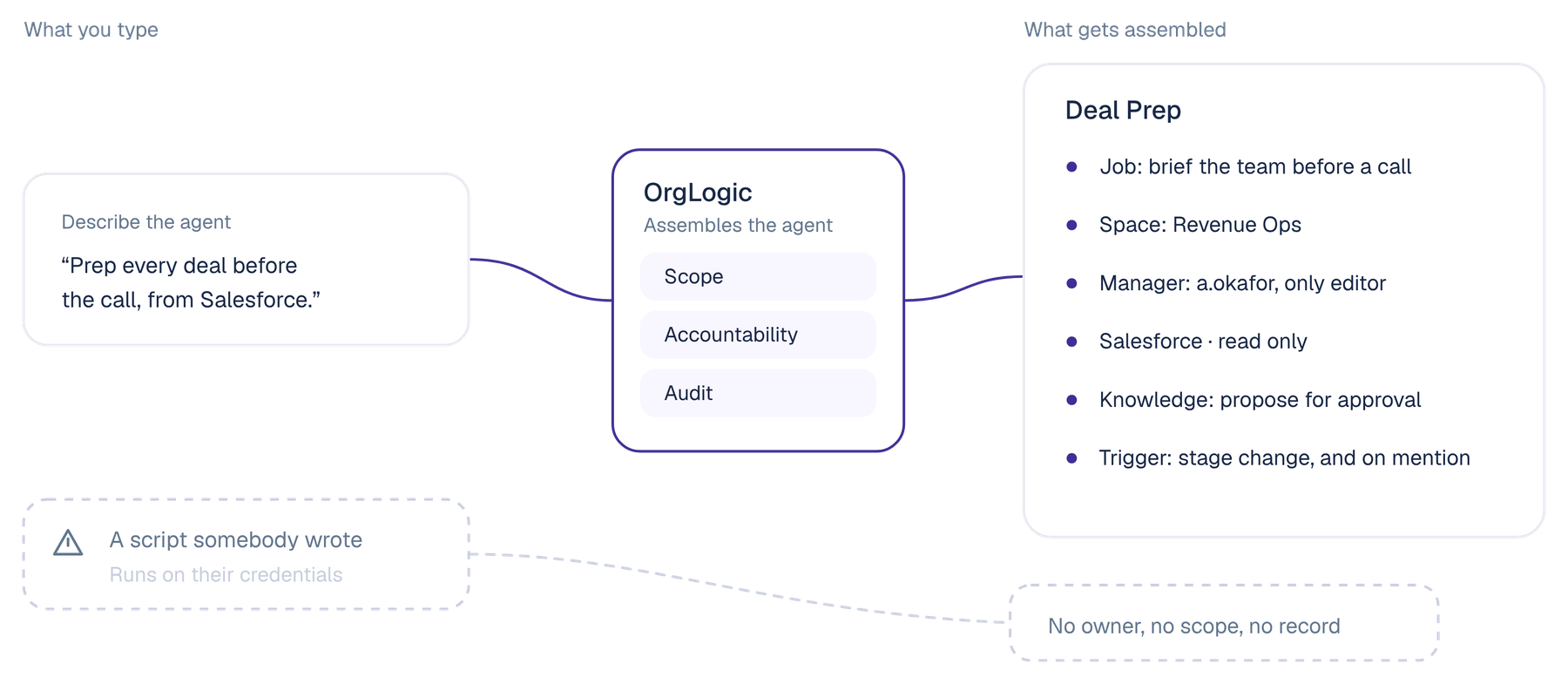
A no-code AI agent builder lets somebody who does not write software create an AI worker that does a specific job: reads from the systems the team uses, does the reasoning, and acts or reports on a schedule, an event or a mention.
The building part stopped being hard some time ago. Most platforms will give you a working agent in an afternoon. What has not been solved is the part immediately after, which is getting that agent into production in a company where somebody has to answer for what it does. That is the difference between a no-code agent builder and an enterprise one: the second produces something that works, is owned by a named person, can only reach what it was scoped to reach, and leaves a record of everything it did.
The problem
Somebody in operations builds an agent that works. It gets shown around. Then it reaches the person who has to approve it touching Salesforce, and the questions start. Who owns this. What exactly can it read. Can it write. What happens when the person who built it leaves. Where is the log.
None of those questions are unreasonable, and almost none of them are answered by the builder that produced the thing. So the agent stays in a sandbox, or it goes live in a corner nobody is watching, which is worse. The bottleneck is not the building. It is the accountability.
The shift
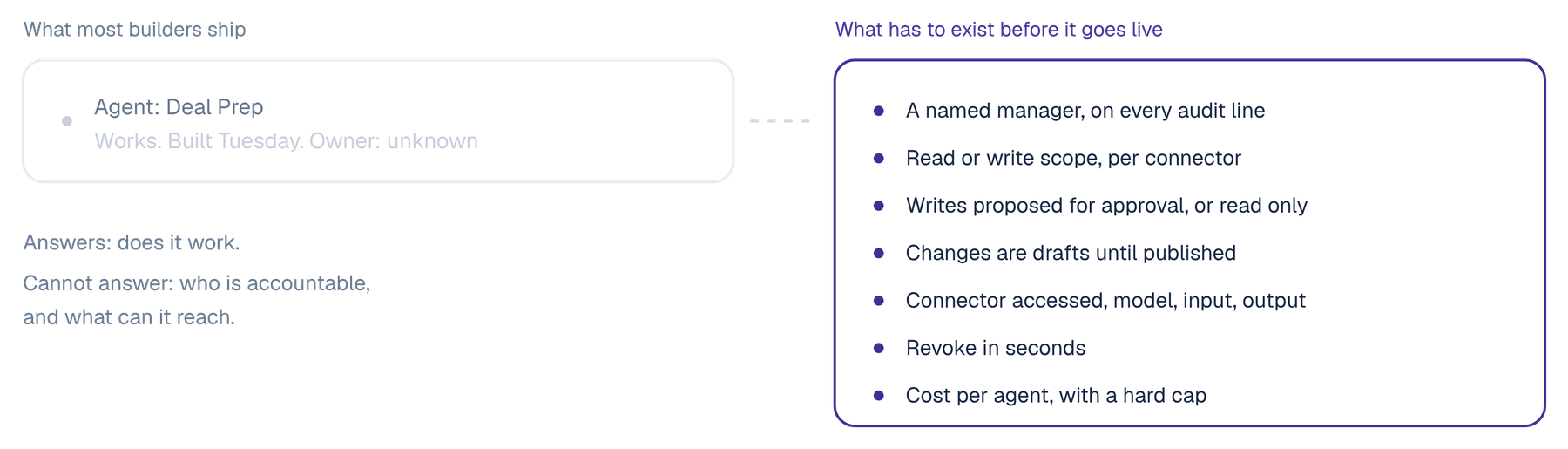
Who owns it
Whoever built it
A named manager, recorded on every audit line the agent produces
What it can reach
Whatever the builder's credentials reach
Read or write scope set per agent per connector, revocable in seconds
Who can change it
Anyone with the login
The manager is the only editor, others request a change
Changes go live
Immediately
Changes are drafts until published
When it writes to a system
It writes
Per-agent permission: propose for approval, or read only
The record
Whatever was logged by accident
User, agent, manager, Space, thread, connector accessed, model, input and output
None of the right-hand column is harder to use than the left. It is the same single field and the same three minutes. The difference is what gets assembled around what you typed.
Requirements
Four things, and the drag-and-drop part is not one of them. An owner on every agent, permissions that belong to the agent rather than its builder, a place to work where the team can see it, and a record from the first run.
Autonomy without an owner does not clear a security review. Every agent needs a manager accountable for its permissions, its spend and its behaviour, and that name belongs on the audit line rather than in somebody's head. In OrgLogic the manager is the agent's only editor, other members request changes, and being the manager grants no access to what the agent read.
An agent running on its creator's credentials inherits everything that person can reach, which is almost never what anyone intended. An agent should own its own connections, with read or write scope set per connector and revocable in seconds, acting only inside the intersection of what its team granted and what it was scoped to do.
An agent that answers one person in one window recreates the problem it was meant to solve. Agents should be members of a shared Space, mentionable in a thread, posting results where the team already is, so one person's agent becomes the team's.
Not an export you set up later. Every agent action logged with the user, the agent, its manager, the Space, the thread, the connector accessed, the model, the input and the output, searchable and exportable from the first time it runs.
How it works
Type what the agent should do in one field. OrgLogic assembles it and shows you the result to confirm: a name, a job, the Space it belongs to, its manager, its knowledge permission and its connections.
92 agents are available to add, across ten function categories: Sales, Marketing, Product and Engineering, Customer Support and Success, Operations, Data and Analytics, HR, Finance, IT and Security, and Legal and Compliance. Adding one creates it in your organization, where you adjust it like any other.
The agent owns its own connections to Salesforce, Jira, Confluence, Google Workspace, Slack, SharePoint, Notion, ServiceNow, GitHub or a custom API, with read or write set per connector. Knowledge permission is separate: propose changes for approval, or read only. No agent publishes on its own.
Skills are packaged expertise written in plain language: what to look for, how to reason, what the output should be. They are versioned with rollback, and one Skill is reused across many agents so an update propagates. A Skill template library covers call prep, code review, support drafting, competitive analysis, brand voice, compliance and job description generation.
Mention it in a thread in a Space it belongs to, trigger it on an external event such as a new Jira ticket or a Salesforce stage change, or run it on a schedule. Results post into a Space thread where the team can see them.
Changes in the agent builder are drafts until published. After that, agent analytics show usage per agent: users, Spaces, frequency, Skills invoked and cost. Administrators control which agents are available to which teams.
By function
Every one of these is built the same way, by the person who knows the job rather than by an engineer who has to learn it first.
Reviews pull requests in GitHub against the team's own standards, comments on the PR and posts a summary into the engineering Space.
Reads the account, the opportunity history and recent cases in Salesforce, and posts a brief into the team's Space before the call.
Works the ATS, drafts job descriptions, screens against the criteria the team defined, and prepares interview packs.
Answers policy questions from the handbook and HR systems, citing the source document and when it was last updated.
Watches for new incidents in ServiceNow, classifies them against the knowledge base, and drafts a response for a human to send.
Reads contracts in SharePoint, flags risk against the clause positions written into a Skill, and proposes changes for approval.
Governance
On every plan, including Free. This is the part that turns a prototype into something a CISO signs.
Every agent has a named manager, recorded on every audit line it produces. The manager is the only editor, and other members request changes.
Read or write per agent per connector, revocable in seconds. The agent acts only inside the intersection of what the Space granted and what it was scoped to do.
Per-agent knowledge permission: propose for approval, or read only. No agent publishes to a knowledge base on its own.
User, agent, agent manager, Space, thread, connector accessed, model, input and output. Searchable and exportable.
Personal data masked before any prompt reaches a model. Your own provider keys at zero surcharge, so data goes directly to the provider and OrgLogic never sees it.
Agent analytics with cost per agent, per-team budget limits with alerts and hard caps, and per-agent caps on routed traffic.
The obvious objection
It would be, if that were all it had. A saved prompt has no connections, no scope, no owner and no memory of what it did last time, which is exactly why saved prompts never make it out of the team that wrote them.
What makes an agent different is the configuration around the instruction. It owns its own connections with read or write scope per connector. It has a manager accountable for it. It has Skills that encode how the work is done, versioned so a change can be rolled back and reused so one improvement reaches every agent using it. It has triggers, so it runs on an event or a schedule rather than when somebody remembers. And it has a per-agent audit trail, so the question of what it did on the fourteenth has an answer. The plain-language part is the interface, not the product.
In practice
A pre-opening cognitive city development in Florida, fourteen districts, built by a confidential enterprise, runs 14 agents in production across finance, legal, procurement, investor relations and programme management, with zero confidential leaks and CISO sign-off in month one.
Agent-level audit trails with a named manager accountable for every agent were the condition of the security review rather than an outcome of it. Autonomous agents would never have cleared that review without per-agent permissions and a record of what each one did.
Department to daily activAcross finance, legal, procurement, investor relations and programme management.e use.
No confidential document has reached an ungoverned model endpoint since rollout.
Governance shipped as the first deliverable.
FAQ
A tool that lets somebody who does not write software create an AI worker that reads from the systems a team uses, does the reasoning and acts or reports on a schedule, an event or a mention. In OrgLogic you describe the agent in one field and it is assembled with a name, a job, the Space it belongs to, its manager, its knowledge permission and its connections, which you confirm before it exists.
There are two layers and they work differently. Agents are built in plain language in a form-based builder covering identity, Spaces, knowledge and edit policy, connections, instructions, triggers and accountability. Workflows, which define when agents run and how multi-step automations chain together, are built on a node canvas with steps, branches and connections between them. So the visual canvas is at the workflow level, and the agent itself is a sentence plus configuration.
Not to build or run them. An administrator configures organization connections and model keys once, and after that a team lead or a department director can create, scope and publish agents without engineering involvement. API and SDK are available from Standard for teams that want them.
It owns its own connections, with read or write scope set per connector, to Salesforce, Jira, Confluence, Google Workspace, Slack, SharePoint, Notion, ServiceNow, GitHub or a custom REST API. Knowledge permission is separate: an agent can propose changes for approval or read only, and no agent publishes to a knowledge base on its own.
Every agent has a named manager who is its only editor and who is accountable for its permissions, its spend and its behaviour. That manager ID is recorded on every audit line the agent produces. Being the manager does not grant access to what the agent read.
Packaged expertise that teaches agents how to do specific work, authored in plain language: what to look for, how to reason, what the output should be. Skills are versioned with rollback and reused across agents, so one update propagates. A Skill template library covers call prep, code review, support drafting, competitive analysis, brand voice, compliance and job description generation.
$0 for up to 25 users, $8 per seat per month on annual billing or $10 monthly, and custom on Enterprise with a 100-seat minimum. Model usage is a separate layer: your own keys at zero surcharge, or OrgLogic-provisioned at cost plus 6% on prepaid credits.