
AI cost management
Most companies cannot say what AI costs them, because the spend is split across per-department subscriptions, personal cards and a usage layer nobody itemizes. OrgLogic puts every model in one place, prices the platform and the usage separately, and reports both in real time.
Free 25 users · $500 in credits · No credit card required
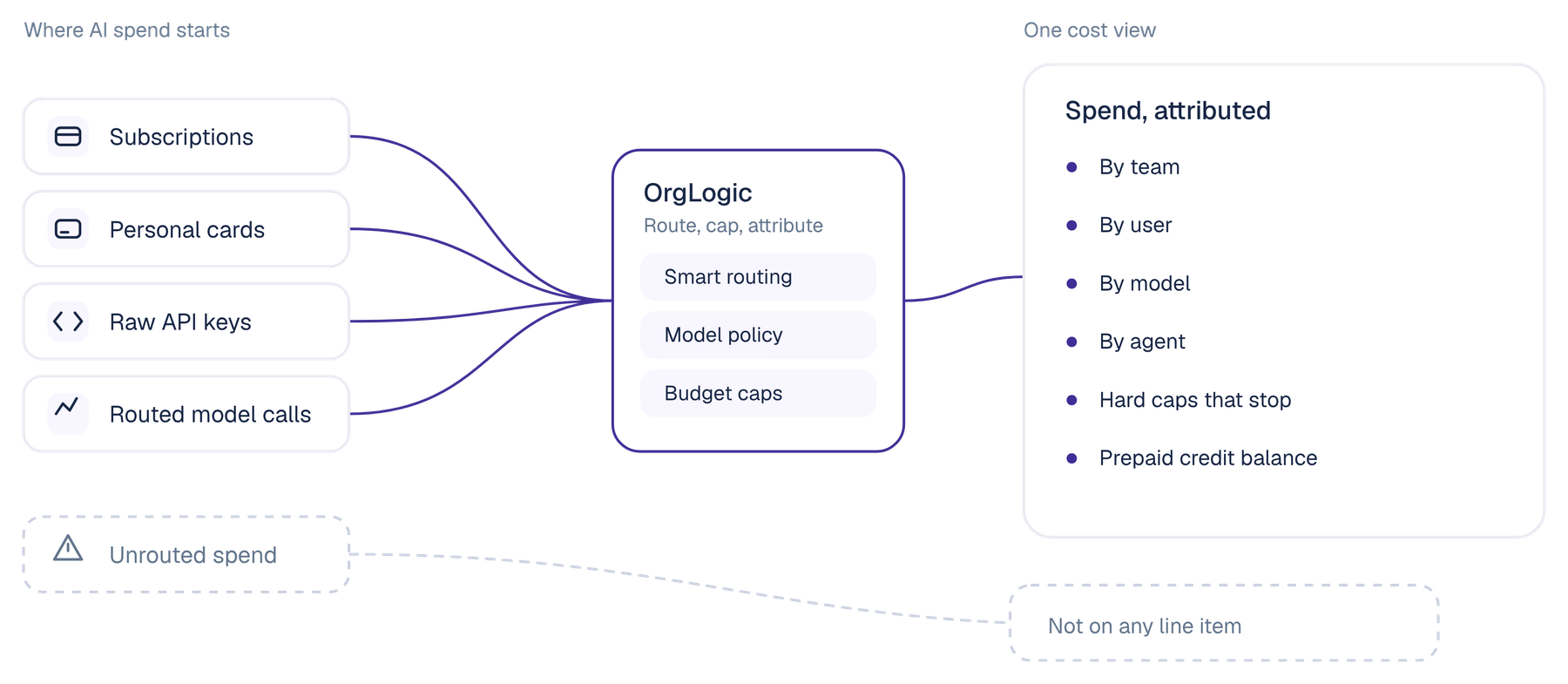
AI cost management is the practice of knowing what your organization spends on AI, attributing it to the team, person, model and agent that incurred it, and controlling it before the invoice arrives rather than after.
It is not the same as buying cheaper seats. A seat fee is a fixed number you already know. The part nobody can answer is the second layer, the model usage, which moves with how much work your people and your agents actually do. Bundled tools fold that layer into the seat price, which makes the bill predictable and the consumption invisible, and you cannot optimize what you are not shown.
The shape of the spend is changing too. A year ago AI cost was a headcount question: how many people get a licence. With agents running on schedules and events, it is becoming a throughput question, and throughput does not respect a seat count.
The problem
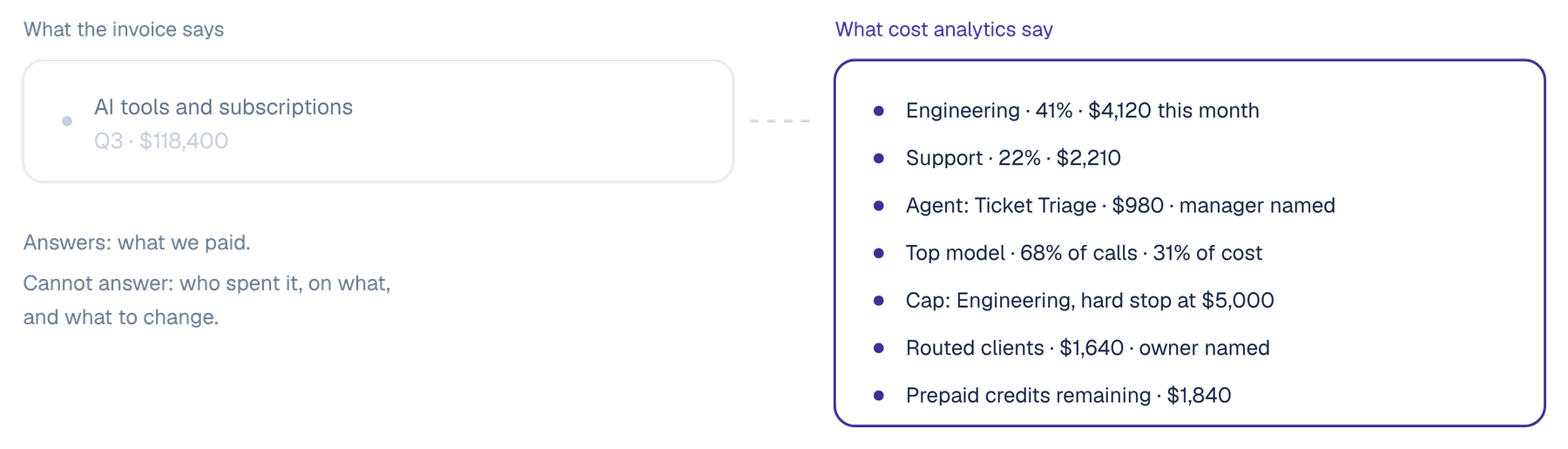
Finance can tell you what you paid. They cannot tell you what you bought. Marketing expensed one tool, engineering has another on a corporate card, a third sits inside a platform renewal nobody reads, and somewhere a scheduled agent has been calling a frontier model every fifteen minutes since March. None of that is unusual, and none of it is visible until somebody asks for next year's AI budget and there is no defensible number to give them.
The shift
The unit
A licence
A call, attributed to a team, user, model and agent
What you see
An invoice total
Spend in real time, broken out four ways
The usage layer
Folded into the seat price and never itemized
Priced and reported separately, so it can be reduced
Model choice
One vendor's models at one vendor's margin
Every frontier model, routed per task, on your keys or ours
The control you get
Buy fewer seats
Hard caps that stop, per team and per agent
Who it covers
The people with a licence
Everyone, plus the agents, plus the clients you routed
Buying fewer seats is a procurement decision you make once a year. Attributing and capping consumption is a control you hold every day, and it is the one that matters once agents are doing the work.
Requirements
Four things, and a dashboard is only the first. Attribution to the unit that incurred the cost, a limit that actually stops, levers that reduce consumption rather than describe it, and coverage of the AI you did not buy from one vendor.
A number for the organization is a budget line, not a management tool. Spend has to resolve to the team, the user, the model and the agent, in real time, so a conversation about cost is a conversation about something specific that somebody can change. AI usage tracking that stops at the company level tells you AI is expensive, which you already knew.
Alerts are useful and insufficient. A per-team spending limit has to be able to hard stop, and an agent in a runaway loop has to hit a cap rather than an inbox. Spend controls that only notify are a reporting feature wearing a governance label.
AI cost optimization means changing what a call costs, not reporting it afterwards. Route each task to the model that suits it rather than sending everything to the most expensive one. Decide which models are available to which teams. Cache and fall back at the gateway. Bring your own provider capacity where you have already paid for it.
Your teams build agents on raw model APIs and your people run assistants you did not select. Routed through a gateway, those calls carry a model, tokens, cost and latency against a named owner. Unrouted, they arrive as a provider invoice with no owner at all.
Diagnosis
None of these are hard questions. They are only hard to answer with the data most companies have.
Which team spent the most on AI last month, and on which model.
What a single agent costs to run, and whether anyone has looked since it was built.
What share of your spend went to a frontier model for a task a cheaper one would have handled.
Whether a team can exceed its budget, or only be told that it has.
What the assistants nobody put through procurement are costing, and on whose card.
What you will spend next quarter, on a basis more solid than last quarter plus a percentage.
The typical seat price of the single-model tools this replaces, with the usage layer folded in and never itemized.
What OrgLogic-provisioned model usage costs, stated as a separate layer. Or bring your own keys at zero surcharge.
Controls
A dashboard tells you what you spent. These change what you spend. Most of the saving in LLM cost optimization comes from the first two, routing and model policy, and all of them are on every plan including Free.
Spend by team, by user, by model and by agent, in real time. The same activity the audit trail records, so a line item has a line of evidence behind it.
Spending limits, alerts and hard caps. At organization level, a monthly spend limit and a prepaid credit balance you can top up at any time.
Auto-routes each task to the optimal model, so the expensive one is used where it earns its price rather than by default. Users can switch model mid-thread.
Decide which models are available per organization and per team. New models do not arrive by default, and neither does their price.
Bring your own provider keys, including capacity you have already purchased, and pay your provider directly with no margin from us. Administrator configured.
Routing, caching, fallback and load balancing on traffic that runs through the AI Gateway, with per-agent budget caps carrying alerts and hard stops.
The obvious objection
No, and the difference shows up in the second year rather than the first. A cheaper seat is a one-time saving you negotiate once and then stop thinking about. Consumption is the part that compounds, in both directions, and it is the only part anybody can still influence after the contract is signed.
There are two layers in every AI bill: the platform, which is a seat fee, and the model usage, which is throughput. We charge $8 a seat per month on annual billing against the $25 to $60 that single-model tools charge, and that is a real saving. But the reason we state the usage layer separately, at cost plus 6% on our keys or zero surcharge on yours, is not candour for its own sake. A number you can see is a number you can reduce, and a number folded into a seat price is not.
The honest version is this. If your AI usage is small, the seat price is most of your bill and consolidation is the win. If your usage is large, or you are putting agents into production, the usage layer will overtake the seat fee, and at that point attribution, routing and hard caps are worth more than any per-seat discount you will ever negotiate.
In practice
A publicly traded autonomous vehicle technology company with roughly 1,500 employees consolidated 12 AI tools into OrgLogic, cut AI spend 70%, and reduced shadow AI by 91%, with engineers adopting within 2 weeks.
Their engineering teams had been running AI on personal accounts, with roughly $40K a month in scattered subscriptions nobody had consolidated. Multi-model chat gave everyone one place for AI. BYOK kept proprietary data inside their own environment. Smart routing let engineers pick the right model per task. Slack and Chrome drove the adoption.
From roughly $40K a month to roughly $12K, through consolidation and smart model routing.
Twelve fragmented AI tools replaced with one governed workspace across every department.
Engineers adopted within two weeks via Slack and Chrome. No training required.
FAQ
The practice of knowing what your organization spends on AI, attributing it to the team, person, model and agent that incurred it, and controlling it before the invoice arrives. It covers both layers of the bill: the platform seat fee, which is fixed, and the model usage, which moves with how much work your people and agents do.
A seat price is negotiated once a year and then stops changing. Consumption changes every day, and with agents running on schedules it changes without anybody deciding. AI spend management is the attribution and the controls that let you influence that second layer rather than only reading about it at renewal.
Managing the cost of the model calls themselves: which model answered, how many tokens it used, what it cost and who incurred it. In OrgLogic this comes from the AI Gateway, which is also the enforcement point for third-party AI clients and for agents your teams built on raw model APIs, so calls you did not originate carry a cost against a named owner.
The record of AI consumption itself, as opposed to the bill. In OrgLogic, usage is reported by team, user, model and agent in real time, alongside messages, users, Spaces, agents deployed, Skills and connectors. End users see the percentage of their allocated usage rather than dollar amounts.
Four levers, and none of them takes the tool away. Route each task to the model that suits it instead of sending everything to the most expensive one. Decide which models are available per team. Cache and fall back at the gateway. Bring your own provider keys or pre-purchased capacity at zero surcharge.
Yes. Per-team spending limits carry alerts and hard caps, and agents routed through the gateway carry per-agent budget caps with hard stops. At organization level there is a monthly spend limit and a prepaid credit balance you can top up at any time.
$0 for up to 25 users, $8 per seat per month on annual billing or $10 monthly on Standard, and custom on Enterprise with a 100-seat minimum. Model usage is a separate layer: your own keys at zero surcharge, or OrgLogic-provisioned at cost plus 6% on prepaid credits.
For the model traffic you route through OrgLogic, yes. Routed clients and externally built agents carry model, tokens, cost and latency against a named owner, with per-agent budget caps. Cost reporting applies to the traffic that flows through OrgLogic.