
Every business leader today faces the same question: how do we move from talking about AI to actually deploying it in a way that creates real, measurable value?
The answer isn't buying more AI tools. According to IBM's 2025 research, the average mid-to-large enterprise now juggles 10 or more disconnected AI subscriptions — and 80% of employees are using AI tools that were never approved by IT. The result is fragmented workflows, ungoverned data exposure, and a mounting bill with nothing strategic to show for it.
What separates companies that get real ROI from AI from those that don't isn't access to technology. It's having a structured AI implementation strategy: a deliberate plan that connects AI to business outcomes, governs how it operates, and scales with the organization.
This guide walks through every layer of that strategy — from the foundational questions you need to answer before deploying anything, to the governance structures that make AI sustainable at scale, to the specific frameworks enterprise teams are using right now to move from pilot to company-wide rollout.
Whether you're a CTO evaluating platforms, a Head of IT fielding AI requests from every department, or a CISO trying to understand what AI data exposure actually looks like inside your organization — this is the practical playbook you need.
An AI implementation strategy is the structured plan an organization uses to integrate artificial intelligence into its operations in a way that is intentional, governed, and aligned with business goals.
It is not a single tool purchase. It is not a pilot program that runs in one department. And it is not a directive from the C-suite to "be more AI-native" without a supporting framework.
A mature AI implementation strategy covers five dimensions:
1. Business objective alignment. Which problems is AI solving? For which teams? With what success metrics? AI deployment without a clear business problem is expensive experimentation.
2. Technology architecture. Which AI models, platforms, and integrations will be used? How will AI connect to the systems where work actually happens — CRMs, ticketing systems, document repositories, and communication tools?
3. Governance and compliance. How will data be protected? What's the audit trail? How does the organization maintain control as AI usage scales? This is especially critical for regulated industries.
4. Adoption and change management. How will employees learn to use AI effectively? How do you move from a handful of power users to company-wide adoption?
5. Measurement and iteration. How do you know it's working? What metrics prove value — cost savings, time recovered, output quality, adoption rates?
An AI implementation strategy weaves all five dimensions together into a roadmap that is specific enough to execute and flexible enough to evolve as the technology does.
The cost of an unstructured approach is high — and not just theoretical.
When employees want AI tools and the organization hasn't provided sanctioned alternatives, they find their own. ChatGPT on personal accounts. Claude accessed from home email addresses. Midjourney, Perplexity, Notion AI — subscriptions that never passed through IT or security review.
According to IBM's 2025 Cost of a Data Breach report, companies that experience a shadow AI-related breach face an average of $670,000 in additional costs on top of standard breach costs. That's not a compliance fine. That's the cost of uncontrolled data flowing into third-party AI systems that the organization knows nothing about.
Read more about: Shadow AI : What It Is, Why It Happens, and How to Stop It
Even when organizations sanction AI tools department by department, the result is typically 10+ different platforms, each with separate billing, separate logins, separate governance policies, and zero integration with each other. The average cost of this fragmentation is estimated at $3,200 per employee per year in wasted licenses, duplicated effort, and lost productivity from context-switching.
Most enterprise AI deployments stop at chat. Employees get access to a ChatGPT or Claude interface, use it for drafting and summarizing, and then manually copy outputs back into Salesforce, Jira, Confluence, or whichever system actually runs the work. The AI never connects to where the work lives. The result is AI that feels more like a productivity novelty than a business transformation.
A structured AI deployment strategy solves all three of these problems: it governs what's already happening, consolidates fragmented tooling, and creates pathways for AI to move beyond chat into real action in real systems.
When organizations approach AI implementation with structure and intention, the benefits compound quickly.
Consolidating AI tooling onto a governed platform eliminates redundant subscriptions, removes uncontrolled spend, and — when using a bring-your-own-key (BYOK) architecture — gives finance full visibility into what AI actually costs per team, per use case, and per model. One publicly traded autonomous vehicle company that implemented a structured AI strategy reduced its AI spend from $40,000/month to $12,000/month — a 70% reduction — within 90 days of consolidation.
With a structured strategy, security teams can define exactly what AI can access, log every interaction for audit purposes, and enforce PII redaction before sensitive data reaches any model. Organizations operating in regulated industries — healthcare, financial services, defense —can maintain compliance while still enabling broad AI adoption. That's not a tradeoff. It's a product of good strategy.
A well-implemented AI strategy doesn't just help individual employees write faster. It enables AI Agents — specialized AI workers — to take action in the systems where work happens. A Deal Prep Agent in Salesforce. A Ticket Resolution Agent in ServiceNow. A PR Review Agent in GitHub. This shifts AI from a text generation tool to an operational force multiplier.
Organizations that successfully implement AI at scale — across multiple departments, with governance, with measurable outcomes — develop institutional AI fluency that becomes a genuine competitive moat. The companies that figure this out in 2025 and 2026 will be operating at a fundamentally different speed and cost structure than those that don't.
When employees have access to sanctioned, well-designed AI tools inside a governed environment, the incentive to use unsanctioned alternatives disappears. The autonomous vehicle company referenced above reduced shadow AI usage by 91% within six weeks of deploying a governed AI workspace — not through policy enforcement, but through product quality. When the official tool is better, people use it.
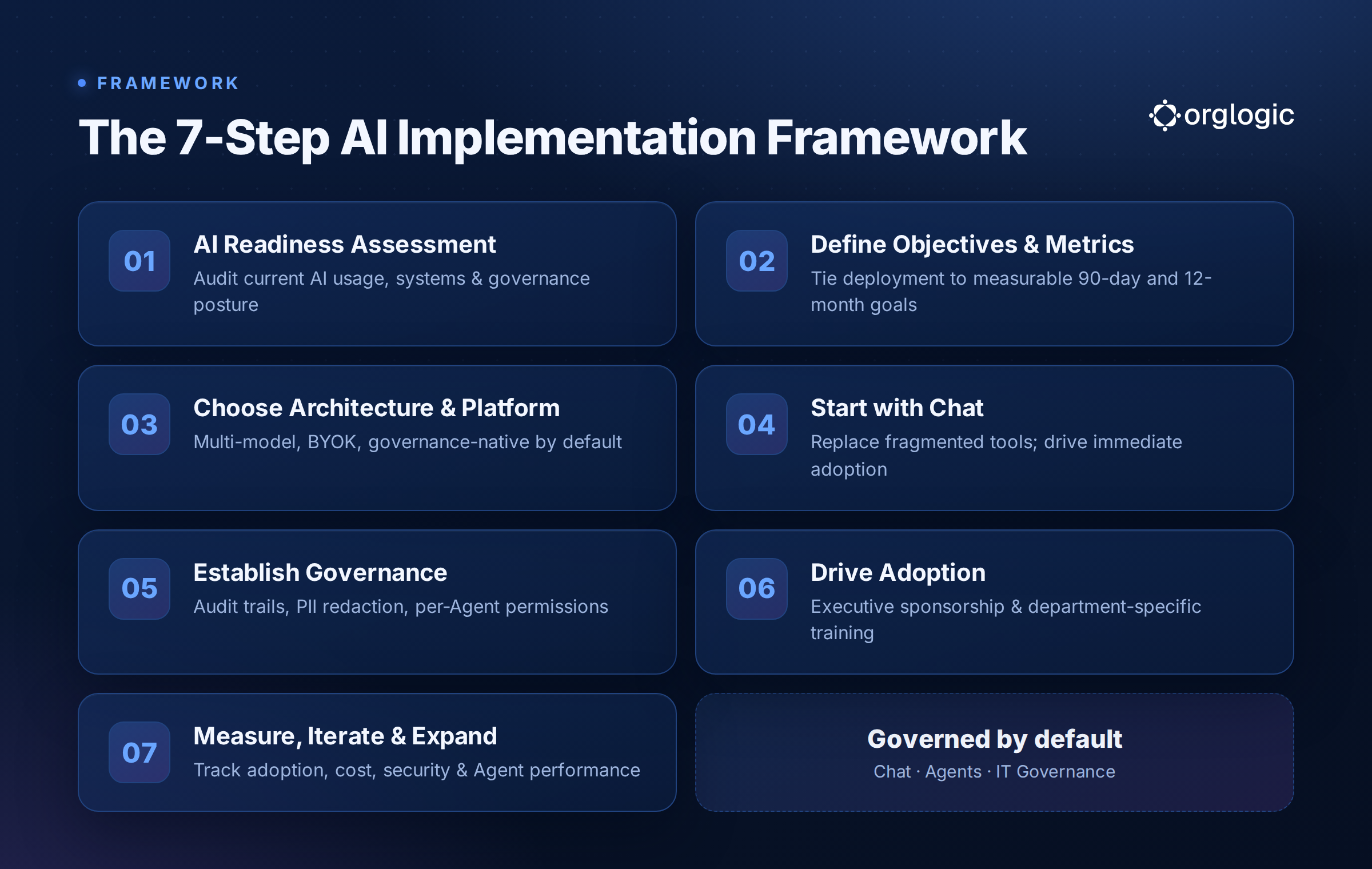
Before deploying anything, audit the current state:
Inventory existing AI usage. Survey employees across departments. You'll almost certainly discover more AI tool usage than IT knows about. Understand which tools are being used, for what jobs, and by which teams.
Map your systems of record. Where does work actually live? CRM, ticketing, document storage, communication tools, HR systems? AI that can't connect to these systems will hit a ceiling quickly.
Assess your governance posture. What compliance requirements govern your data? HIPAA, GDPR, SOC 2, industry-specific regulations? These inform architecture decisions — particularly around BYOK, data residency, and audit requirements.
Identify your highest-leverage use cases. Don't try to automate everything at once. Start by mapping the workflows where AI can have the most measurable impact: reducing handle time in support, accelerating deal prep in sales, speeding up code review in engineering.
Every AI implementation initiative needs an answer to: what does success look like in 90 days? In 12 months?
Objectives should be specific and tied to measurable outcomes:
Without defined metrics, AI implementation becomes an amorphous "transformation initiative" that's impossible to evaluate and easy to defund when leadership attention shifts.
This is the decision that determines everything that comes after. The right architecture depends on your governance posture, your systems of record, your workforce size, and where you want to be in three years — not just where you are today.
Key architectural decisions include:
Multi-model vs. single-model. Single-model platforms (ChatGPT Enterprise, Claude Teams) lock you into one provider's capabilities and pricing. Multi-model platforms give employees access to the best model for each task — and protect the organization from vendor concentration risk.
BYOK vs. bundled usage. Bring-your-own-key means your data flows directly to model providers and the AI vendor never sees it. Bundled usage means your data passes through the vendor's infrastructure. For most regulated and security-conscious organizations, BYOK is the right choice — but verify that the platform charges no surcharge for BYOK, since some charge 10% or more.
AI Chat vs. AI Agents. Chat is where adoption starts. Agents are where value multiplies. Look for platforms that support both, and that allow Agents to connect to the systems where your work already lives — not just generate text in isolation.
Governance-native vs. governance-bolted-on. Some platforms add governance features at the enterprise tier. The better architecture is one where governance — audit trails, PII redaction, per-team budget controls, connector permissions — is on by default at every plan level. Governance shouldn't be an upgrade. It should be the foundation.
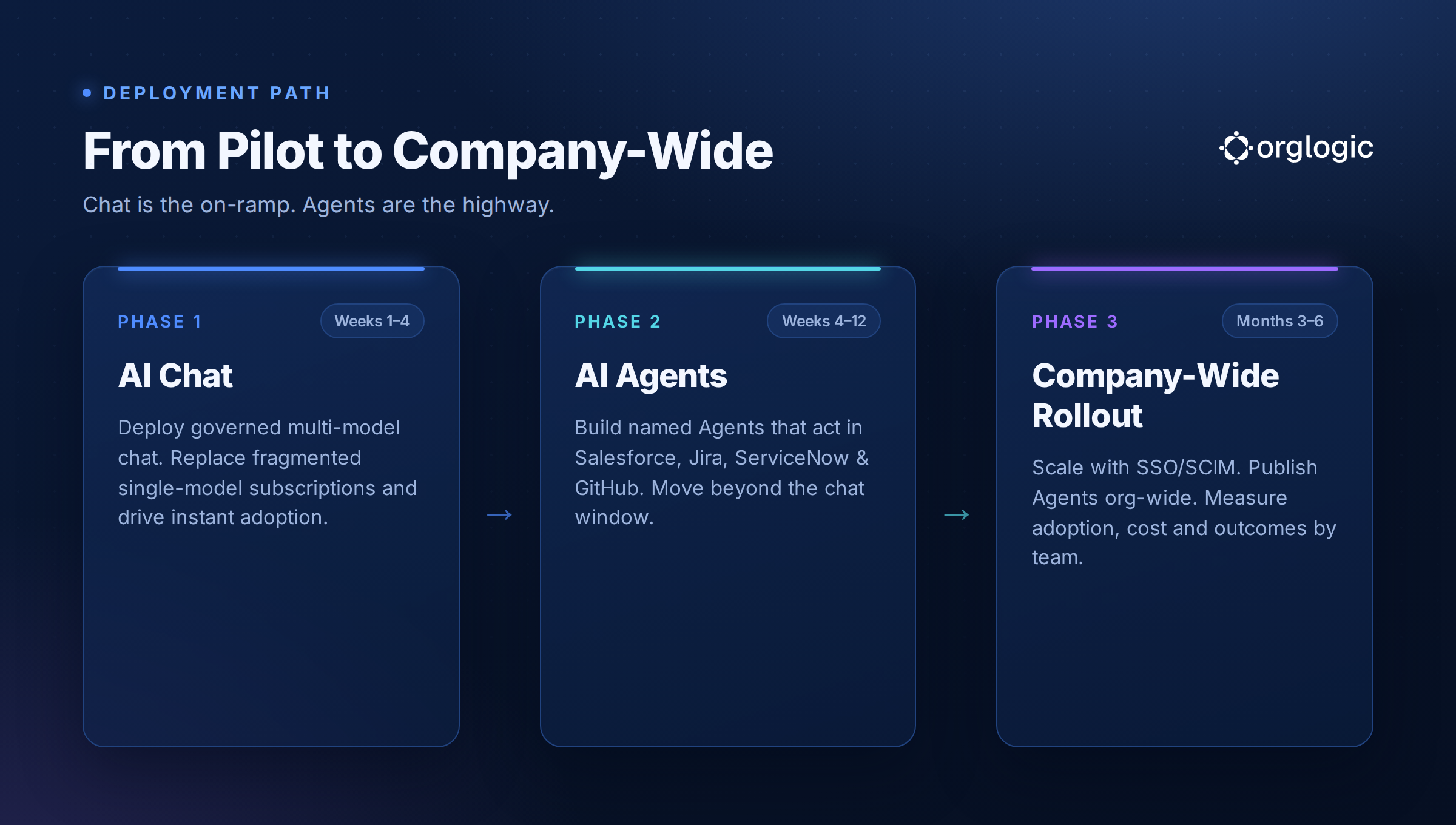
The most successful enterprise AI implementations follow a consistent pattern: Chat is the on-ramp;
Agents are the highway.
Phase 1 — Chat (Weeks 1-4): Deploy governed multi-model AI chat to your target population. Replace the fragmented single-model subscriptions your teams are paying for individually. Give every employee one place for AI, with smart routing that picks the right model per task. This delivers immediate value and drives adoption.
Phase 2 — Agents (Weeks 4-12): Identify the power users and department champions who want to go further. Work with them to build the first named Agents for their specific workflows: a Deal Prep Agent connected to Salesforce, a Ticket Triage Agent connected to ServiceNow, a PR Review Agent connected to GitHub. These are AI workers with domain expertise that act in real systems — not just chat windows that produce text.
Phase 3 — Company-wide rollout (Months 3-6): Use SSO/SCIM to roll out at scale. Publish successful Agents to the broader organization. Measure adoption, usage, and outcomes by team. Iterate based on data.
The worst time to think about governance is after something goes wrong. The right time is before you scale beyond your initial pilot.
A robust AI governance framework for enterprise includes:
Data flow control. Know exactly where your data goes. BYOK ensures it goes to model providers, not AI vendors. VPC or on-prem deployment provides additional isolation for the most sensitive environments.
Audit trails. Log every AI interaction: who, what model, what prompt (or a hash of it), what response, what system was accessed. This is both a compliance requirement for many industries and a management tool for understanding how AI is actually being used.
PII redaction. Automatically detect and redact personally identifiable information before queries reach any model. This should happen pre-model, not post-response.
Per-Agent connector permissions. When AI Agents connect to systems like Salesforce, Jira, or SharePoint, define exactly what read and write permissions each Agent has — not blanket access to the entire system. This is the principle of least privilege applied to AI.
Per-team budget controls. AI spend can grow quickly across a large organization. Implement team-level spending limits, usage alerts, and hard caps to maintain cost visibility and control.
Technology doesn't drive adoption. People do.
Effective AI adoption programs in enterprise settings share several characteristics:
Executive sponsorship. AI implementation needs a visible champion at the VP or C-level who communicates why this matters and holds the organization accountable to adoption metrics.
Department-specific training. Generic AI training doesn't stick. Train sales teams on how to use AI in their Salesforce workflows. Train support teams on their Ticket Resolution Agent. Train engineers on the PR Review workflow. Specificity drives behavior change.
Agent builders and power users. Identify the early adopters in each department who want to go deeper. Give them access to the Agent builder. Let them create department-specific Agents and share them with their teams. These internal champions drive organic adoption better than any top-down mandate.
Feedback loops. Build mechanisms for employees to report what's working, what isn't, and what they wish AI could do. This input drives roadmap prioritization and keeps the implementation aligned with actual work patterns.
Step 7: Measure, Iterate, and Expand
A successful AI implementation strategy is never "done." It evolves as the technology changes, as use cases mature, and as the organization develops AI fluency.
Track a core set of metrics:
Review these metrics quarterly. Use them to identify which departments need more support, which Agents are driving the most value, and where to build next.
The CISO's concern is legitimate: AI tools that process sensitive data without governance create real exposure. The solution isn't to slow down AI adoption — it's to make the governed path the easiest path. When employees have access to a platform that handles compliance by default (BYOK, audit trail, PII redaction), there's no reason to route around it.
Internal AI builds are attractive in theory. In practice, they typically take 6-12 months, consume 3-5 engineers, and still don't include governance, multi-model routing, Agent frameworks, or multi-surface support. By the time the internal build ships, the market has moved. Platform solutions deploy in days, not months.
Employees who've built workflows around existing tools resist change. The antidote is specificity: show the sales team how AI makes their existing Salesforce workflow faster. Don't ask them to "embrace AI." Give them something concretely better.
AI implementation fails when no single person or team owns it. Successful deployments designate a clear owner — typically a Head of AI, Head of IT, or CTO — who is accountable for platform decisions, governance, adoption metrics, and expansion roadmap.
AI implementation is an ongoing capability, not a one-time project. Organizations that treat it as a checkbox ("we deployed AI") miss the compounding returns that come from continuous iteration, new use cases, and deepening integration. The highest-value AI implementations look very different at 12 months than they did at day one.
A publicly traded defense and transportation technology company faced a sprawling AI governance problem. Engineering, operations, and corporate teams had each adopted their own AI tools — 12 unauthorized platforms in total — with no audit trail, no PII protection, and no visibility into what data was flowing where. Government contracts made compliance requirements especially strict.
The company implemented a governed AI workspace with BYOK architecture and VPC deployment, replacing all 12 tools with a single multi-model platform. Per-Agent connector permissions gave security precise control over what AI could access. Full audit trail coverage gave compliance the documentation they needed.
Results:
A publicly traded autonomous vehicle technology company with roughly 1,500 employees had a different problem: engineers were pasting proprietary sensor data and algorithms into personal AI accounts. $40,000 a month was leaving the company through untracked AI subscriptions. IP exposure was real and unmeasured.
The company deployed a multi-model AI workspace with BYOK, ensuring proprietary data stayed in their environment. Slack and Chrome surface integrations drove adoption in the channels engineers already worked in. Smart model routing let engineers use the right model for each task without switching platforms.
Results:
Also Read: The Enterprise AI Workspace Checklist
The next evolution in enterprise AI isn't smarter individual Agents — it's Agents that work together. Multi-Agent workflows allow the output of one Agent to feed into another: a Research Agent that summarizes competitive intelligence, feeding a Content Agent that drafts positioning, feeding an Approval Agent that routes for review. Organizations building AI implementation strategies today should account for this architecture.
Purpose-built AI Agents with domain expertise — packaged, versioned, and reusable — will replace generic chat as the primary AI interface for most enterprise workflows. The organizations that develop institutional expertise in authoring these Skills will develop an AI capability that competitors cannot easily replicate.
Regulatory frameworks around AI governance are tightening globally. The EU AI Act, emerging US state-level regulations, and sector-specific rules in healthcare and financial services are all moving in the same direction: organizations must demonstrate that they know what their AI is doing and can prove it. Audit trails, model access controls, and PII governance will shift from differentiators to table stakes.
Read more about: What Is AI Governance? And How Does an AI Governance Platform Work?
Enterprise buyers are increasingly unwilling to send their data through third-party AI vendor infrastructure. The expectation — especially in regulated industries — is that data flows directly to model providers and the AI platform never sees it. Organizations selecting enterprise AI platforms should treat BYOK as a baseline requirement, not a premium feature.
AI will increasingly operate inside the tools employees already use — Slack, Teams, Chrome, email — rather than requiring a separate application visit. Implementation strategies should account for how AI surfaces map to existing workflows. An AI Agent available in Slack is adopted faster than one that requires opening a new tab.
OrgLogic is the AI workspace built specifically for enterprise AI implementation at scale. It's not a single-model chat tool. It's not a governance product bolted onto AI as an afterthought. It's the platform where AI Chat, AI Agents, and IT Governance operate together by default.
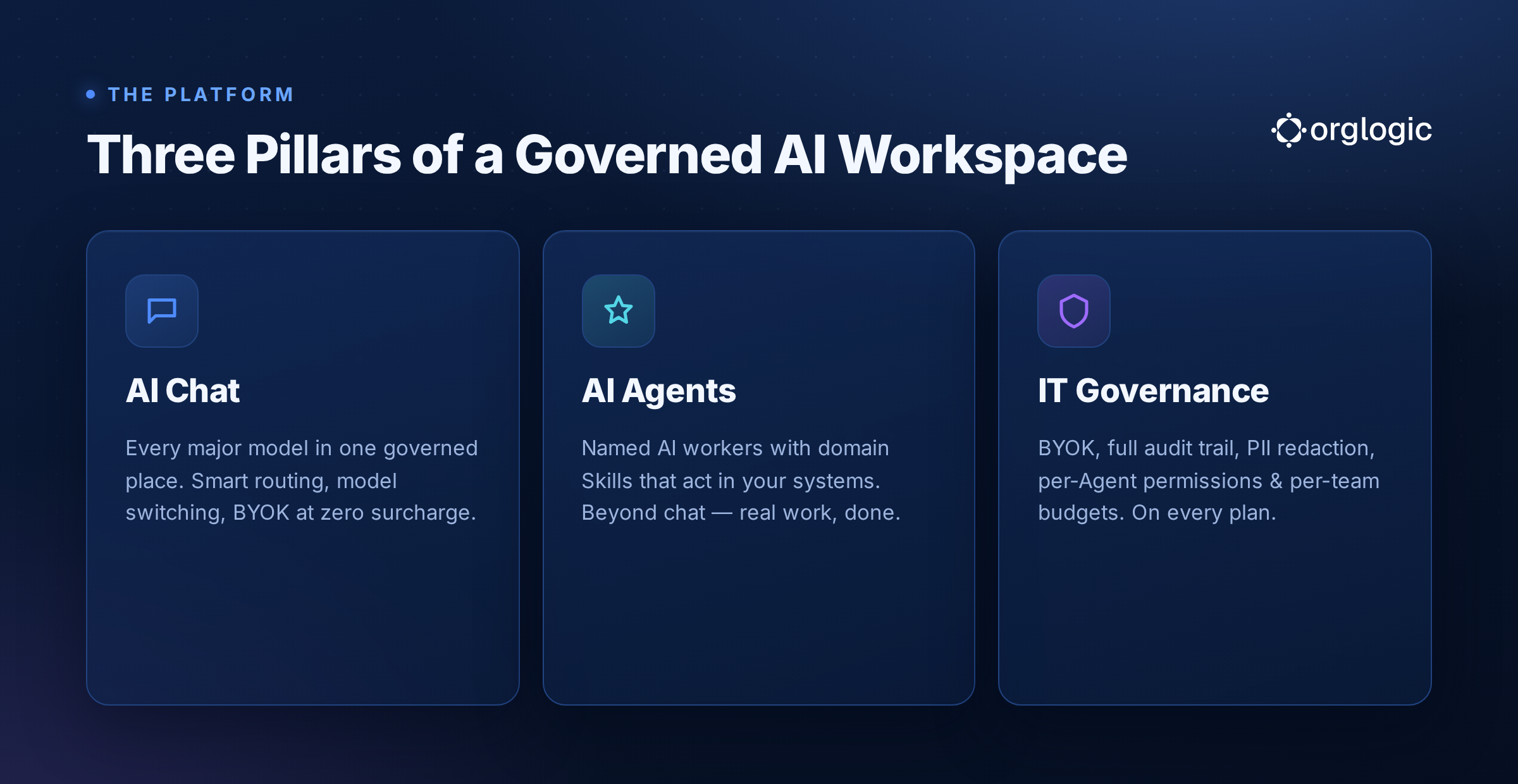
Every major model in one place — GPT-4o, GPT-4.1, Claude Sonnet 4, Gemini 2.5 Pro, Llama, Mistral, and more. Smart routing picks the best model per task automatically. Model switching mid-conversation lets power users control the experience. At $8/seat, OrgLogic replaces $25-60/seat single-model tools like ChatGPT Enterprise or Claude Teams — and gives employees access to every model instead of one.
Chat is where every team starts. It delivers immediate productivity gains, replaces fragmented subscriptions on day one, and creates the foundation for everything that comes next.
Named AI workers — Deal Prep, PR Review, Ticket Resolution, Policy Lookup, Contract Review — built for specific jobs, connected to the systems where work actually happens. Agents use Skills (packaged domain expertise, versioned and reusable) and Connectors (Salesforce, Jira, Confluence, ServiceNow, GitHub, Google Workspace, SharePoint, Slack, and more) to take action in real workflows.
This is what moves AI from a text generation novelty to a genuine operational capability. The Deal Prep Agent doesn't just summarize. It pulls account history from Salesforce, surfaces relevant Confluence documentation, and delivers a structured brief — without any copy-pasting.
Full governance on every plan — including Free. BYOK with zero surcharge means data flows directly to model providers, not through OrgLogic. Full audit trail on every chat and every Agent action: user, model, connector accessed, input, output — searchable and exportable. PII redaction fires automatically before queries reach any model. Per-Agent Connector permissions give security precise control over what each Agent can read and write in connected systems. Per-team budget controls give finance visibility and hard caps at the granularity they need.
This is why OrgLogic passes security review at companies that other AI platforms don't. Governance isn't an enterprise add-on. It's on by default.
OrgLogic deploys in minutes for up to 25 users on the Free plan — with full governance included. Teams evaluate with real data, real use cases, and real governance controls, not a sandboxed demo environment. When the evaluation passes security review, SSO/SCIM rollout scales to the full organization. $8/seat covers the platform. Model usage is separate: BYOK at zero surcharge, or OrgLogic-provisioned at cost plus 6% — the most transparent pricing in the category.
600+ enterprise deployments. Named customers including Snowflake, Spotify, Rakuten, Snap, and Wayfair. SOC 2 Type II and ISO 27001 certified. HIPAA BAA available.
AI implementation strategy isn't a technology problem. It's a business design problem. The organizations that solve it — with a clear framework, the right governance architecture, and a deployment path that moves from chat to Agents — will compound advantages that are increasingly hard to catch up to.
The first step isn't choosing an AI model. It's deciding what kind of AI organization you're building: one where AI is a tool individuals use informally, or one where AI is an operational capability the entire company relies on.
If it's the latter, you need more than a chat interface. You need a strategy — and a platform built to execute it.

Single-model AI tools lock you into one provider at $25-60/seat. OrgLogic is a multi-model AI workspace with named Agents that act in your systems (Salesforce, Jira, Confluence, ServiceNow), packaged Skills for domain expertise, and full governance at $8/seat. You get every model, not just one.

Bring Your Own Key means you connect your own API keys from OpenAI, Anthropic, Google, or any provider. Your data flows directly to the model provider. OrgLogic never sees, stores, or processes your prompts or responses. Zero surcharge on your own keys. This is the #1 requirement for security teams evaluating enterprise AI platforms.
An Agent is a named AI worker with a defined job, connected to your systems via Connectors. A Skill is packaged expertise that teaches an Agent how to do specific work consistently. Unlike a generic chatbot, a Deal Prep Agent with a Salesforce Connector pulls real CRM data and produces structured call briefs. Skills are reusable across Agents, versioned, and authored in plain language.
Every Workspace includes per-Agent Connector permissions (each Agent gets scoped access, not blanket access), Agent-level audit trails, automatic PII redaction, per-team budget controls, model-level access controls, and configurable guardrails. Governance is the default environment on every plan, including Free. SOC 2 Type II, ISO 27001, HIPAA, and GDPR compliant.
The Free plan covers 25 users with $500 in credits ($20 per active user, pooled). The Business plan is $8/seat/month (annual) or $10 monthly. The seat fee covers the full platform: Agents, Skills, Connectors, governance dashboard, 5 surfaces, and all features. Model usage is separate: BYOK at zero surcharge, or OrgLogic-managed models at cost + 6%.
80% of employees already use AI tools without IT approval. OrgLogic replaces fragmented, ungoverned tools with one AI workspace employees actually want to use, available on web, Slack, Teams, Chrome, and API. One customer, a regulated tech company with 1,500 employees, reduced shadow AI by 91% within 6 weeks while cutting AI spend by 70%.
OrgLogic Connectors integrate with Salesforce, Jira, Confluence, ServiceNow, SharePoint, Google Workspace, Slack, SAP, and more via custom APIs. Each Connector has per-Agent permission scopes controlled by IT, so your Deal Prep Agent only accesses the Salesforce objects you approve. The Connector library is growing and new integrations ship regularly.
Self-serve signup takes 30 seconds. Connect your API keys in 2 minutes. Deploy pre-built Agents for sales, support, engineering, HR, and legal on day one. The Free plan (25 users, full governance) lets you pilot without procurement. One customer had engineers adopting within 2 weeks across Slack and Chrome. Enterprise plans add SSO/SCIM, VPC, and on-prem deployment.