This guide gives enterprise IT leaders, CISOs, CTOs, and executive teams a complete and actionable understanding of shadow AI. We cover what it actually is, the full spectrum of risks it creates, the structural causes behind it, what it looks like across real departments and roles, and a proven framework for managing it. No jargon. No vague recommendations. The full picture.

The use of artificial intelligence tools, applications, models, or services by employees within an organization without the knowledge, authorization, review, or oversight of that organization's IT, security, or compliance teams. Shadow AI includes any AI-powered tool — free, paid, browser-based, API-accessed, embedded in another application, or accessed on a personal device during work hours — that operates outside an organization's governed technology environment.
“Shadow AI is not a future risk to plan for. It is a current, active, and expanding reality inside almost every enterprise — and the majority of organizations are managing it poorly, if at all.”
Shadow AI is the direct successor to shadow IT — the decades-old phenomenon of employees adopting technology outside official procurement processes. Where shadow IT created access and data storage problems, shadow AI creates data processing, data exposure, and decision-making influence problems.
An employee using an unsanctioned AI tool is not just storing a file on an unapproved server. They may be transmitting your most sensitive company data to a third-party model provider, receiving AI-generated outputs that influence business decisions, and leaving a complete absence of audit trail for any of it.

Research consistently shows 75–85% of knowledge workers use at least one AI tool their employer has not formally approved. In technology and software companies, that figure approaches 90%.
ChatGPT crossed 100 million users in 60 days of launch in late 2022. Enterprise procurement processes that typically take 6–18 months could not keep pace. By the time most organizations had begun evaluating enterprise AI tools, a significant fraction of their workforce had already adopted consumer AI products and integrated them into daily work.
The question for enterprise leaders is no longer whether AI is happening inside their organization. It's whether it's happening with any governance at all.
The risks of shadow AI fall into five distinct categories: data security, regulatory compliance, intellectual property, financial, and operational. Each category creates independent exposure; in many incidents, they compound simultaneously.

When an employee uses an unauthorized AI tool with work data, that data is transmitted to a third-party server. Depending on the tool and account tier, it may be:
Key Risk Statistic: IBM's 2025 Cost of a Data Breach Report found that breaches involving unauthorized AI tools carry an average additional cost of $670,000 compared to equivalent breaches in governed environments. This covers investigation, remediation, and notification — not including regulatory fines, which can add millions in regulated industries.
In regulated industries, shadow AI creates direct, actionable regulatory exposure:

Shadow AI creates IP risk in two directions. Outbound IP risk occurs when employees input proprietary information — source code, product roadmaps, pricing models, customer lists — into unauthorized AI tools. The Samsung incident in 2023, where engineers pasted proprietary source code into ChatGPT during debugging sessions, became the defining example and led to a company-wide AI governance overhaul.
Inbound IP risk occurs when AI-generated content used in work products creates copyright or ownership ambiguity. Enterprise AI agreements include IP indemnification provisions. Consumer AI accounts typically do not, leaving organizations exposed when AI-generated code, copy, or contract language is incorporated into commercial work products.
Fragmented individual AI subscriptions across a 1,000-person organization can reach $40,000–$80,000 per month in invisible, untracked spend. Add the $670,000 breach premium, retroactive compliance remediation costs, and engineering overhead of maintaining undocumented internal AI builds. The total financial cost of unmanaged AI consistently exceeds the cost of a governed AI platform by a substantial margin.
Without governance, there is no systematic way to evaluate the quality, consistency, or accuracy of AI-generated outputs influencing business decisions. A sales forecast supported by an AI hallucination. A legal argument citing a case that doesn't exist. An HR decision influenced by AI output reflecting historical bias. Without an audit trail, none of these can be reconstructed, investigated, or defended in litigation, regulatory review, or insurance claims.
Shadow AI is not a behavioral problem. It is a structural problem. Employees who use unauthorized AI tools are, in virtually all cases, trying to do their jobs more effectively — not deliberately creating security incidents. Any governance approach that treats the symptoms without addressing root causes will fail.
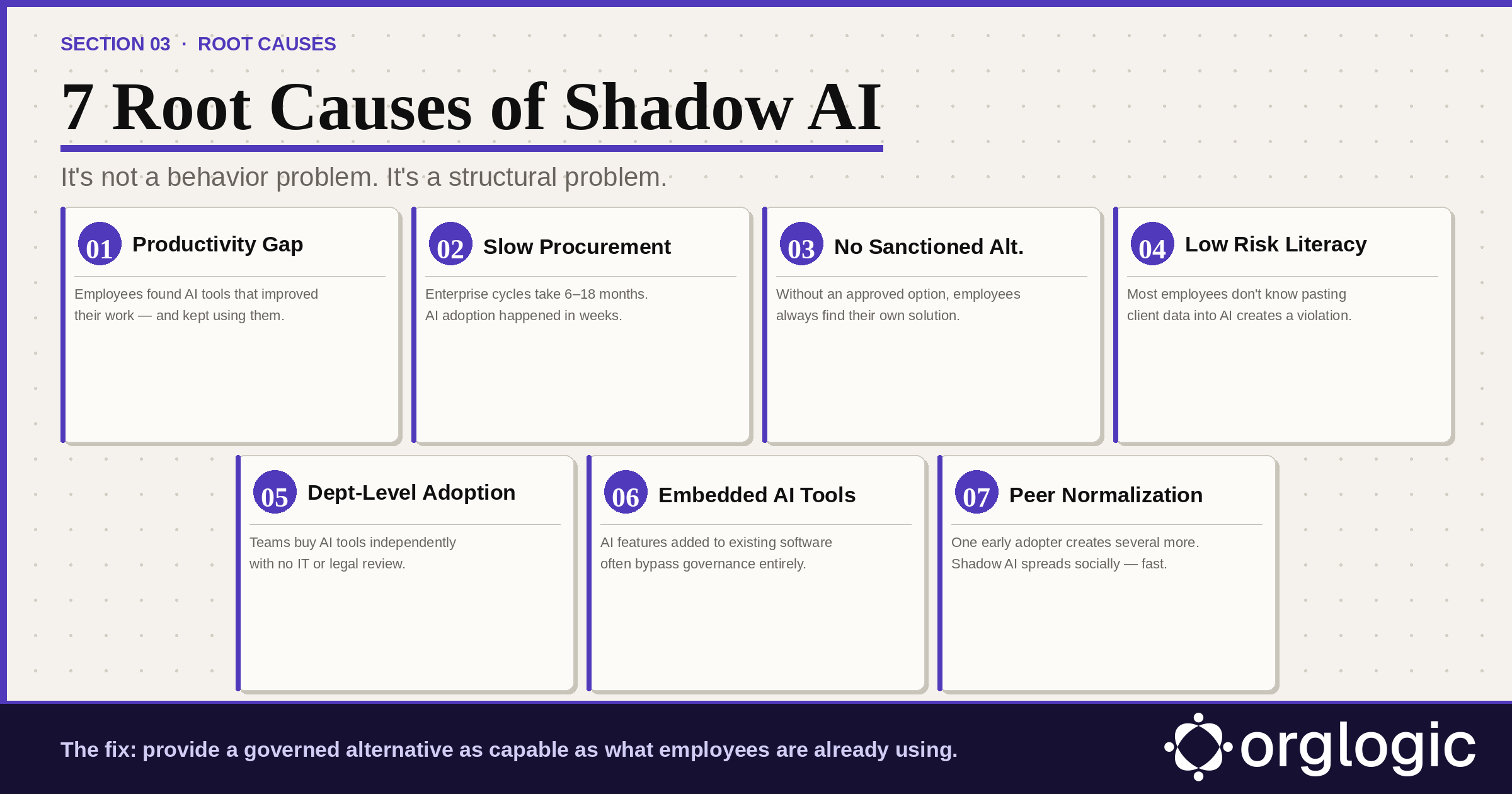
Consumer AI tools became dramatically capable in a short period. Employees who discovered these tools found the productivity gains were real. When their organization's official offering couldn't match what they had already experienced, they continued using what worked. This is a rational response to a productivity gap — not recklessness.
Also read: Enterprise AI Workspace Checklist: What IT, Security & Leaders Must Evaluate
The typical enterprise software procurement cycle takes 6–18 months. Consumer AI tools achieve mass adoption in weeks. By the time most organizations had formed a committee to evaluate enterprise AI, a significant portion of their workforce had already adopted consumer tools and integrated them into daily workflows. This is a structural mismatch between procurement timelines and technology adoption velocity.
The single most powerful driver of shadow AI is the simple absence of an approved alternative. Organizations that issue "no AI" policies without providing an alternative simply drive usage underground, where it becomes harder to detect. The cause of shadow AI in most enterprises is not employee defiance of a reasonable policy. It is the presence of an unreasonable one: "don't use AI" with no "here's what you can use instead."
Many employees who use shadow AI tools are genuinely unaware of the risks. They understand AI helps them work faster. They don't necessarily understand that pasting a client's personal information into a consumer AI tool may create a GDPR violation, that uploading source code to a free AI service may constitute trade secret disclosure, or that using AI in hiring decisions without oversight may violate employment law.
AI adoption is often happening department by department. A marketing team lead discovers an AI content tool and buys seats on a corporate card. A sales manager subscribes their team to an AI call analysis platform. Each decision may be well-intentioned and budget-approved within the department, but none has gone through IT security review or legal compliance review.
Increasingly, shadow AI is not a deliberate choice to use a new AI tool — it is an AI feature added to software employees already use. Browser extensions with AI capabilities. Email clients with built-in AI composition. Document editors with AI suggestions. Meeting tools with AI transcription. Employees often don't realize they've opted into AI features that require governance review.
When one team member discovers a useful AI tool and shares it with colleagues, adoption cascades rapidly through social networks within organizations. One early adopter creates several more, each creating several more. By the time IT discovers the usage, it is deeply embedded in team workflows and difficult to remove without significant productivity disruption.
Shadow AI manifests differently across departments, roles, and industries. The examples below reflect real patterns observed across enterprise environments.
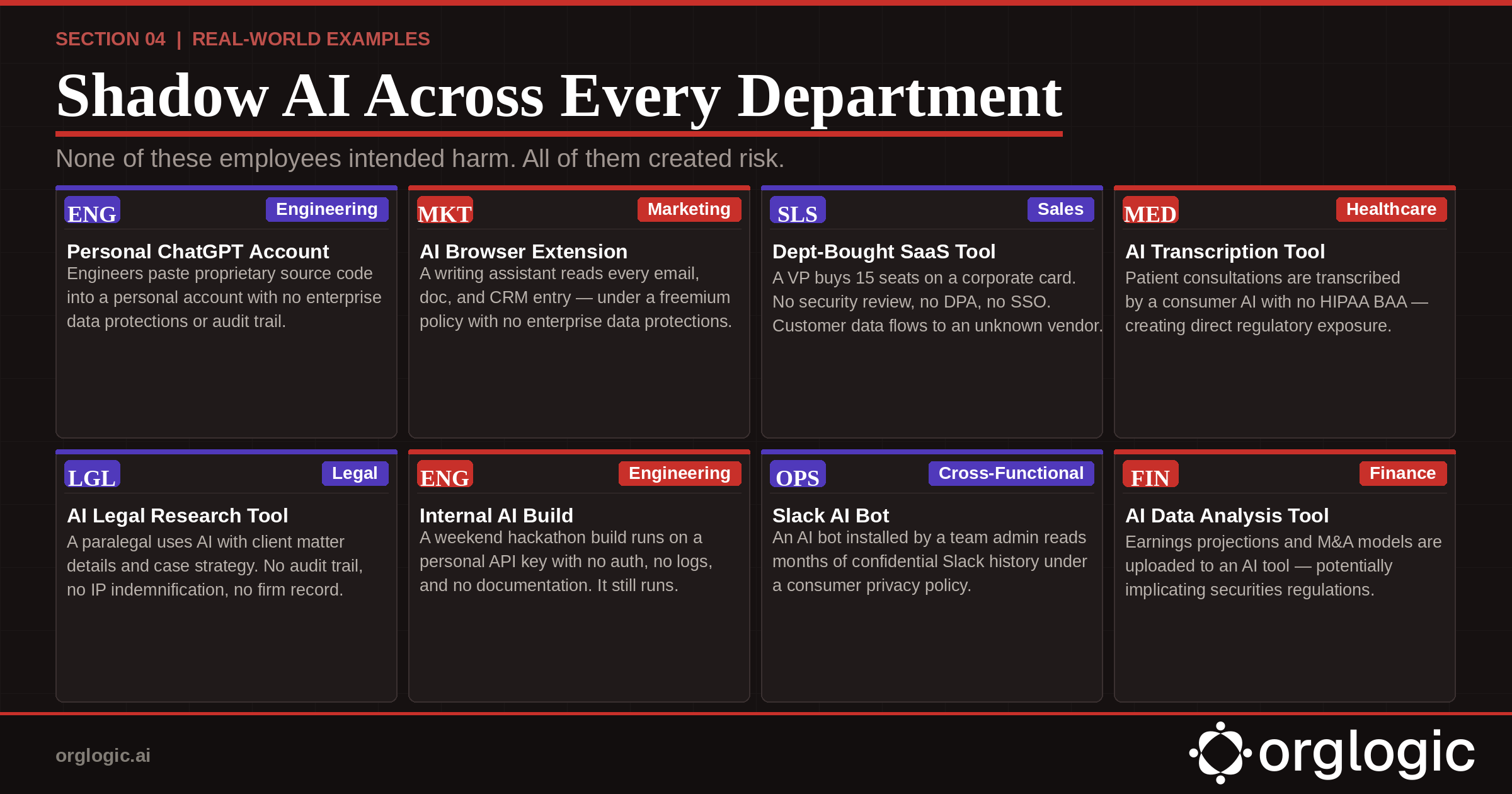
A software engineer signs up for ChatGPT Plus with a personal email and regularly pastes proprietary source code, internal architecture documents, and production database schemas for debugging and documentation help. Confidential IP has been transmitted to a consumer AI account with no enterprise data protections, no zero-retention guarantee, and no audit trail. This is exactly how the Samsung incident in 2023 began.
A marketing manager installs a browser-based AI writing assistant that integrates with Gmail, Google Docs, and the company CRM — reading email threads, document drafts, and sales notes. Under freemium consumer terms, the extension logs content for quality improvement. Customer data, internal strategy, and confidential deal information flow through a tool IT has never reviewed.
A VP of Sales purchases 15 seats of an AI sales intelligence platform on a corporate card, expensed as "software tools." The platform integrates with Salesforce, gaining access to the entire customer database. No security review occurred. No data processing agreement exists. When the VP leaves six months later, customer data has been in the vendor's system for months under consumer terms.
A hospital administrator uses a consumer AI transcription tool to document physician-patient consultations. What they don't know: the consumer tier retains audio and transcripts on the vendor's servers, and no Business Associate Agreement has been signed. Patient names, diagnoses, treatment details, and insurance information flow through a tool that creates direct HIPAA exposure.
A paralegal uses an AI legal research assistant with client matter details, draft contract terms, and confidential case strategy. The tool runs on a consumer AI model. The firm has no record of what client information has been processed and no audit trail. Professional responsibility obligations are implicated without anyone realizing it.
A small engineering team builds an internal AI assistant using raw API calls, accessing the company's internal knowledge base, Confluence, and Jira. It runs under a personal API key with no authentication, no logging, no access controls, and no documentation. When the engineer who built it leaves, the tool keeps running — and no one knows how it works or how to turn it off.
A team admin installs a third-party AI bot into the company's Slack workspace. Over months, it has accumulated access to confidential business discussions, personnel matters, financial information, and M&A activity discussed across channels. The bot's privacy policy, which no one has read, permits content retention for service improvement.
Learn more about: How to Use Slack for Customer Service
A financial analyst uploads financial models, revenue projections, and board presentation drafts to an AI analysis tool. They don't realize that uploading material non-public financial information — earnings projections, M&A modeling — to an unauthorized external tool may implicate securities regulations and the company's insider trading policy.
Managing shadow AI risk requires a multi-layered approach addressing detection, governance infrastructure, policy, and culture simultaneously. Organizations that focus only on detection and prohibition consistently fail. The following 7-step framework is built from enterprise deployments that reduced shadow AI usage by 80–91% within 6–8 weeks.

Before taking any action, understand the scope. Most organizations significantly underestimate how much shadow AI is active inside their network. A complete audit requires four methods:
The sequence is critical. Organizations that issue restrictions before they have a governed alternative consistently see shadow AI migrate to personal devices outside network monitoring entirely. The correct order: deploy first, communicate second, restrict third.
A governed AI platform must meet a high bar: at least as capable as what employees are already using (multi-model access across GPT-4o, Claude, Gemini), as easy to use as consumer alternatives, and explicitly safe for work data with BYOK architecture and enterprise data protections employees can see and trust.
Bring Your Own Key (BYOK) is the technical foundation of enterprise AI governance. Under BYOK, your organization connects its own API keys from model providers directly to the AI platform. Data flows from employees' queries directly to the model provider under your enterprise agreement. The AI platform vendor never sees, stores, or processes the data.
BYOK should be paired with zero-retention guarantees from model providers at the enterprise tier, ensuring your data is not used for model training and is not retained after the API call completes. Together, BYOK and zero-retention are the contractual and technical foundation of defensible AI governance.
Learn more about: What Is AI Governance? And How Does an AI Governance Platform Work?
Pre-query PII redaction — automatic detection and removal of personally identifiable information before any query reaches a model — creates a safety net that catches mistakes before they become incidents. Redaction should be automatic, configurable, and extended to cover organization-specific sensitive data.
Every AI interaction should be logged in a searchable, exportable audit trail: who queried what, with which model, when, and what was returned. For organizations deploying AI agents, the audit trail must extend to agent actions — recording which agents accessed which systems for which users at which times.
As AI expands to agents that take actions in enterprise systems, governance must expand to granular per-agent permission scoping. A Deal Prep Agent should have read access to Salesforce opportunities — but not HR records. A Ticket Resolution Agent should update ServiceNow tickets — but not access financial systems. Permissions should be set per agent, revocable immediately, and visible in a central dashboard.
An effective enterprise AI use policy covers four things: what AI tools are approved and how to access them; what data categories are acceptable to use with AI tools; what the process is for requesting additional AI tool approvals; and what the consequences are of using unauthorized tools with company data.
Policies framed as "protecting employees" rather than "monitoring behavior" achieve better adoption. Specific policies outperform vague ones. Communicate through direct manager channels, not IT all-hands emails, so employees internalize policy rather than archive it.
Most shadow AI persists because employees don't understand the risks. A sustained AI risk literacy program — not a one-time compliance training module — is essential for long-term governance. Make it role-specific (engineers hear about code and API risk; HR hears about employment law risk), update it as AI capabilities and regulations evolve, and integrate it into onboarding for every new hire.


Single-model AI tools lock you into one provider at $25-60/seat. OrgLogic is a multi-model AI workspace with named Agents that act in your systems (Salesforce, Jira, Confluence, ServiceNow), packaged Skills for domain expertise, and full governance at $8/seat. You get every model, not just one.

Bring Your Own Key means you connect your own API keys from OpenAI, Anthropic, Google, or any provider. Your data flows directly to the model provider. OrgLogic never sees, stores, or processes your prompts or responses. Zero surcharge on your own keys. This is the #1 requirement for security teams evaluating enterprise AI platforms.
An Agent is a named AI worker with a defined job, connected to your systems via Connectors. A Skill is packaged expertise that teaches an Agent how to do specific work consistently. Unlike a generic chatbot, a Deal Prep Agent with a Salesforce Connector pulls real CRM data and produces structured call briefs. Skills are reusable across Agents, versioned, and authored in plain language.
Every Workspace includes per-Agent Connector permissions (each Agent gets scoped access, not blanket access), Agent-level audit trails, automatic PII redaction, per-team budget controls, model-level access controls, and configurable guardrails. Governance is the default environment on every plan, including Free. SOC 2 Type II, ISO 27001, HIPAA, and GDPR compliant.
The Free plan covers 25 users with $500 in credits ($20 per active user, pooled). The Business plan is $8/seat/month (annual) or $10 monthly. The seat fee covers the full platform: Agents, Skills, Connectors, governance dashboard, 5 surfaces, and all features. Model usage is separate: BYOK at zero surcharge, or OrgLogic-managed models at cost + 6%.
80% of employees already use AI tools without IT approval. OrgLogic replaces fragmented, ungoverned tools with one AI workspace employees actually want to use, available on web, Slack, Teams, Chrome, and API. One customer, a regulated tech company with 1,500 employees, reduced shadow AI by 91% within 6 weeks while cutting AI spend by 70%.
OrgLogic Connectors integrate with Salesforce, Jira, Confluence, ServiceNow, SharePoint, Google Workspace, Slack, SAP, and more via custom APIs. Each Connector has per-Agent permission scopes controlled by IT, so your Deal Prep Agent only accesses the Salesforce objects you approve. The Connector library is growing and new integrations ship regularly.
Self-serve signup takes 30 seconds. Connect your API keys in 2 minutes. Deploy pre-built Agents for sales, support, engineering, HR, and legal on day one. The Free plan (25 users, full governance) lets you pilot without procurement. One customer had engineers adopting within 2 weeks across Slack and Chrome. Enterprise plans add SSO/SCIM, VPC, and on-prem deployment.