An AI workspace is the answer to that specific problem. This guide covers what it is, how it works, what to look for when you evaluate one, and how it differs from the chatbot your team is already using.
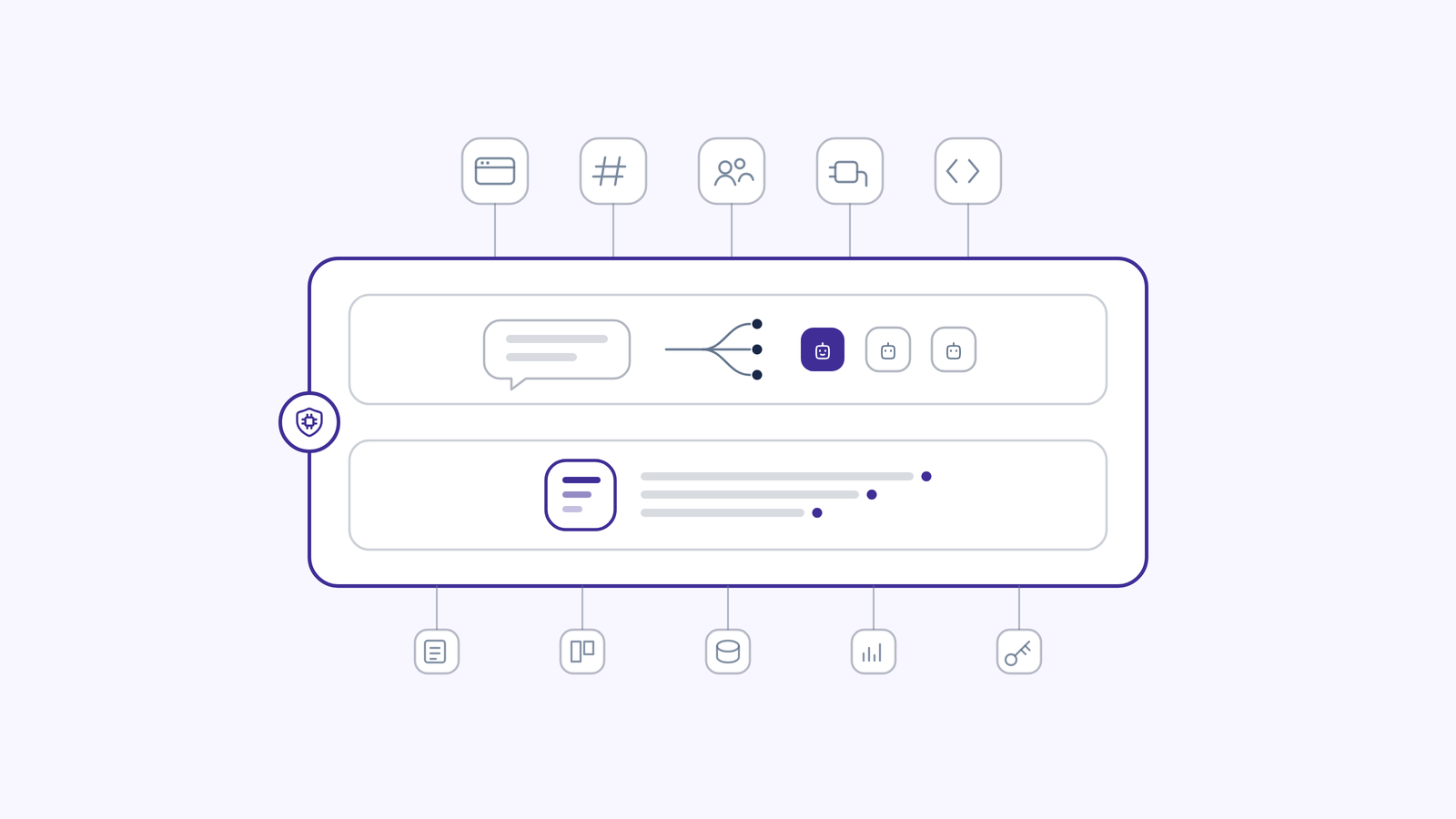
An AI workspace is a single governed environment where employees use any leading AI model, where AI agents act inside the company's real systems, and where every one of those interactions is grounded in the organization's own knowledge and recorded in an audit trail. It is not one more AI tool. It is the layer that sits above the models and makes all of them usable at work.
That distinction matters because most companies did not decide to adopt AI. AI adopted them. Marketing bought one subscription, engineering bought another, three people are pasting customer records into a personal account, and nobody in IT can produce a list of what is running. IBM found 80% of employees use unsanctioned AI tools (IBM, 2025), and IBM puts the additional cost of a breach involving shadow AI at $670K (IBM, 2025).
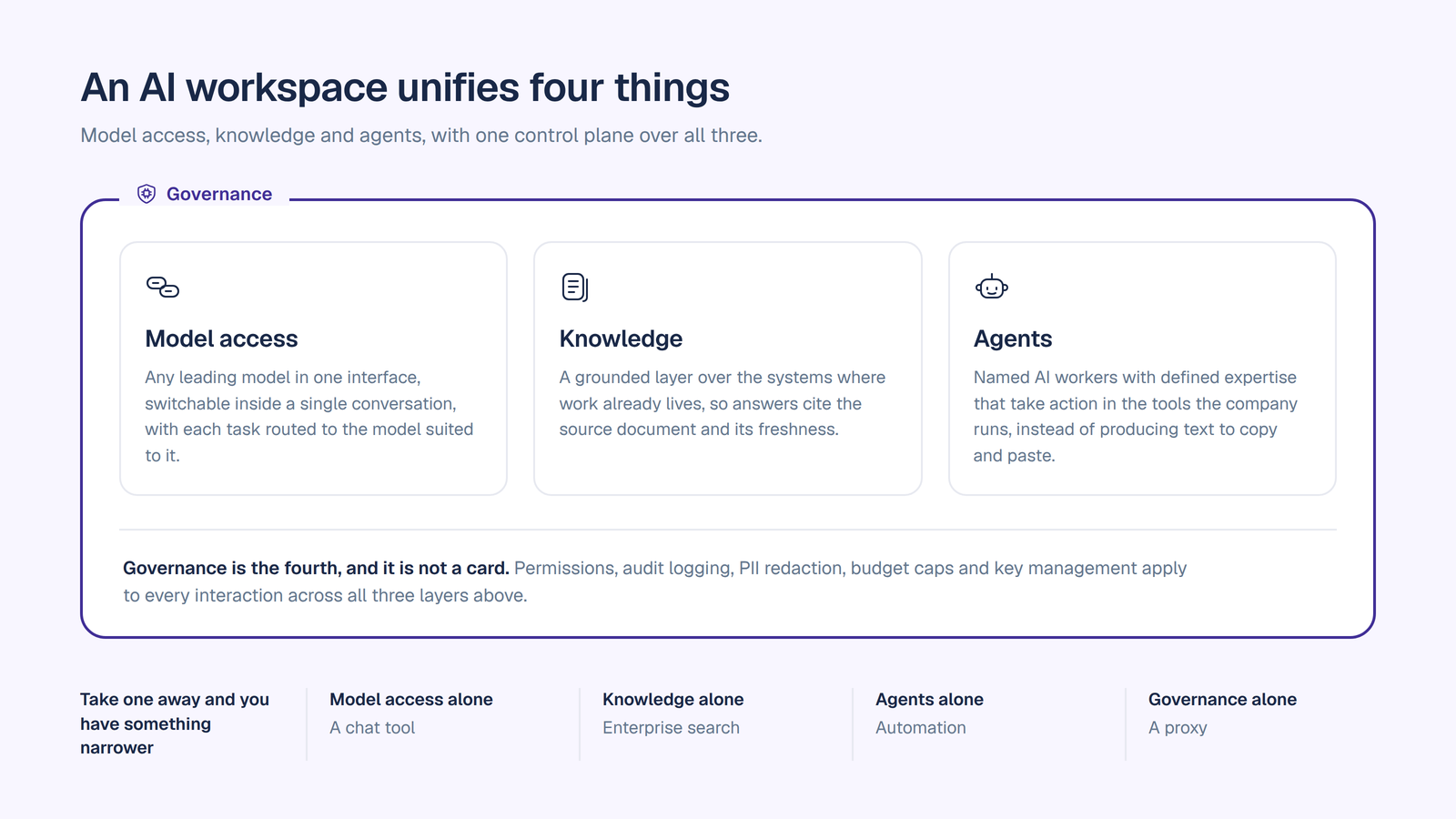
An AI workspace is a platform that unifies four things that are usually scattered:
Model access. Any leading large language model, available in one interface, with the ability to switch models inside a single conversation and route each task to the model best suited to it.
Knowledge. A grounded layer that connects to the systems where work already lives, so answers cite the source document and its freshness instead of guessing from the public internet.
Agents. Named AI workers built for specific jobs, with defined expertise, that take action in the tools your company runs rather than just producing text for a human to copy and paste.
Governance. Permissions, audit logging, PII redaction, budget caps, and key management applied to every interaction across all three layers above.
Take any one of those away and you have something narrower. Model access alone is a chat tool. Knowledge alone is enterprise search. Agents alone are automation. Governance alone is a proxy. A workspace is the combination, and the combination is what makes it deployable in a company that has auditors.
Most definitions of "AI workspace" circulating online describe a productivity app: one place for your notes, tasks, and meeting summaries. That definition is fine for a five-person team. It is the wrong definition for a company of 250 to 5,000 employees in a regulated industry, because it says nothing about who can see what, which model saw which data, and what you hand an auditor. For that buyer, an AI workspace is defined by its control plane.
The mechanics are easier to understand as the path a single request takes.
1. The request enters through a surface. A workspace meets people where they work: a web app, Slack, Microsoft Teams, a browser extension, or an API for embedding AI into your own products. The surface changes; the policies do not.
2. Policy runs before the model does. Personally identifiable information is detected and redacted before the prompt reaches any model. Content guardrails apply. The workspace checks which models that team is allowed to use and whether the team is inside its budget. This ordering is the entire security argument: enforcement happens pre-model, not after the fact.
3. The request is grounded. The workspace retrieves relevant context from connected systems and knowledge bases. Retrieval is scoped to what the requesting user is actually permitted to see. In a well-designed workspace, a user's personal index is built under that user's own credentials, so the index physically cannot contain a document their token could not fetch. That is a stronger guarantee than filtering results from a shared store.
4. A model is selected. Either the user picks one, or smart routing sends the task to the model best matched to it. Because the workspace is above the models, you are not locked to a single provider's roadmap or pricing.
5. Agents act. If the job requires more than an answer, a named agent executes it through connectors into Salesforce, Jira, Confluence, GitHub, ServiceNow, SharePoint, and similar systems. Each agent gets read or write scope per connection, not blanket access to the tool.
6. Everything is recorded. Each chat and agent action is logged: which user, which agent, which connector it touched, which model answered, and what went in and out. The log is searchable and exportable, which is what turns "we have AI governance" into something you can hand to an auditor.
Steps two and six are what separate a workspace from a nicer chat window. The intelligence is in the middle. The control is at the edges.
Use this as an evaluation checklist, alongside our fuller enterprise AI workspace checklist. The items are ordered by how often they turn out to be the thing that blocks a rollout.
1. Model independence. Any leading model, switchable mid-conversation, with automatic routing per task. Ask whether you can bring your own provider keys, and whether there is a surcharge for doing so.
2. Bring Your Own Key with no markup. With BYOK, your data flows directly to the model providers under your own enterprise keys, and the workspace vendor never sees it. Confirm this is configured by an admin at the workspace level. End users should never be prompted to attach personal API keys.
3. Grounding you can inspect. Answers should carry the source document and its last-synced date, and the system should say it does not know when retrieval comes back thin. An answer without provenance is unverifiable, and unverifiable answers do not survive contact with a compliance team.
4. Permission-correct retrieval. Ask how the index is built. Token-scoped per-user indexes are safe by construction. Visibility filters over a shared index are a policy that can be misconfigured.
5. Per-agent connector permissions. Security should be able to approve exactly what each agent can read and write in each connected system, and revoke it in seconds. Blanket connector access is the most common reason an agent project fails security review.
6. Governance on every plan. If audit trails, PII redaction, and key management only appear on the top tier, you cannot pilot safely. Governance gated behind an enterprise contract means your evaluation runs ungoverned, which is the exact risk you were trying to close.
7. Cost controls that actually stop spend. Per-team budget caps with alerts and hard stops, and cost analytics broken out by team, user, model, and agent. Bundled per-seat pricing hides consumption; you want to see it.
8. Coverage of the AI you did not buy. The best workspaces let you register external agents and route third-party AI clients through one gateway, so previously invisible model traffic inherits your policies and shows up in your audit trail. Check the scope of this carefully: it governs model traffic routed through the gateway, not everything those clients do outside it.
Then the table stakes: SOC 2 Type II, ISO 27001, a HIPAA BAA if you need one, GDPR, SSO and SCIM, and deployment options that match your risk posture including single-tenant VPC or on-premise.
The category is moving quickly, and in a consistent direction. Five shifts are worth tracking if you are evaluating now, because they change what "good" looks like within a budget cycle.
1. Multi-model is the steady state, not a transition phase. The expectation that enterprises would eventually standardize on one AI vendor has quietly collapsed. Model leadership rotates every few months, pricing moves underneath it, and different tasks genuinely reward different models. The workspace's job is shifting from picking a model to arbitrating between them: routing per task, switching without losing the thread, and keeping provider keys portable so a pricing change is a configuration change rather than a migration.
2. Agents are becoming identities that security reviews. For the last two years an AI agent was a feature. It is now being treated as a principal, closer to a service account than a chat window. That means a name, an accountable human owner, its own credential rather than a shared key, an access scope reviewed like any other non-human identity, and a log that records what it did and on whose behalf. Expect agent identity to appear in access reviews and offboarding checklists, not just in AI strategy decks.
3. Governance is consolidating at the gateway. Per-tool admin panels do not compose. Ten AI products means ten policy surfaces, ten audit formats, and no single answer to "what did our AI see last quarter." The pattern winning out is a routing layer where PII redaction, model permissions, budget limits, and logging are enforced once and inherited by everything downstream, including agents your teams built elsewhere and clients you did not procure. Enforcement before the model, not reporting after it.
4. Provenance is turning into an audit artifact. Citations and freshness stamps started as trust features for end users. They are becoming evidence. Regulators are converging on record-keeping and transparency rather than restricting model use outright. In the EU, the Digital Omnibus on AI deferred high-risk obligations for standalone Annex III systems from August 2026 to 2 December 2027, and to 2 August 2028 for AI embedded in products already covered by product-safety law. The transparency and AI-content-labeling duties under Article 50, however, took effect on schedule on 2 August 2026, and they apply based on what a system does rather than its risk tier, which puts mainstream generative AI deployments in scope regardless of the deferral. US companies are in scope when output reaches the EU. The deferral bought time, not exemption, and the practical implication is the same either way: an answer you cannot trace is an answer you cannot defend.
5. Cost is moving from seats to consumption. Bundled per-seat AI pricing is under pressure from both ends. Finance cannot see what is actually being consumed, and light users subsidize heavy ones. The direction of travel is transparent usage billing with governance attached: budget caps that hard-stop, spend attributed per team, per model and per agent, and the ability to bring pre-purchased provider capacity. AI spend is starting to get the FinOps treatment that cloud spend got a decade ago, and procurement is beginning to ask for the attribution data up front.
None of these five is a prediction. Each is already visible in how security teams review AI proposals today, which is why the checklist above weights identity, enforcement point, and cost attribution so heavily.
This is the comparison most evaluations actually turn on, because almost every company already has a chatbot and is trying to work out whether a workspace is different enough to matter.
Seven dimensions, and the same distinction runs through all of them.
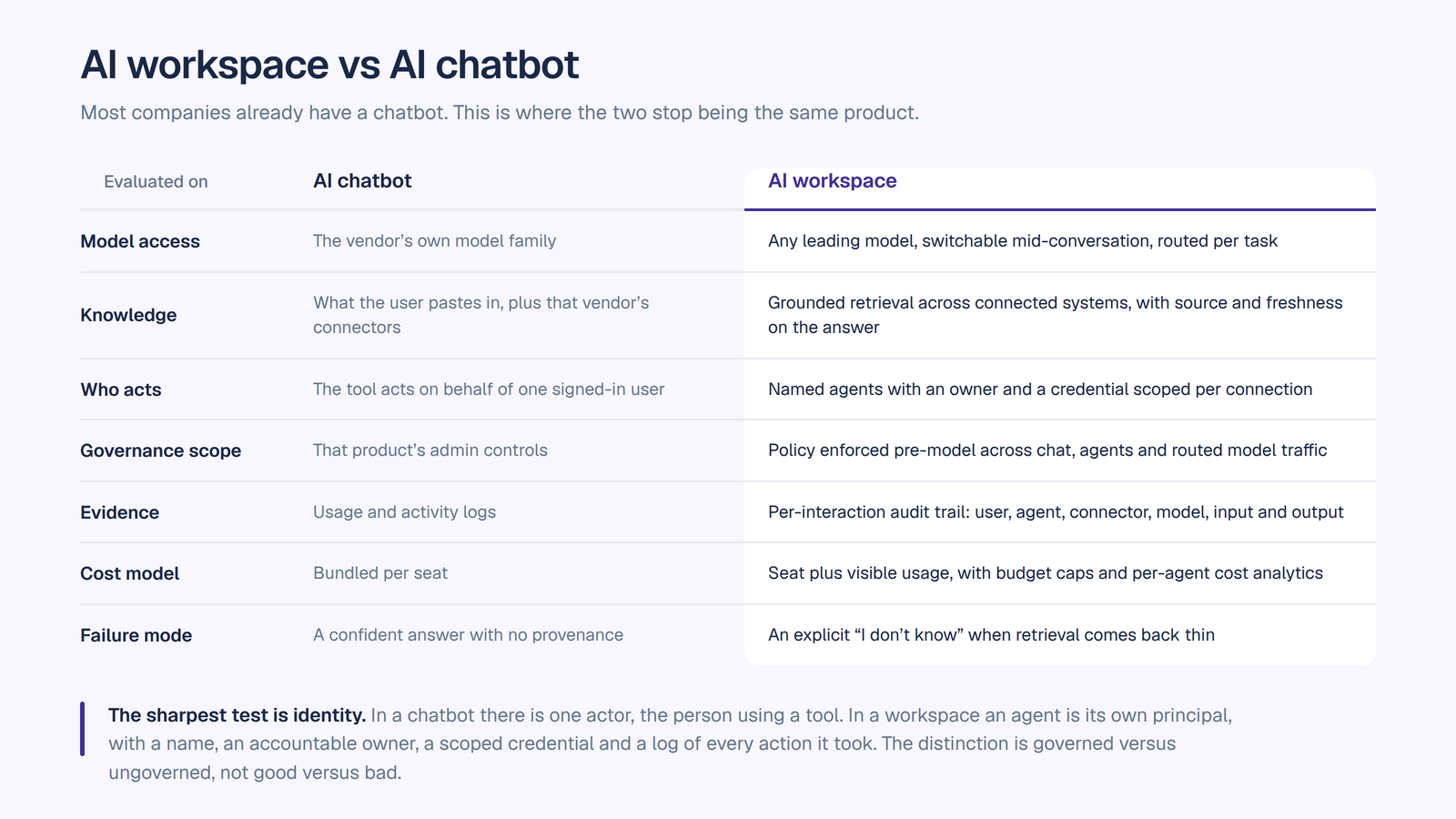
The sharpest test is identity. In a chatbot, there is one actor: the human, using a tool. In a workspace, an agent is its own principal. It has a name, an accountable owner, a credential scoped to specific systems, and a log of every action it took. That is the difference between AI you use and AI you can deploy across a department and still explain to an auditor six months later.
None of this makes chatbots bad. Frontier assistants are excellent, employees like them, and a workspace should let them keep working rather than rip them out. The distinction is governed versus ungoverned, not good versus bad. If you are past the definition and comparing platforms, see our rundown of the best enterprise AI workspace for teams.
What this looks like once it is running, by function:
The pattern is consistent. Chat drives adoption in the first two weeks because it is immediately useful to everyone. Agents drive retention, because once a department has an agent doing a real job in a real system, the workspace stops being optional.
Consolidation. One vendor and one governed environment in place of subscriptions accumulated department by department, with model usage visible instead of bundled into a seat fee.
Shadow AI becomes visible. Employees use unsanctioned tools because the sanctioned option is worse. A workspace with every model in it removes the reason to go around IT, and a gateway gives you a record of the traffic you previously could not see. Our guide to shadow AI covers this in more detail.
Context compounds. In a fragmented stack, every tool starts from zero on your company, forever. A workspace gives them one grounded knowledge layer, so usage builds an asset instead of evaporating.
Security signs off before rollout, not after. BYOK, pre-model PII redaction, per-agent permissions, and an exportable audit trail are what a CISO needs to approve a deployment. When they are present on day one, governance is the first deliverable rather than a retrofit, which is the sequencing our AI implementation strategy guide argues for.
Costs stop being a surprise. Per-team caps, per-agent analytics, and usage priced transparently rather than folded into a bundled seat.
No migration. Because it sits above your systems and can govern routed model traffic, the existing stack keeps working.
OrgLogic is the AI workspace that sits above the models. Every leading model in one governed place at $8 a seat, named agents that act inside the systems your teams already run, and a grounded knowledge layer underneath both. Governance is on from the first message, not unlocked at the enterprise tier: BYOK so your data goes straight to the model providers, per-agent permissions security can scope and revoke, and an audit trail you can export. Built for companies where AI has to clear security review before it clears the budget.
Every leading model, one governed place, $8 a seat. Multi-model chat with model switching mid-conversation and smart routing per task. For comparison, single-model per-seat AI subscriptions typically run about $20 to $60 a seat per month. Model usage is separate and transparent: bring your own keys at zero surcharge, or use OrgLogic-provisioned models at cost plus 6%. See pricing.
Named agents with per-agent connector permissions. Agents built in a no-code builder, given packaged expertise through reusable Skills, deployed on demand, on a schedule, or triggered by an event in a connected system. Security approves read or write scope per agent per connection and can revoke it in seconds. Per-agent connector permissions are the capability most often missing from platforms in this category.
Company Brain. Grounded answers that cite the source and its freshness, with an honest "I don't know" when retrieval is thin. Personal indexing runs under each user's own credentials, so the index cannot contain what their token cannot fetch.
Governance on every plan, including Free. BYOK, full audit trail, agent-level audit trail, PII redaction pre-model, guardrails, model availability controls per team, per-team budget caps, and cost analytics. SOC 2 Type II, ISO 27001, HIPAA with a BAA available, and GDPR. SSO and SCIM on Enterprise, with single-tenant VPC and on-premise deployment available.
Coverage beyond the agents you build here. External agents and third-party AI clients can be registered and routed through the OrgLogic AI Gateway, where they inherit model availability rules, per-agent budget caps, PII redaction, and BYOK routing, each with its own credential and its own audit trail. Scope is model traffic routed through the gateway.
A publicly traded autonomous vehicle company with ~1,500 employees consolidated 12 AI tools into OrgLogic, cut AI spend 70%, and reduced shadow AI by 91%, with engineers adopting in 2 weeks.
An AI workspace is not a better chat window. It is the layer that makes every model, every agent, and every company knowledge source usable together, under one set of rules you can prove you enforced. If your company already has AI running in five places and no single view of it, the workspace is the thing that turns that sprawl into an asset.
The evaluation is straightforward. Ask where policy is enforced relative to the model. Ask how the index is permissioned. Ask what you can hand an auditor. Ask what happens to the AI your employees are already using.
See what a governed AI workspace looks like on your own stack. Start free with governance switched on from the first message, or book a discovery call to walk through your environment with our team.
What is an AI workspace?
An AI workspace is a single governed platform that combines access to multiple AI models, a grounded knowledge layer connected to a company's own systems, AI agents that take action in those systems, and governance controls including permissions, audit logging, PII redaction, and cost limits applied across all of them.
What is the difference between an AI workspace and an AI chatbot?
A chatbot gives one user access to one vendor's model. An AI workspace gives an organization access to many models, grounds answers in company knowledge with citations, lets named agents act in connected systems under scoped permissions, and records every interaction in an exportable audit trail. The practical difference is that a workspace treats each agent as its own principal with an owner and a credential, which is what makes AI deployable at department scale.
Is an AI workspace secure enough for regulated industries?
It depends on the platform. Look for BYOK so data flows directly to model providers rather than through the vendor, PII redaction applied before the prompt reaches a model, permission-correct retrieval, per-agent connector permissions, an exportable audit trail, and certifications including SOC 2 Type II and ISO 27001, with a HIPAA BAA where required.
How much does an AI workspace cost?
Pricing models vary. Single-model per-seat AI subscriptions typically run about $20 to $60 a seat per month with model usage bundled in. OrgLogic charges $8 per seat per month on annual billing, with model usage billed separately and transparently: bring your own keys at zero surcharge, or use OrgLogic-provisioned models at cost plus 6%. A free plan covers up to 25 users with governance included.
Do we have to replace our existing AI tools to use an AI workspace?
No. Model traffic from third-party AI clients and externally built agents can be routed through an AI gateway, where it inherits your model policies, budget caps, PII redaction, and audit logging. The existing stack keeps working under one set of controls. Note that gateway governance covers model traffic routed through it, not activity those clients perform outside it.
What should we evaluate first when choosing an AI workspace?
Start with where policy is enforced. If PII redaction, model availability rules, and budget checks run before the prompt reaches a model, the platform is architected for governance. If they run after, they are reporting. Then check how the knowledge index is permissioned, and whether governance is available on the plan you intend to pilot on.

Single-model AI tools lock you into one provider at $25-60/seat. OrgLogic is a multi-model AI workspace with named Agents that act in your systems (Salesforce, Jira, Confluence, ServiceNow), packaged Skills for domain expertise, and full governance at $8/seat. You get every model, not just one.

Bring Your Own Key means you connect your own API keys from OpenAI, Anthropic, Google, or any provider. Your data flows directly to the model provider. OrgLogic never sees, stores, or processes your prompts or responses. Zero surcharge on your own keys. This is the #1 requirement for security teams evaluating enterprise AI platforms.
An Agent is a named AI worker with a defined job, connected to your systems via Connectors. A Skill is packaged expertise that teaches an Agent how to do specific work consistently. Unlike a generic chatbot, a Deal Prep Agent with a Salesforce Connector pulls real CRM data and produces structured call briefs. Skills are reusable across Agents, versioned, and authored in plain language.
Every Workspace includes per-Agent Connector permissions (each Agent gets scoped access, not blanket access), Agent-level audit trails, automatic PII redaction, per-team budget controls, model-level access controls, and configurable guardrails. Governance is the default environment on every plan, including Free. SOC 2 Type II, ISO 27001, HIPAA, and GDPR compliant.
The Free plan covers 25 users with $500 in credits ($20 per active user, pooled). The Business plan is $8/seat/month (annual) or $10 monthly. The seat fee covers the full platform: Agents, Skills, Connectors, governance dashboard, 5 surfaces, and all features. Model usage is separate: BYOK at zero surcharge, or OrgLogic-managed models at cost + 6%.
80% of employees already use AI tools without IT approval. OrgLogic replaces fragmented, ungoverned tools with one AI workspace employees actually want to use, available on web, Slack, Teams, Chrome, and API. One customer, a regulated tech company with 1,500 employees, reduced shadow AI by 91% within 6 weeks while cutting AI spend by 70%.
OrgLogic Connectors integrate with Salesforce, Jira, Confluence, ServiceNow, SharePoint, Google Workspace, Slack, SAP, and more via custom APIs. Each Connector has per-Agent permission scopes controlled by IT, so your Deal Prep Agent only accesses the Salesforce objects you approve. The Connector library is growing and new integrations ship regularly.
Self-serve signup takes 30 seconds. Connect your API keys in 2 minutes. Deploy pre-built Agents for sales, support, engineering, HR, and legal on day one. The Free plan (25 users, full governance) lets you pilot without procurement. One customer had engineers adopting within 2 weeks across Slack and Chrome. Enterprise plans add SSO/SCIM, VPC, and on-prem deployment.