Every enterprise AI agent project dies in the same place. Not at the demo, where the agent looks brilliant. At the security review, where someone asks which credential the agent used, who approved its access, and where the record of what it did is kept.
That question is the real product requirement, and it is the one most comparisons skip. Building an agent is now easy. Getting a hundred of them into production across departments, under controls your CISO will sign, is the hard part, and it is what separates an agent platform from an agent demo.
This guide compares the five AI agent platforms worth shortlisting in 2026, with published pricing for all five, and gives you the questions that decide which one survives procurement.
All competitor pricing and capabilities were verified against vendor documentation on 4 September 2026. This category is repricing constantly, so confirm before you sign.
An AI agent platform is software for building, deploying, governing and measuring AI agents: systems that take a goal, plan the steps, act inside real business systems, and report what they did. The distinction from a chatbot is action. A chatbot returns text to a person. An agent updates the record, files the ticket, drafts the contract redline, and moves the deal stage.
The distinction from a workflow automation tool is judgment. Traditional automation follows a fixed path that somebody mapped in advance. An agent decides the path at runtime based on context, which is exactly what makes it useful and exactly what makes governance non-optional.
For an enterprise buyer, that produces a definition worth holding onto: an AI agent platform is the environment where an agent gets an identity, a scope, and a record. Everything else, the builder interface, the model access, the connector library, is in service of those three things. A platform that lets anyone build an agent but cannot tell you what each agent is permitted to touch is a prototyping tool, not a platform.
Agent platforms sit adjacent to, and often inside, a broader AI workspace. The workspace is where people work with AI. The agent platform is where AI does work on its own. If you are evaluating both together, see our comparison of the best enterprise AI workspaces for teams.
Six components. The first three are where vendors compete on demos. The last three are where deployments succeed or fail.
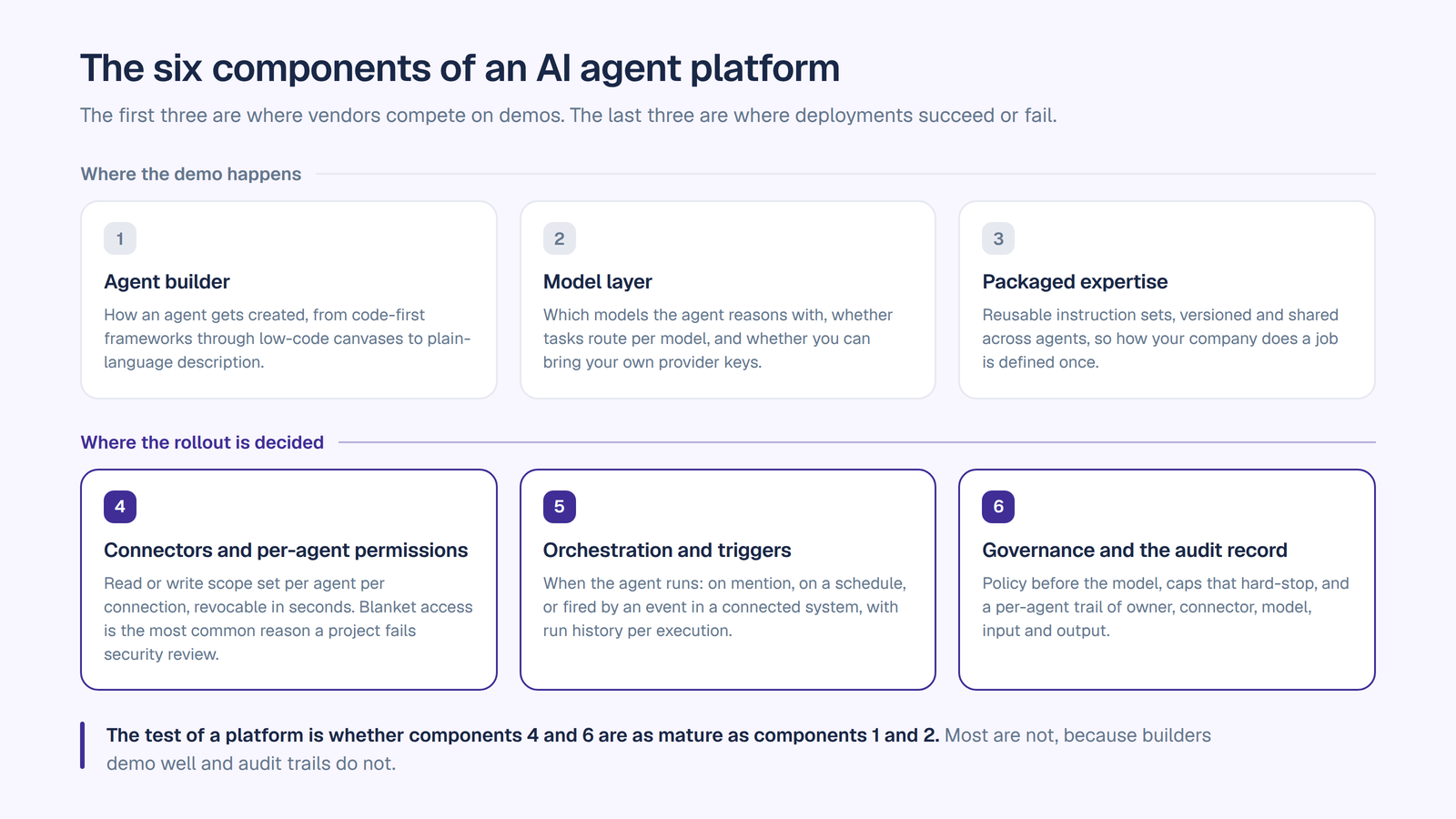
1. The agent builder. How an agent gets created. The spectrum runs from code-first frameworks through low-code canvases to natural language description, where you write what the agent should do and the platform assembles it. Lower barriers matter because the person who knows the job is rarely the person who can write the orchestration code.
2. The model layer. Which models the agent can reason with, whether you can route different tasks to different models, and whether you can bring your own provider keys. Model leadership rotates every few months. A platform welded to one provider’s model family inherits that provider’s pricing and roadmap decisions.
3. Packaged expertise. Reusable instruction sets that teach agents how to do a specific kind of work, versioned and shared across agents, so the way your company does contract review is defined once rather than re-prompted by every person who builds an agent. This is the component that turns a collection of agents into an institutional asset.
4. Connectors and per-agent permissions. What the agent can reach, and at what scope. This is the single most load-bearing component in the whole stack. The question is not whether the platform integrates with Salesforce. It is whether security can grant one agent read-only access to opportunities while another gets write access to cases, and revoke either in seconds. Blanket connector access is the most common reason an agent project fails security review.
5. Orchestration and triggers. When the agent runs. Conversationally when someone mentions it, on a schedule, or fired by an event in a connected system such as a new ticket or a stage change. Multi-step workflows chain agents and system actions together with branching and run history.
6. Governance and the audit record. Where enforcement sits relative to the model, and what evidence comes out the other end. This means PII redaction before the prompt reaches a model, model availability rules per team, budget caps that hard-stop rather than alert, and a per-agent audit trail recording the agent, its accountable owner, the connector it touched, the model, the inputs and the outputs, searchable and exportable.
The test of a platform is whether components 4 and 6 are as mature as components 1 and 2. Most are not, because builders demo well and audit trails do not.
Work gets done, not just drafted. The gap between an answer and a completed task is where nearly all the value sits. An agent that files the ticket, updates the CRM record, and posts the summary back to the team removes the copy-paste step that quietly eats the productivity gain.
Expertise stops being personal. One person builds a deal prep agent. The whole team uses it. The institutional knowledge that used to live with your best rep becomes a reusable asset, which is also what makes onboarding faster.
Agents run when you are not there. Scheduled and event-triggered runs mean the work happens on the business’s clock rather than an employee’s. A ticket triaged at 2am is a ticket already routed at 9am.
Shadow AI has a sanctioned alternative. People build unauthorized automations for the same reason they use unsanctioned tools: the approved option is worse. A real agent platform removes the reason to go around IT, and the gateway pattern gives you a record of the shadow AI traffic you previously could not see, which starts with shadow AI detection.
Security can say yes. This is the benefit that unlocks the others. When each agent has a scoped credential, a named owner and an exportable audit record, a rollout across departments becomes an approval rather than an argument.
Cost becomes attributable. Per-agent analytics tell you which agents earn their keep. Without that, agent spend is a single line item nobody can defend at renewal.
What agents actually do once they are running, by function:
Sales. A deal prep agent that pulls account history and open opportunities from the CRM and assembles call prep before every meeting. Pipeline summaries posted to the team on a schedule. Proposal drafting against approved positioning.
Customer support. A ticket triage agent reading the ticketing system and the knowledge base together, classifying and routing on arrival, and drafting responses grounded in the documentation rather than an approximation of it.
Engineering. A pull request review agent working in the repository against your team’s standards. A debug agent reading logs and filing to the tracker. A docs agent that updates documentation when code changes. Our guide on how to build an AI agent walks through one of these end to end.
IT and operations. Internal request handling, access request triage, incident summarization, and runbook drafting, with the agent acting in the service management system rather than telling a human what to do there.
Legal and compliance. A contract review agent working over the document repository, flagging risk against the clauses your business actually cares about, with every review recorded.
HR and recruiting. A policy agent grounded in the handbook, answering employee questions with a citation to the paragraph. A sourcing agent working the applicant tracking system, with screening against a documented rubric.
Finance and procurement. Invoice and document analysis, variance explanation, vendor research, and recurring reporting pulled from the systems of record instead of rebuilt by hand each month.
Marketing. Content production in a defined brand voice, campaign research, localization, and competitive monitoring on a schedule.
The pattern across all of them: the agent is only as useful as its reach into the system where the work lives, and only as deployable as the permissions around that reach.
OrgLogic treats an agent as a member of a team rather than a script someone runs. Every agent has a name, a job, an accountable manager who is its only editor, and its own connections into your systems with read or write scope set per agent per connector, revocable in seconds. Every action it takes is logged against the agent, its manager, the connector, the model, and the Space it acted in, searchable and exportable.
Agents are created by describing what the agent should do in one field and confirming an assembled agent, or configured fully in the agent builder. There is a catalogue of 92 agents available to add across ten function categories covering sales, marketing, product and engineering, support, operations, data and analytics, HR, finance, IT and security, and legal. Skills package expertise in plain language, versioned with rollback and reusable across agents, so how your company does a job is defined once. Workflows handle multi-step automation on a node canvas with scheduled, event and manual triggers, and run history per execution.
Agents reason across every leading model with smart routing per task, and run on your own provider keys through BYOK at zero surcharge, with data flowing directly to the model providers.
The part that clears security review: governance is on every plan including Free. PII redaction pre-model on every call, model availability controls per team, per-team budget caps with hard stops, cost analytics per agent, and guardrails at the organization level. SOC 2 Type II, ISO 27001, HIPAA with a BAA available, GDPR. SSO, SCIM, single-tenant VPC and on-premise on Enterprise.
It also governs agents built somewhere else. External agents can be registered in the External Agent Registry and routed through the OrgLogic AI Gateway, where each gets its own credential with one-click revoke and inherits your model rules, budget caps with hard stops, and PII redaction, with a per-agent audit trail and observability on call volume, cost and error rate. Scope is model traffic routed through the gateway. For most enterprises this is the only view they have of agents nobody centrally procured.
Pricing: Free up to 25 users with governance included. $8 per seat per month on annual billing, $10 monthly. Model usage separate: BYOK at zero surcharge, or OrgLogic-provisioned at cost plus 6%. Enterprise custom, 100-seat minimum. No per-action, per-conversation or per-credit meter. See pricing.
A confidential fourteen-district development in Florida cut shadow AI 92% in eight weeks and now runs 14 agents in production across finance, legal, procurement, IR and program management.
Agentforce is the most visible agent platform in the enterprise market, and inside Salesforce it is genuinely strong. Agent Builder is a low-code environment where you describe an agent’s purpose in natural language, define its scope through pre-built topics, and connect it to existing Salesforce data, Flows, Apex and APIs, with pro-code extension available. Plan Tracer lets you preview and test how an agent will respond before it ships. Because it sits on your CRM data model, agents get a unified data foundation without an integration project.
If your business runs on Salesforce and the agents you want are customer service, sales and commerce agents acting on CRM records, nothing else in this list will match the depth of that integration.
The considerations are scope and cost predictability. Agentforce is strongest inside the Salesforce estate, and its pricing has changed repeatedly, with multiple models live at once.
Pricing: several models run concurrently on Salesforce’s published pricing. Flex Credits at $500 per 100,000 credits, where a standard action consumes 20 credits ($0.10) and a voice action 30 credits ($0.15). Conversations at $2 each. An Agentforce User License at $5 per user per month that still requires a Flex Credits purchase. Flat fee access at $125 per user per month. Agentforce 1 Editions from $550 per user per month. Flex Credits and Conversations cannot both run in one org. Enterprise Edition customers receive a Flex Credits allowance through Salesforce Foundations. Note that Agentforce depends on Data Cloud, and buyer reports consistently put that line above the Agentforce licence itself, so scope it as part of the total.
Copilot Studio is Microsoft’s low-code platform for building custom agents and extending Microsoft 365 Copilot. For an organization already standardized on Microsoft, it is the path of least resistance: agents build against Microsoft Graph, deploy into Teams and SharePoint where people already are, and inherit a compliance posture most Microsoft shops have already approved. It reaches external channels too, including websites and apps.
The economics have a genuinely useful wrinkle worth knowing. Internal employee-facing agents used by licensed Microsoft 365 Copilot users inside Copilot, Teams and SharePoint are zero-rated within fair use limits, so if you already pay for Microsoft 365 Copilot, internal agents are the cheapest agents you will build anywhere.
The considerations are scope and credit governance. Copilot Studio is Microsoft-centric by design, and credits are pooled tenant-wide, which means one team’s experiment can draw down the pool everyone else is using. Someone has to own allocation and monitoring. Agents touching Dataverse, premium connectors or Managed Environments also pull in Power Platform licensing that is not on the Copilot Studio price list.
Pricing: billed in Copilot Credits, renamed from messages in September 2025. A prepaid capacity pack is $200 per month for 25,000 credits, pooled tenant-wide with no rollover, working out near $0.008 per credit at full consumption. Pay-as-you-go is $0.01 per credit through an Azure subscription. The maker licence itself is free but requires a tenant prepaid pack. Different actions consume different credit amounts, and autonomous actions draw the most.
Glean came to agents from enterprise search, and that origin is its advantage. Agents reason over an index of the company’s content with permissions checked on every request, so an agent returns only what the requesting user is entitled to. For organizations whose agent use cases are knowledge-heavy, where the hard part is finding and synthesizing the right information across a large document estate, that foundation is difficult to replicate.
The platform now spans an agent builder including a natural-language Auto Mode, agent orchestration with event triggers and routing between agents, an agent library, sub-agents so a parent agent can coordinate specialists at runtime, debug and trace views giving step-by-step visibility into every run, and an agent governance layer with admin-defined sharing rules and action-level controls. In May 2026 Glean packaged this as an Agent Development Lifecycle framework aimed at CIOs trying to move agents from scattered experiments to governed production.
The consideration is commercial predictability. Glean does not publish pricing, sells through a quote process, and seat minimums put it out of reach for smaller pilots.
Pricing: quote-only, no published list price. Buyer and analyst reports in 2026 put the base licence around $45 to $65 per user per month with an AI add-on reported around $15 on top, minimum commitments commonly around 100 seats, and minimum annual contracts reported near $50,000 to $60,000. Enterprise Flex adds consumption-based FlexCredits, discounted for customers who supply their own model keys or self-host. Treat all of these as reported figures rather than list prices. We compare the two platforms directly in OrgLogic vs Glean.
Lyzr is built for one thing: getting a large number of agents from prototype into production and keeping them there. Its centre of gravity is the agent lifecycle rather than the daily work surface, with an agent studio, pre-built named agents and industry blueprints, evaluation gates and a simulation engine, staged promotion with rollback, and per-agent identity. It is VPC-native and self-hostable with a data sovereignty posture, and it concentrates in regulated verticals, particularly financial services. It sells platform plus people, with forward-deployed engineers to cross the prototype-to-production gap.
If your organization’s stated goal is a fleet of production agents and you want a vendor in the room helping build them, Lyzr is the most focused option in this list.
The consideration is that it is not the everyday surface your whole company lives in. Lyzr ships and governs agents; it is not the multi-model workspace employees open every morning. Cost also arrives in three layers once you include studio subscription, per-run charges and passed-through model tokens.
Pricing: a free Community tier, Starter at $19 per month, Pro at $99 per month or $79 billed annually, and custom Enterprise. Production runs billed separately at $0.08 per agent run on Lyzr Cloud and $0.03 per agent run on VPC or on-premise. Model token costs passed through at provider rates.
The five platforms in this list meter on four different units, which makes sticker comparison meaningless and total cost genuinely hard to forecast.
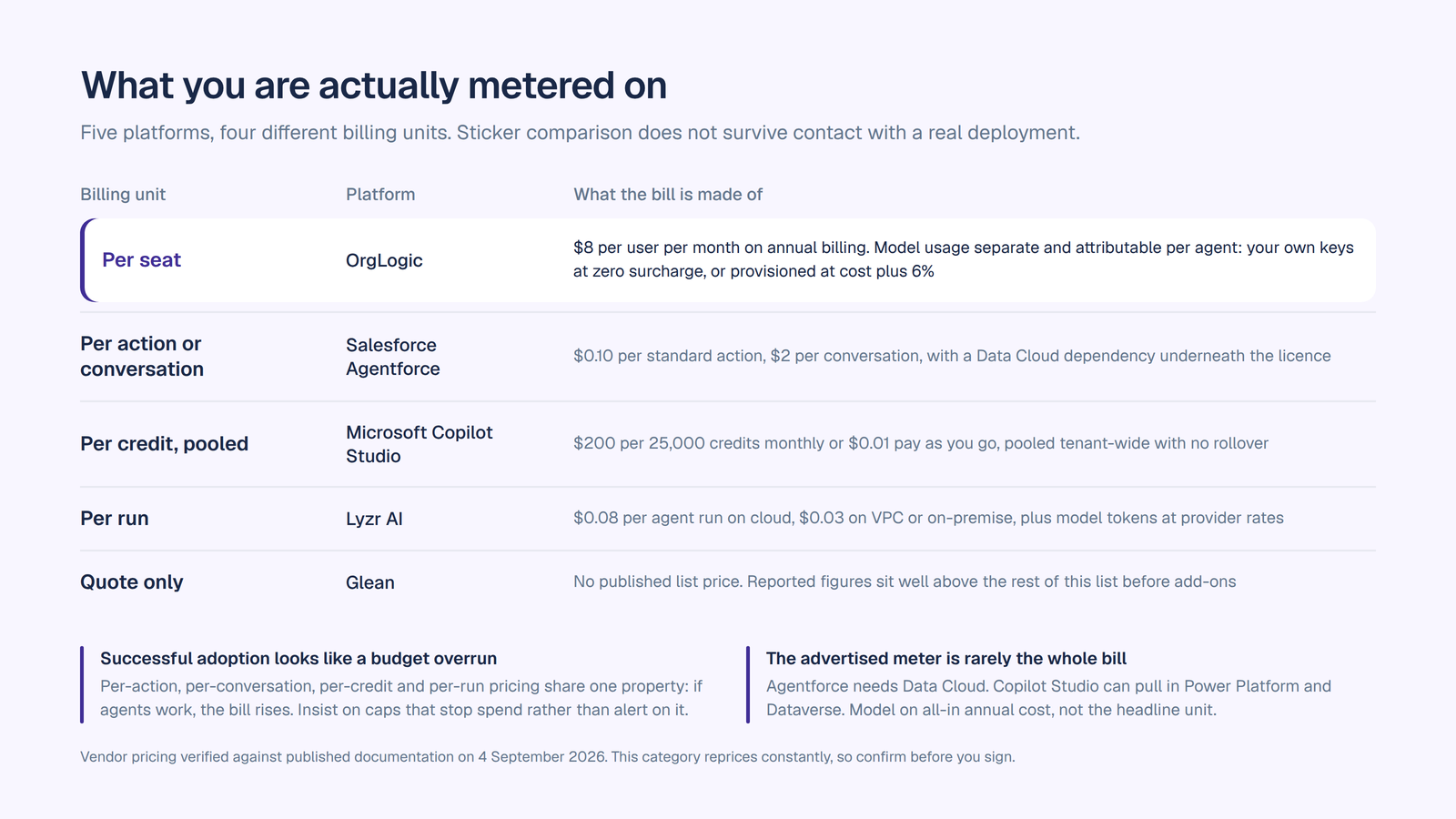
Per seat. OrgLogic at $8 per user per month annual, with model usage separate and visible: your own keys at zero surcharge, or provisioned at cost plus 6%. Predictable platform cost, usage attributable per agent, budget caps that hard-stop.
Per action or per conversation. Agentforce at $0.10 per standard action or $2 per conversation, plus the Data Cloud dependency underneath. The cost of an agent depends on how many actions a task decomposes into, which you cannot know until it runs in production.
Per credit, pooled. Copilot Studio at $200 per 25,000 credits monthly or $0.01 pay-as-you-go, with different actions drawing different amounts and no rollover. Internal agents for licensed Microsoft 365 Copilot users are zero-rated, which is a real advantage if you are already paying that bill.
Per run. Lyzr at $0.08 per agent run on cloud, $0.03 on VPC or on-premise, plus passed-through tokens.
Quote-only. Glean, with reported figures well above the rest of this list before add-ons.
Two rules when you model this.
Usage meters make successful adoption look like a budget overrun. Per-action, per-conversation, per-credit and per-run pricing all share one property: if agents work, you use more, and the bill rises. That is not a reason to avoid them, but it is a reason to insist on caps that stop spend rather than alerts that report it, and to ask what happens when a runaway agent loops.
The advertised meter is rarely the whole bill. Agentforce needs Data Cloud. Copilot Studio can pull in Power Platform and Dataverse licensing. Glean’s seat sits alongside implementation and permission mapping. Build the comparison on all-in annual cost, not the headline unit.
Eight questions. The first four eliminate most of a shortlist before you sit through a demo.
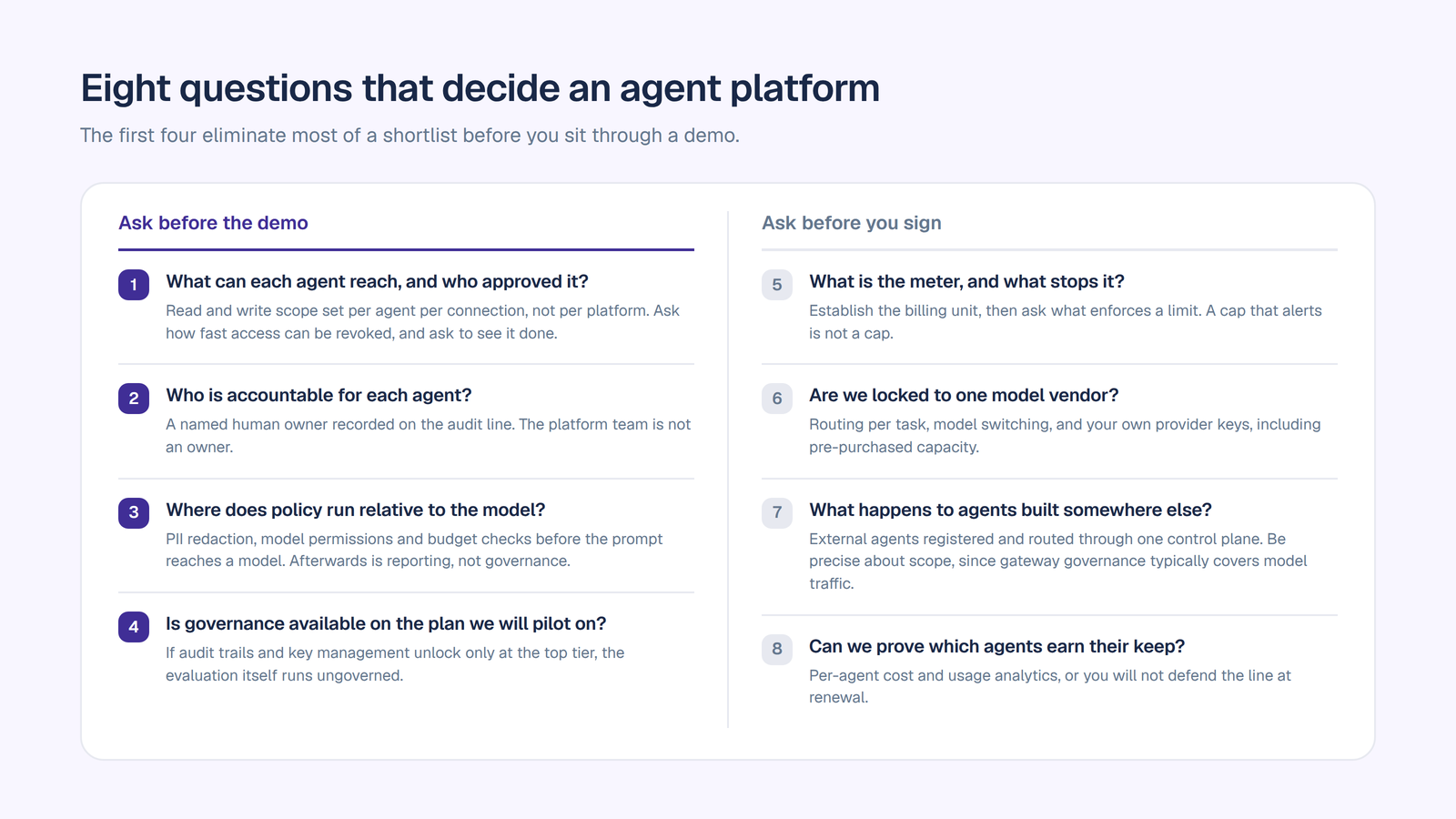
1. What can each agent reach, and who approved it? Push for read and write scope set per agent per connection, not per platform. Ask how fast access can be revoked, and ask to see it done.
2. Who is accountable for each agent? Every agent should have a named human owner recorded on the audit line. “The platform team” is not an owner. Without this, nobody can answer who approved an action six months later.
3. Where does policy run relative to the model? If PII redaction, model permissions and budget checks execute before the prompt reaches a model, the platform is architected for governance. If they run afterwards, it is reporting.
4. Is governance available on the plan we will pilot on? If audit trails and key management unlock only at the top tier, your evaluation runs ungoverned, which is the exact risk you set out to close.
5. What is the meter, and what stops it? Establish the billing unit, then ask what enforces a limit. A cap that alerts is not a cap.
6. Are we locked to one model vendor? Ask whether agents can route per task, switch models, and run on your own provider keys, including pre-purchased capacity.
7. What happens to agents built somewhere else? Most enterprises already have agents running on raw APIs and vendor platforms. Ask whether external agents can be registered and routed through one control plane, and be precise about scope, since gateway governance typically covers model traffic rather than everything an external agent does.
8. Can we prove which agents earn their keep? Per-agent cost and usage analytics, or you will not defend the line at renewal.
Then pilot on real data with real permissions. Agent demos run on clean data with god-mode access, which hides the two things that actually break deployments: permission edge cases and what the agent does when it is wrong. Our AI implementation strategy guide covers sequencing the rollout, and the enterprise AI workspace checklist turns these questions into something you can take into a vendor call.
The best AI agent platform for your enterprise depends on where the work lives. If your agents act on CRM records and your business runs on Salesforce, Agentforce is the deepest fit. If you are a Microsoft shop and your agents are internal, Copilot Studio is the cheapest path you will find. If the hard part is synthesizing knowledge across a large document estate, Glean’s search foundation is hard to beat. If your goal is industrializing a fleet of agents with vendor delivery help, Lyzr is the most focused.
If what you need is agents that act across every system your company runs, on any model, with per-agent permissions your security team sets and revokes, an exportable record of every action, and a way to govern the agents somebody already built elsewhere, that is what OrgLogic was built for, at $8 a seat with governance on every plan including Free.
Troopr Labs, the company behind OrgLogic, has 600+ enterprise deployments and is SOC 2 Type II and ISO 27001 certified.
Start free with governance on from the first agent, up to 25 users, no migration required. Or book a discovery call and we will map it against the agents you are already running.
It depends on where the work happens. OrgLogic leads for cross-system agents with per-agent connector permissions, an accountable owner per agent, governance on every plan and a $8 seat price. Salesforce Agentforce is strongest for agents acting on CRM records. Microsoft Copilot Studio is the cheapest route for internal agents if you already license Microsoft 365 Copilot. Glean is strongest for knowledge-heavy agents over a large document estate. Lyzr AI is the most focused on industrializing a fleet of production agents.
The platforms meter differently, so compare all-in annual cost rather than the headline unit. OrgLogic is $8 per seat per month on annual billing with model usage separate at your own keys with no surcharge or provisioned at cost plus 6%. Salesforce Agentforce publishes Flex Credits at $500 per 100,000 credits, roughly $0.10 per standard action, or $2 per conversation, with flat-fee per-user options from $125. Microsoft Copilot Studio is $200 per 25,000 pooled credits monthly or $0.01 pay-as-you-go. Lyzr charges studio tiers plus $0.08 per agent run on cloud. Glean does not publish pricing.
Workflow automation follows a path somebody mapped in advance. An AI agent decides the path at runtime using context, then acts. That flexibility is why agents handle work automation cannot, and why per-agent permissions and audit trails matter more for agents than they ever did for scripted automation.
Start with identity and scope: read and write access set per agent per connection, a named human owner recorded on every audit line, and revocation in seconds. Then check where policy runs relative to the model, whether governance is available on the plan you will pilot on, what the billing meter is and what enforces a cap on it, and whether agents built on other platforms can be brought under the same controls.
On some platforms, yes. The pattern is an agent registry plus a gateway: each external agent is registered, issued its own credential that can be revoked, and routed through a control plane where it inherits model rules, budget caps and PII redaction, producing a per-agent audit trail. OrgLogic supports this through its External Agent Registry and AI Gateway. Scope is the model traffic routed through the gateway rather than everything that agent does.
Support and economics both vary, so ask two questions. Can we connect our own model provider keys, and is there a surcharge for doing so. OrgLogic supports BYOK on every plan at zero surcharge, admin-configured, with data flowing directly to the model providers. Some platforms charge a markup on model usage, discount seats in exchange, or restrict you to one provider’s models entirely.

Single-model AI tools lock you into one provider at $25-60/seat. OrgLogic is a multi-model AI workspace with named Agents that act in your systems (Salesforce, Jira, Confluence, ServiceNow), packaged Skills for domain expertise, and full governance at $8/seat. You get every model, not just one.

Bring Your Own Key means you connect your own API keys from OpenAI, Anthropic, Google, or any provider. Your data flows directly to the model provider. OrgLogic never sees, stores, or processes your prompts or responses. Zero surcharge on your own keys. This is the #1 requirement for security teams evaluating enterprise AI platforms.
An Agent is a named AI worker with a defined job, connected to your systems via Connectors. A Skill is packaged expertise that teaches an Agent how to do specific work consistently. Unlike a generic chatbot, a Deal Prep Agent with a Salesforce Connector pulls real CRM data and produces structured call briefs. Skills are reusable across Agents, versioned, and authored in plain language.
Every Workspace includes per-Agent Connector permissions (each Agent gets scoped access, not blanket access), Agent-level audit trails, automatic PII redaction, per-team budget controls, model-level access controls, and configurable guardrails. Governance is the default environment on every plan, including Free. SOC 2 Type II, ISO 27001, HIPAA, and GDPR compliant.
The Free plan covers 25 users with $500 in credits ($20 per active user, pooled). The Business plan is $8/seat/month (annual) or $10 monthly. The seat fee covers the full platform: Agents, Skills, Connectors, governance dashboard, 5 surfaces, and all features. Model usage is separate: BYOK at zero surcharge, or OrgLogic-managed models at cost + 6%.
80% of employees already use AI tools without IT approval. OrgLogic replaces fragmented, ungoverned tools with one AI workspace employees actually want to use, available on web, Slack, Teams, Chrome, and API. One customer, a regulated tech company with 1,500 employees, reduced shadow AI by 91% within 6 weeks while cutting AI spend by 70%.
OrgLogic Connectors integrate with Salesforce, Jira, Confluence, ServiceNow, SharePoint, Google Workspace, Slack, SAP, and more via custom APIs. Each Connector has per-Agent permission scopes controlled by IT, so your Deal Prep Agent only accesses the Salesforce objects you approve. The Connector library is growing and new integrations ship regularly.
Self-serve signup takes 30 seconds. Connect your API keys in 2 minutes. Deploy pre-built Agents for sales, support, engineering, HR, and legal on day one. The Free plan (25 users, full governance) lets you pilot without procurement. One customer had engineers adopting within 2 weeks across Slack and Chrome. Enterprise plans add SSO/SCIM, VPC, and on-prem deployment.