In 2026, no single AI model is best at everything, and the leader changes almost every month. Here's what multi-model AI chat is, how it differs from multimodal AI, and why betting your whole company on one model is a risky strategy.
Nowadays, the title of “best AI model” rarely survives a full quarter. Open any independent benchmark and you'll find one model leading on coding, another on complex reasoning, a third on speed, and a fourth on cost-to-performance — and the ranking reshuffles almost monthly. In a single stretch of spring 2026, five major labs shipped new flagship models within about thirty days of each other. For an enterprise, that pace creates a hard question: standardize your entire company on one model, and you're locking in a bet the odds say will be wrong most of the time.
Your employees, meanwhile, aren't waiting for a decision. Up to 78% of workers already bring their own AI tools to the job (Microsoft, 2025), and the average enterprise now runs around 14 different AI tools — with IT aware of only four or five of them (Productiv, 2026). The real question leaders face isn't “which model should we pick?” It's “how do we give every team the right model for every task, without losing control of cost, data, and compliance?”
That is what multi-model AI chat solves. This guide covers what multi-model AI chat is, how it differs from multimodal AI (the two get confused constantly), the concrete reasons one model isn't enough for an enterprise, and what to look for when you evaluate a platform.
Multi-model AI chat is a single chat interface connected to multiple large language models — such as OpenAI's GPT, Anthropic's Claude, Google's Gemini, Meta's Llama, and others — that lets users switch between models or automatically routes each request to the model best suited to the task. Instead of locking a company into one provider, it treats models as interchangeable, best-tool-for-the-job resources behind one governed front door.
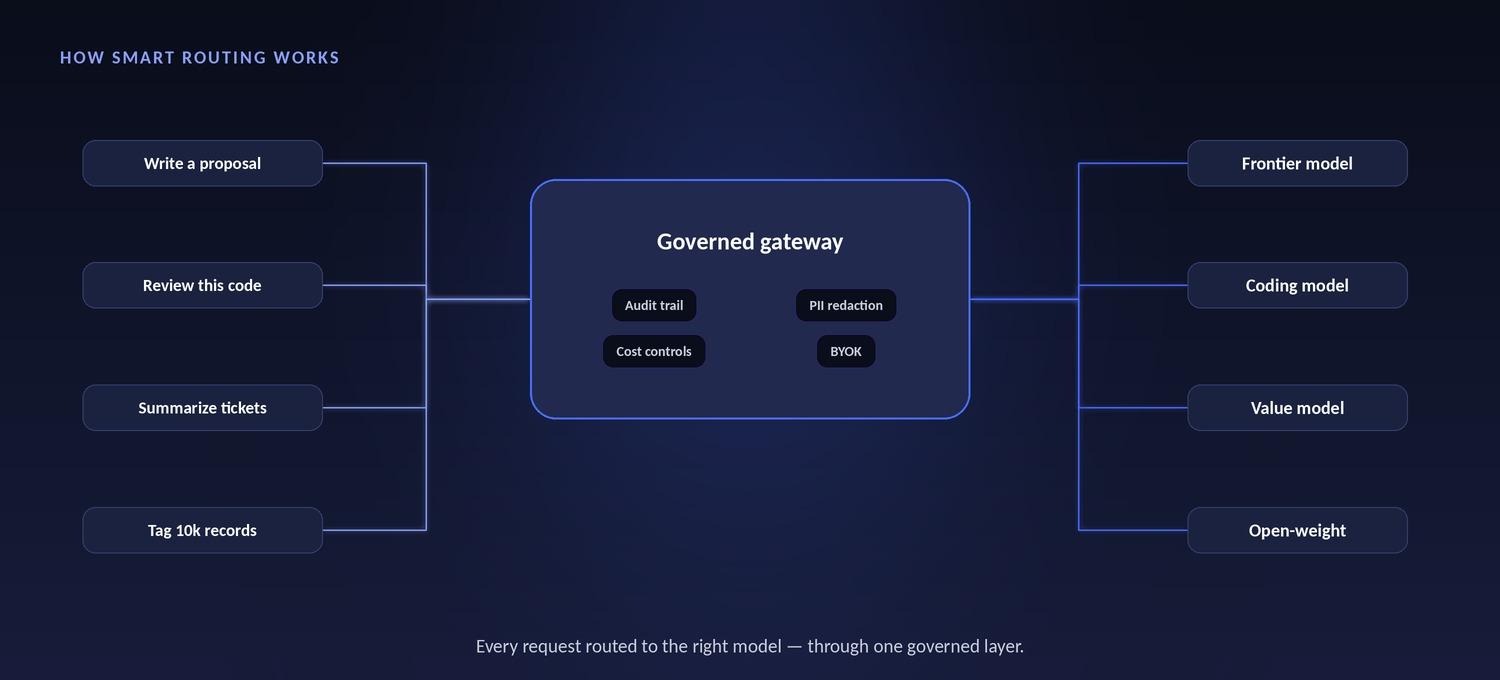
In practice, that comes down to two mechanisms working together. The first is model switching: a user can pick a specific model from a dropdown, or change models partway through a conversation — starting on a fast, cheap model and escalating to a frontier model for one hard step without losing context. The second is smart routing: the platform reads each request and sends it to the optimal model automatically, based on the type of task, its complexity, and cost.
Crucially, all of it sits behind one governed layer. One login, one prompt library, one audit trail, one cost dashboard — no matter which underlying model answers. That unified control plane is what turns “access to lots of models” into something an enterprise can actually deploy company-wide.
These two terms sound almost identical and get used interchangeably — but they mean different things, and the difference matters when you're scoping a platform.
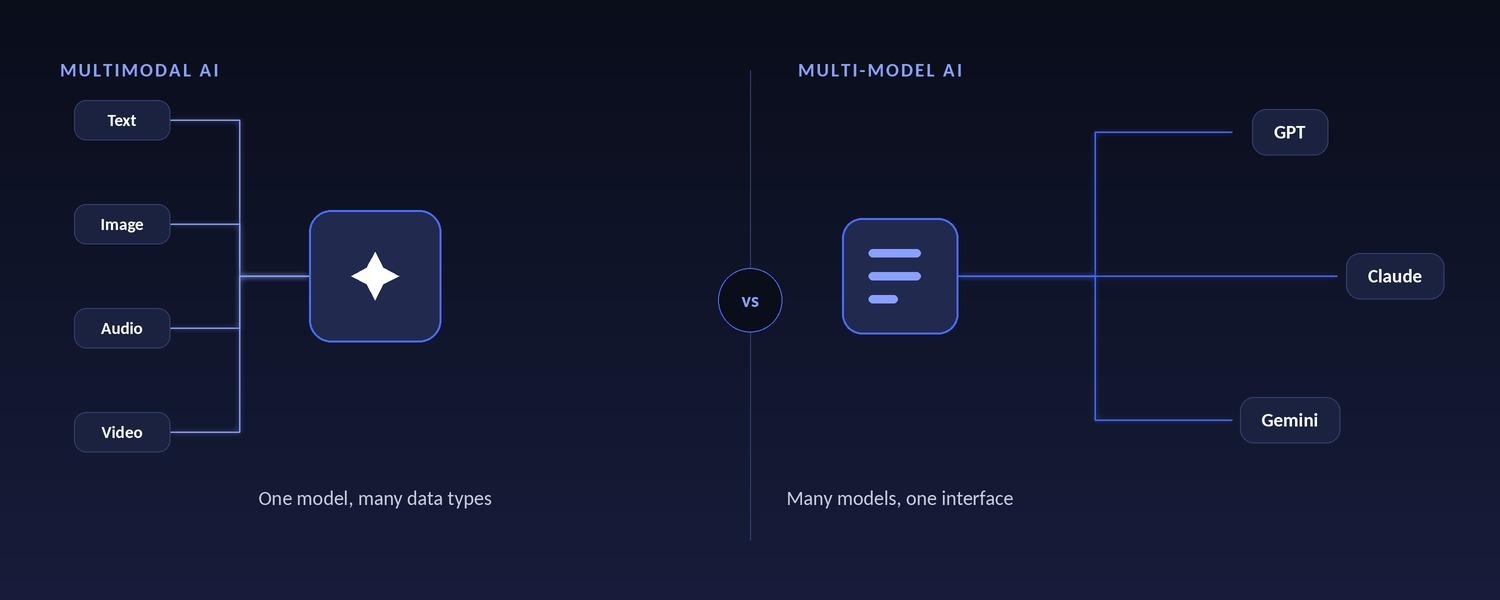
Multimodal AI describes a single model that can handle multiple types of data: text, images, audio, and video. A model that can “look at” a screenshot and answer a question about it in writing is multimodal. Multi-model AI describes multiple models working behind one interface. Routing a coding question to one model and a contract summary to another is multi-model. One is about input types; the other is about the number of models. They're complementary — a strong multi-model platform gives you access to many models, most of which are themselves multimodal.
In short: in multimodal AI, the “multi” is the data types one model handles (text, image, audio, video); in multi-model AI, the “multi” is the number of models working behind one interface.
“Just pick the best one” sounds efficient. In practice, six things break that logic at enterprise scale.
Independent 2026 benchmarks are unanimous on this: there is no single “best” model. Leadership rotates by task — one model tops coding, another leads on agentic and multi-step reasoning, another wins on speed, another on cost-to-performance. A model that dominates a coding leaderboard may be middling at long-form writing or structured data extraction. Standardize on one, and you accept second-best for most of what your teams actually do all day.
The “best” model is a moving target. In one month of spring 2026 alone, five major labs shipped new flagship models. A model you standardize on in Q1 can be surpassed by Q3 — and re-evaluating, re-procuring, retraining staff, and migrating prompts every time is untenable. With multi-model, you adopt the new leader the day it ships. No migration project, no switching cost.
Outages, rate limits, deprecations, price changes, sudden policy or regional restrictions — any of these can take your whole AI capability offline if you're wired to a single provider's API. Multiple models give you fallback and resilience: if one provider degrades, work reroutes instead of stopping.
Most workloads don't need a frontier model. Sending a simple classification or a one-line summary to a premium model is like couriering a postcard. A common rule of thumb from 2026 practitioner analyses: route roughly 60–75% of requests to low-cost models, 20–35% to mid-tier, and under 5% to frontier models — and getting that routing right is one of the single biggest levers on both cost and quality. Frontier models can cost tens of times more per token than capable value models, so paying premium rates for routine work quietly inflates your bill.
Compliance, data sensitivity, and residency requirements vary across an organization. Some data can go to a US-hosted commercial model; some regulated workloads have specific guarantees they must meet; some sensitive data is best handled by an open-weight model you run yourself. One model can't satisfy every policy at once. A multi-model layer — especially paired with bring-your-own-key access — lets you match the model to the data-handling rules for each case.
Betting your company's AI strategy on one vendor means betting on that vendor's roadmap, pricing decisions, and priorities — indefinitely. Multi-model preserves optionality and negotiating leverage. If a provider raises prices or falls behind, you shift weight elsewhere without re-platforming.
Under the hood, a multi-model platform sits between your users and the model providers and manages four things:
The result is that a marketer, a support agent, and a staff engineer can each get the model best suited to their work, in the same tool, while IT and security see a single, consistent record of everything.
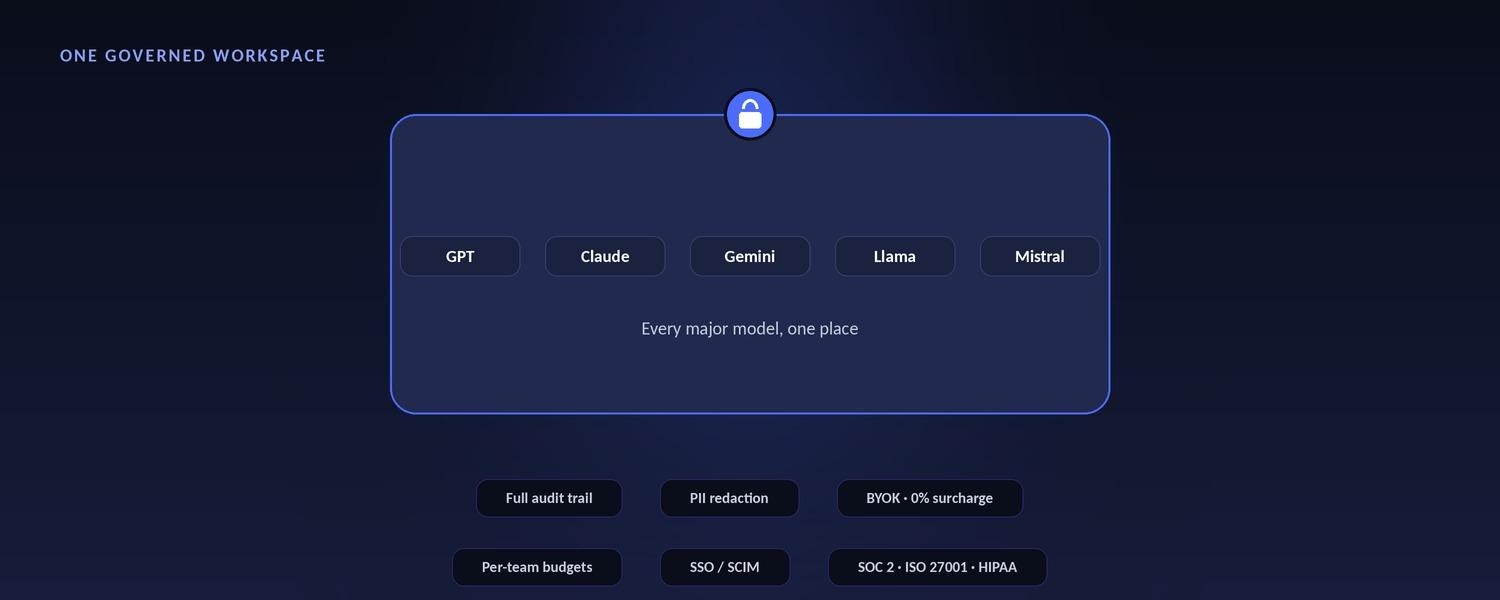
Concretely, one governed workspace replaces the tangle of single-model subscriptions employees sign up for on their own:
And the strongest platforms go beyond chat. Once a company is comfortable, the same governed environment supports AI Agents — named AI workers that don't just answer questions but take action in the systems where work happens, from Salesforce and Jira to Confluence and ServiceNow. Chat is where everyone starts; Agents are where the value multiplies.
Giving employees every model is only half the answer. Without governance, you've simply spread your shadow-AI exposure across more providers. The numbers are sobering: IBM's 2025 Cost of a Data Breach report found that breaches involving shadow AI cost, on average, $670,000 more than those without — and 97% of organizations that suffered an AI-related breach lacked basic AI access controls. Nearly two-thirds of organizations still have no formal AI governance policy at all.
Banning AI doesn’t work — governing it does.Organizations that give employees a sanctioned, capable alternative see unsanctioned AI use fall by as much as 89% (industry research, 2026). The goal isn’t to block ChatGPT or Claude — it’s to offer a better, governed path people actually prefer.
So the real enterprise requirement is both, in the same layer: multi-model access and governance together. That means bring-your-own-key so data flows directly to model providers and is never stored by the platform; a full audit trail on every message; PII redaction before prompts hit any model; per-team cost controls; and SSO/SCIM for company-wide rollout. Multi-model breadth gives employees what they want. Governance is what lets IT and security say yes.
Read more: What Is AI Governance? And How Does an AI Governance Platform Work?
If you're evaluating platforms, these ten criteria separate a genuine enterprise multi-model workspace from a chat app with a model menu:
Related reads: How to Build an AI Agent: What Enterprises Need to Know?
OrgLogic is the AI workspace for the enterprise, built on a simple idea: keep the model your team already loves, and add every other one. Every major model lives in one governed place, with smart routing and model switching mid-conversation — at $8/seat, versus the $25–60/seat you'd pay for a single-model tool.
Model usage is billed transparently and separately from the seat: bring your own keys at zero surcharge, so your data flows directly to the model providers and OrgLogic never sees it — or use OrgLogic-provisioned models at cost plus 6%. Governance is on for everyone, including the free tier: full audit trail, PII redaction, per-Agent Connector permissions, and per-team budgets. OrgLogic is SOC 2 Type II and ISO 27001 certified, with HIPAA support available.
It's proven at scale: 600+ enterprise deployments, with customers including Snowflake, Spotify, Rakuten, Snap, and Wayfair. One OrgLogic customer — a publicly traded autonomous-vehicle technology company with roughly 1,500 employees — consolidated six AI tools into one workspace, cut AI spend about 70%, and reduced shadow AI by 91% within six weeks.
And it goes beyond chat. The same governed environment runs AI Agents with packaged, reusable Skills that take action in Salesforce, Jira, Confluence, ServiceNow, and more — so the platform scales from “everyone has the right model” to “AI actually does the work.”
Multi-model AI chat is a single chat interface connected to several large language models — such as GPT, Claude, and Gemini — that lets users switch between them or automatically routes each request to the best-suited model. It replaces the need for separate, single-model AI subscriptions with one governed workspace.
Multimodal AI is one model that handles multiple data types (text, images, audio, video). Multi-model AI is multiple models working behind one interface. The terms are often confused: one is about input types, the other is about the number of models. They're complementary.
No single model is best at every task, and the leading model changes almost monthly. Relying on one also creates a single point of failure, forces you to overpay by sending routine work to premium models, and locks you into one vendor's roadmap and pricing.
Smart routing automatically sends each request to the optimal model based on the task type, its complexity, and cost — so simple queries go to fast, inexpensive models and hard problems go to frontier models, without users having to choose manually.
Usually the opposite. Routing routine work to low-cost models can cut spend significantly, and platforms like OrgLogic charge $8/seat versus the $25–60/seat common for single-model enterprise tools. With bring-your-own-key at zero markup, you also pay providers' rates directly.
Enterprise-grade platforms run every request through a governed gateway: BYOK so data isn't stored, PII redaction before prompts reach any model, a full audit trail, per-team cost controls, and SSO/SCIM. Look for SOC 2 Type II, ISO 27001, and HIPAA support.
Yes — that's the point of a multi-model workspace. You keep the model your team already prefers and add every other major model alongside it, all behind one governed interface with smart routing.

Single-model AI tools lock you into one provider at $25-60/seat. OrgLogic is a multi-model AI workspace with named Agents that act in your systems (Salesforce, Jira, Confluence, ServiceNow), packaged Skills for domain expertise, and full governance at $8/seat. You get every model, not just one.

Bring Your Own Key means you connect your own API keys from OpenAI, Anthropic, Google, or any provider. Your data flows directly to the model provider. OrgLogic never sees, stores, or processes your prompts or responses. Zero surcharge on your own keys. This is the #1 requirement for security teams evaluating enterprise AI platforms.
An Agent is a named AI worker with a defined job, connected to your systems via Connectors. A Skill is packaged expertise that teaches an Agent how to do specific work consistently. Unlike a generic chatbot, a Deal Prep Agent with a Salesforce Connector pulls real CRM data and produces structured call briefs. Skills are reusable across Agents, versioned, and authored in plain language.
Every Workspace includes per-Agent Connector permissions (each Agent gets scoped access, not blanket access), Agent-level audit trails, automatic PII redaction, per-team budget controls, model-level access controls, and configurable guardrails. Governance is the default environment on every plan, including Free. SOC 2 Type II, ISO 27001, HIPAA, and GDPR compliant.
The Free plan covers 25 users with $500 in credits ($20 per active user, pooled). The Business plan is $8/seat/month (annual) or $10 monthly. The seat fee covers the full platform: Agents, Skills, Connectors, governance dashboard, 5 surfaces, and all features. Model usage is separate: BYOK at zero surcharge, or OrgLogic-managed models at cost + 6%.
80% of employees already use AI tools without IT approval. OrgLogic replaces fragmented, ungoverned tools with one AI workspace employees actually want to use, available on web, Slack, Teams, Chrome, and API. One customer, a regulated tech company with 1,500 employees, reduced shadow AI by 91% within 6 weeks while cutting AI spend by 70%.
OrgLogic Connectors integrate with Salesforce, Jira, Confluence, ServiceNow, SharePoint, Google Workspace, Slack, SAP, and more via custom APIs. Each Connector has per-Agent permission scopes controlled by IT, so your Deal Prep Agent only accesses the Salesforce objects you approve. The Connector library is growing and new integrations ship regularly.
Self-serve signup takes 30 seconds. Connect your API keys in 2 minutes. Deploy pre-built Agents for sales, support, engineering, HR, and legal on day one. The Free plan (25 users, full governance) lets you pilot without procurement. One customer had engineers adopting within 2 weeks across Slack and Chrome. Enterprise plans add SSO/SCIM, VPC, and on-prem deployment.