Somewhere in your company right now, an employee is pasting a customer record into an AI tool nobody approved. They are not being reckless. The sanctioned option is slower, or does not exist, and they have a deadline.
IBM found 80% of employees use unsanctioned AI tools (IBM, 2025), and puts the additional cost of a breach involving shadow AI at $670K (IBM, 2025). Most security teams accept those numbers and then discover the harder problem: finding the usage is genuinely difficult, and finding it does not make it stop.
This guide covers how shadow AI detection actually works, the five layers it happens at, the signals you can pull this week without buying anything, the blind spots every tool in the category shares, and the uncomfortable reason detection alone has never reduced shadow AI in any organization we have seen.
Shadow AI detection is the practice of discovering AI tools, models, agents and AI features being used on company data without IT approval or security review, then attributing that usage to specific people and systems so it can be assessed and governed.
That is a broader scope than most teams assume when they start. It covers at least five distinct categories, and programs that only look for the first one miss most of the exposure:
The second category is the one that breaks most detection programs. Shadow AI frequently lives inside software you already sanctioned, which means blocking by domain does nothing, because the domain is one you deliberately allowed.
Security teams often assume their existing shadow IT process will extend to AI. It partially does, and the gap is where the risk concentrates.
There is no procurement trail. Classic shadow IT usually left a financial footprint somewhere: a card charge, a renewal, a seat count. A large share of AI usage happens on free tiers, so there is nothing in expense data to find.
The data leaves through a browser tab. An employee pasting a contract into a chat window is not an upload, an email attachment, or a file transfer. Controls built around those channels never see it.
Approved tools are the delivery mechanism. When AI ships as a feature of software you already allowed, application-level discovery reports a sanctioned app behaving normally.
Usage is bursty and personal. Shadow IT was usually a team adopting a tool. Shadow AI is one person, one prompt, one afternoon, which produces a much weaker signal than a department standing up a new SaaS platform.
The agents do not log in. An automation built on a provider API authenticates with a key, not a user identity, so it never appears in the identity systems your access reviews depend on.
No single product covers all five well. This is the most important structural fact about the category, and any vendor telling you otherwise is selling one layer and calling it a program.
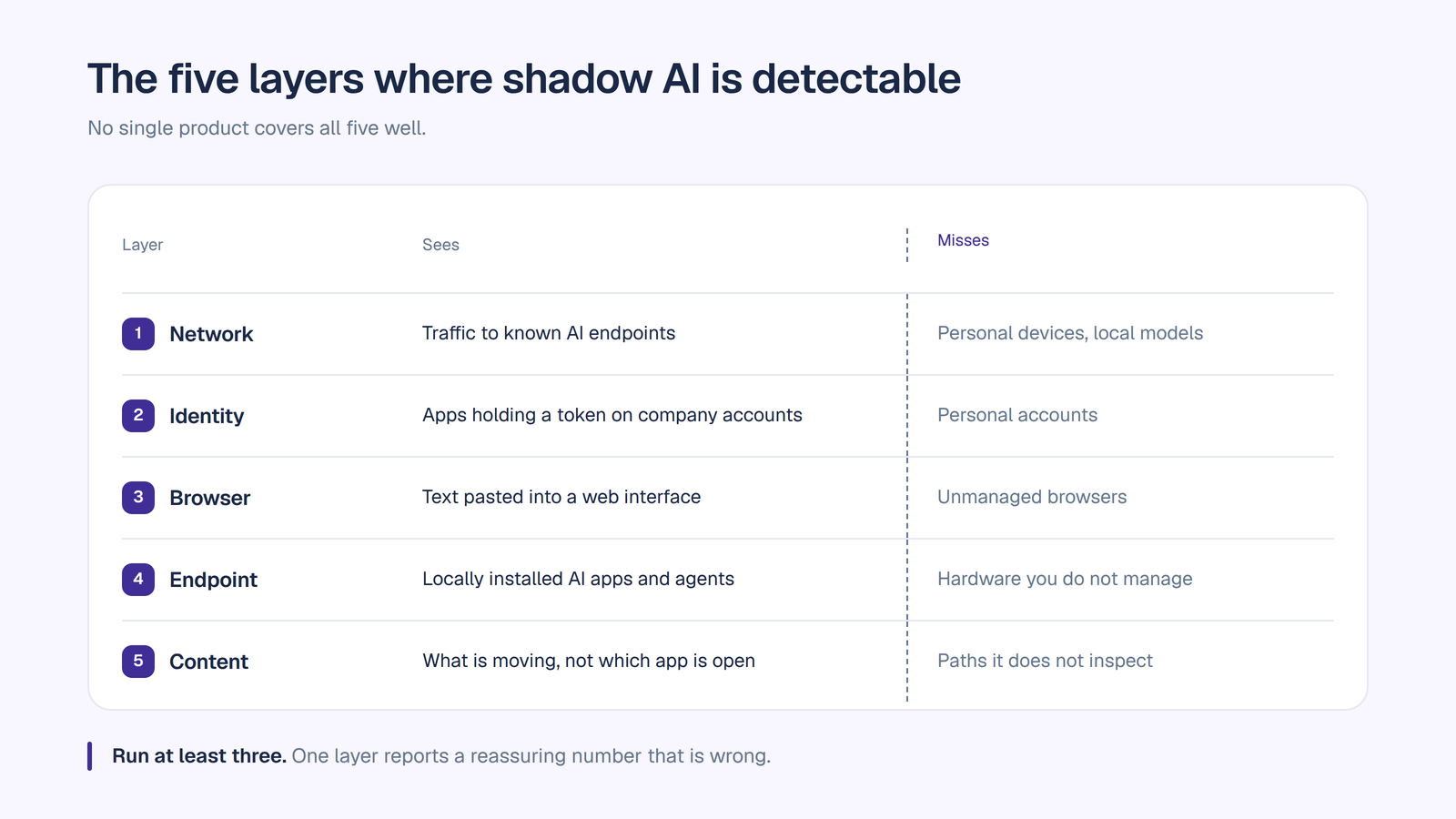
1. Network and secure web gateway. DNS queries, NetFlow, proxy and CASB telemetry showing traffic to known AI provider endpoints, attributed to source users. This is the fastest layer to stand up and the easiest to reason about. What it misses: AI inside sanctioned domains, anything on a personal device or home network, and local models with no meaningful egress.
2. Identity and OAuth. Which AI applications employees have granted access to company accounts, visible through your identity provider and workspace admin console. This layer is underused and unusually high value, because an OAuth grant to a mailbox or document store is a live data pipeline, not just a login. What it misses: tools that never touch corporate identity, which is most consumer-tier usage on personal accounts.
3. Browser. Extension-based or managed-browser telemetry, which is the only layer that reliably sees the actual action most people worry about: text pasted into a web interface. What it misses: unmanaged browsers, personal devices, and desktop applications.
4. Endpoint. Locally installed AI applications, desktop assistants and workstation agents. This is where the threat model moved most in 2026, because a local agent with file access and tool permissions is a meaningful exposure that produces little network signal. What it misses: anything on hardware you do not manage.
5. Content and data flow. Classification and data loss prevention applied to what is actually moving, rather than which application is being used. This is the only layer that can distinguish a harmless prompt from a customer database, but CASB and DLP were designed for file and cloud app movement rather than prompt traffic, so coverage of AI flows is partial in most deployments. What it misses: content it was never tuned to recognize, and anything outside the paths it inspects.
A serious program runs at least three of these layers. A program running one usually reports a reassuring number that is wrong by a wide margin.
Before any procurement cycle, most organizations can assemble a usable first picture from data they already hold. This is the fastest way to turn an abstract concern into a board-ready finding.
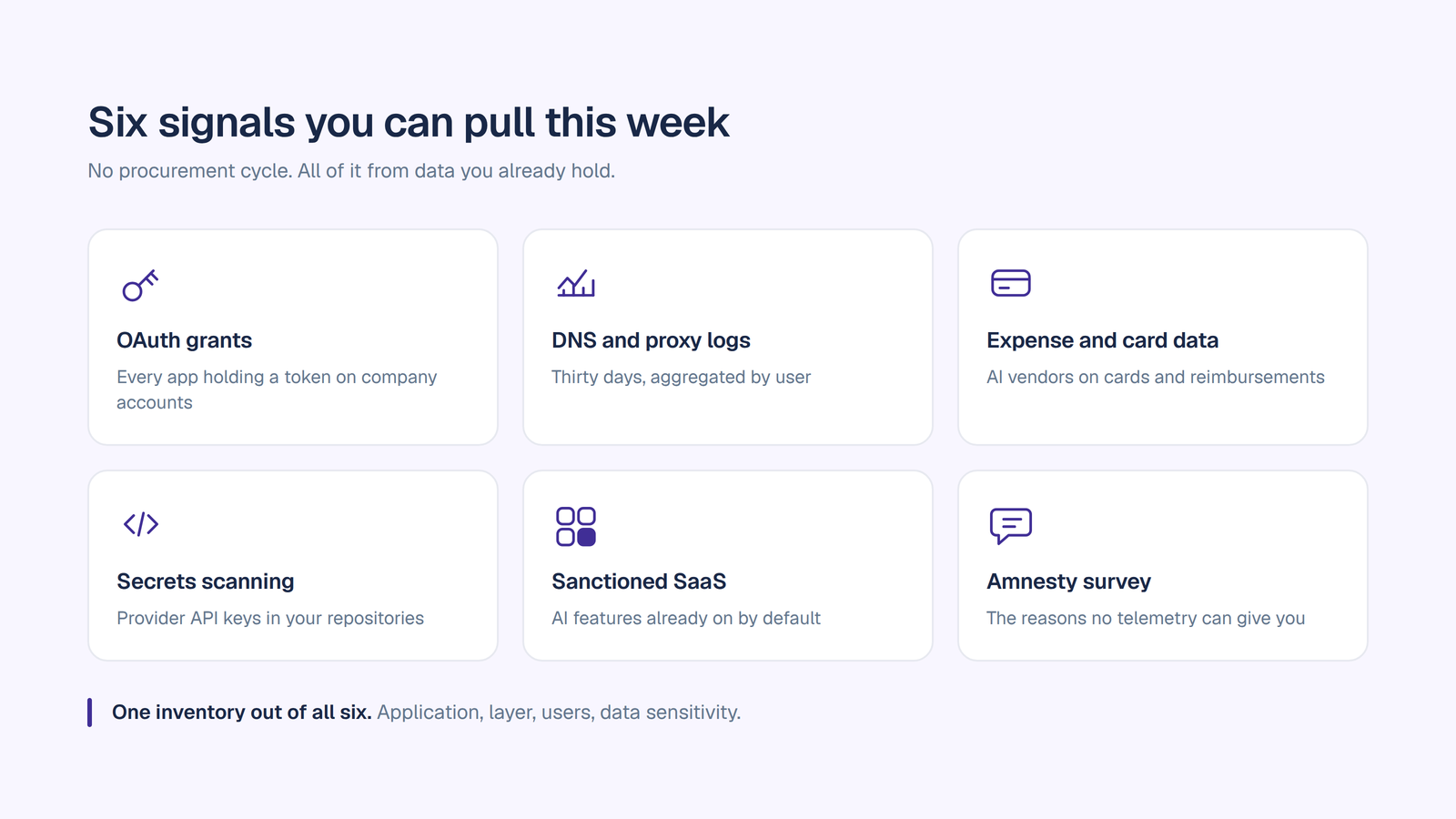
OAuth grants in your identity provider and workspace admin console. List every third-party application holding a token against company accounts, then filter for AI vendors. Each grant tells you the app, the scope, and the user. This single exercise surprises most security teams.
DNS and proxy logs for AI provider domains. Pull 30 days, aggregate by user, and sort by volume. You are looking for the shape of the distribution, not the total. A long tail of light users is a culture finding. A handful of extremely heavy users is a workflow that has already moved.
Expense and card data. Search for AI vendor names across corporate cards and reimbursements. Individual subscriptions expensed by name are the easiest possible win, and they tell you which teams gave up waiting for IT.
Source control and secrets scanning. Search repositories for provider API endpoints and key patterns. This is how you find custom agents, which almost never appear in any other detection layer and usually carry the broadest data access of anything you will find.
Your own sanctioned SaaS. Inventory the AI features in tools you already approved, and check which are enabled by default. Then check whether the data processing terms your legal team signed actually cover them.
An amnesty survey. Ask people what they use, state plainly that nobody is in trouble, and mean it. This gets you the reasons, which no telemetry layer can produce, and the reasons are what determine whether your program works.
Every honest program states its blind spots, because an executive summary that implies full coverage is worse than one that admits the gaps.
Personal devices. The phone in someone’s pocket is the largest single blind spot in the category and no enterprise tool closes it. This is also the exact place usage migrates when you block things.
Copy and paste on unmanaged surfaces. Without browser or endpoint coverage, the action that causes the most data exposure leaves almost no trace.
AI embedded in approved software. Detection reports the approved app. Whether its AI features are processing regulated data is a contract and configuration question, not a telemetry one.
Contractors and vendors. Your controls end at your perimeter. Their AI usage on your data is governed by agreements, not by your SIEM.
Local models. A model running on a workstation with no external calls generates close to nothing for network-layer tools.
Intent. Telemetry tells you an employee used a tool. It cannot tell you whether the prompt contained the quarterly numbers or a lunch order. That difference is the entire risk assessment, and it is why the survey matters.
1. Scope and get air cover. Agree with leadership that the exercise is discovery, not enforcement, and say so publicly before you start. Programs announced as crackdowns return unusable data, because people hide usage the moment they think it is a disciplinary matter.
2. Baseline from data you already have. Run the six signals above. Produce one inventory: application, layer detected, users, data sensitivity, business justification if known.
3. Classify by risk, not by policy violation. Sort what you find by what data it touched, not by whether it was approved. An unapproved tool used for public research is a different problem from an approved tool processing PHI on default settings. Treating them identically destroys credibility with the business.
4. Ask why, for the top findings. Every significant piece of shadow AI is a product requirement in disguise. The reason a team went around IT is the specification for what you need to give them.
5. Close the loop with a sanctioned alternative, then re-measure. Detection without a destination produces a report. Detection that ends in a better sanctioned option produces a reduction you can prove at the next measurement.
Run steps 2 and 5 on the same cadence, quarterly at minimum. A single point-in-time audit ages out in weeks in this category.
Here is the pattern that plays out in most organizations. Security runs a discovery exercise, finds more AI than anyone expected, and blocks the top offenders at the gateway. The dashboard improves immediately. Actual usage does not change at all, because it moved to phones, personal laptops and home networks, where the organization has no visibility whatsoever.
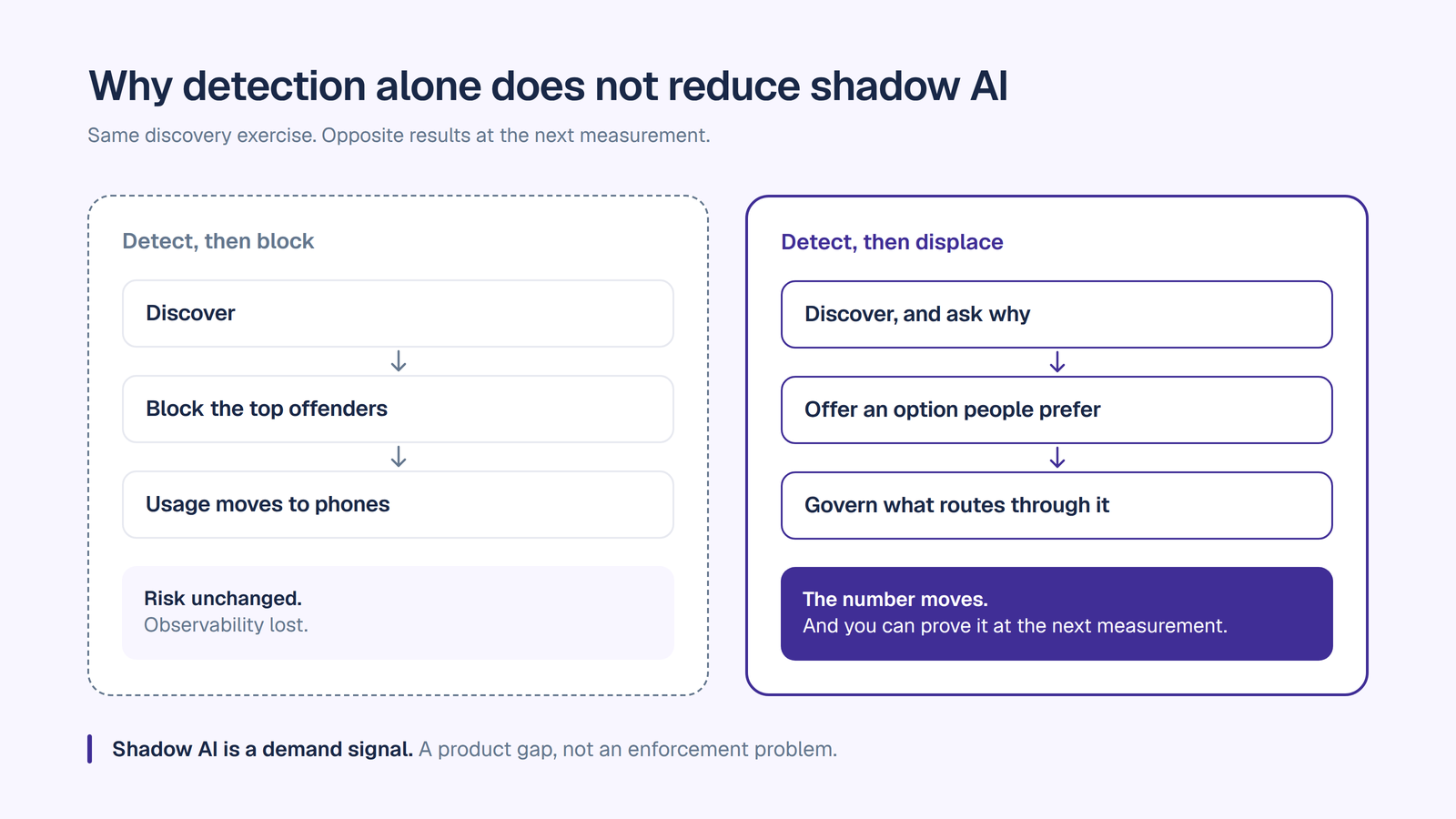
The program has not reduced risk. It has reduced observability, which is worse, because the prior state was at least measurable.
Shadow AI is a demand signal. People adopt unsanctioned AI because it makes their work meaningfully faster and the approved path does not. That is a product gap, and it cannot be closed with an enforcement action. Blocking without providing an alternative converts a governed-adjacent problem into an invisible one.
The organizations that actually bring the number down do three things in sequence. They detect, so they know the scale and the reasons. They displace, by providing a sanctioned option that is genuinely better than what people are using, which for most companies means an AI workspace carrying every leading model rather than a single approved vendor that does not cover everyone’s use case. Then they govern what routes through that option, so the usage they just won becomes the audit trail they never had.
Displacement is what makes the numbers move. A publicly traded autonomous vehicle company with ~1,500 employees consolidated 12 AI tools into OrgLogic, cut AI spend 70%, and reduced shadow AI by 91%, with engineers adopting in 2 weeks.
Being precise about scope matters more here than anywhere else, so plainly: OrgLogic is not a network discovery tool. It does not scan your endpoints, inspect your DNS logs or crawl your SaaS estate, and if what you need is layer-one and layer-four detection, you need a tool built for that. Our governance is enforceable on traffic that flows through OrgLogic.
What OrgLogic does is the other half of the problem, which is the half that actually reduces the number.
It removes the reason people go around IT. Every leading model in one governed place at $8 a seat, with model switching mid-conversation and smart routing per task, so the sanctioned option is not a downgrade from what people are using now. This is the displacement step, and it is why the shadow AI reduction above happened alongside a consolidation rather than a crackdown.
It makes routed traffic visible that previously was not. Third-party AI clients and externally built agents can be registered in the External Agent Registry and routed through the OrgLogic AI Gateway, where each gets its own credential with one-click revoke and inherits your model availability rules, budget caps with hard stops and PII redaction, producing a per-agent audit trail and observability on call volume, cost and error rate. Scope is the model traffic routed through the gateway, not everything those clients do outside it. For most companies this is the first record they have ever had of AI they did not centrally procure.
It gives you the evidence layer. Every thread message and agent action logged with the user, the agent, its accountable manager, the connector touched, the model and the cost, searchable and exportable. PII redaction runs before the prompt reaches a model rather than after. Governance is on every plan including Free, which matters specifically for this use case: a shadow AI pilot that runs without audit logging is not a pilot, it is more shadow AI.
It covers the agents, not just the chat. Custom agents built on raw API keys are the hardest shadow AI to find and the broadest in access. An agent platform where every agent has a named accountable manager and read or write scope set per agent per connection is how that category stops re-forming after you clean it up. We compare the options in best AI agent platforms for enterprises.
SOC 2 Type II, ISO 27001, HIPAA with a BAA available, GDPR. SSO and SCIM, single-tenant VPC and on-premise on Enterprise.
Shadow AI detection is worth doing properly, and most organizations can produce a credible first baseline this quarter from data they already hold, without a procurement cycle. Run at least three layers, publish the blind spots honestly, and classify by data sensitivity rather than by policy violation.
Then be honest about what the exercise can and cannot achieve. A detection program that ends in a blocklist moves usage somewhere you cannot see. A detection program that ends in a sanctioned option people actually prefer moves usage somewhere you can govern, and that is the only version where the number goes down and stays down.
If you want the second version, our AI implementation strategy guide covers sequencing the rollout, and the enterprise AI workspace checklist turns the governance questions into something you can take into a vendor call.
Start free with governance on from the first message, up to 25 users, no migration required. Or book a discovery call and we will map it against what you are already running.
Shadow AI detection is the practice of discovering AI tools, models, agents and AI features being used on company data without IT approval or security review, then attributing that usage to specific users and systems so it can be assessed and governed. It covers standalone AI applications, AI features inside already-sanctioned software, custom agents built on provider APIs, vendor and contractor AI, and local models running on workstations.
Detection happens at five layers: network and secure web gateway telemetry, identity and OAuth grants, browser activity, endpoint applications, and content or data flow inspection. No single product covers all five equally well, so a credible program runs at least three. Before buying anything, most organizations can build a useful baseline from OAuth grants in their identity provider, 30 days of DNS and proxy logs, expense and card data, source control scanning for provider API keys, an inventory of AI features in already-approved software, and an amnesty survey.
Only partially. Both provide a useful foundation at the network and content layers, but they were architected for file movement and cloud application access rather than prompt traffic, so coverage of AI-specific data flows is incomplete in most deployments. They also cannot see AI embedded inside applications you have already sanctioned, which is one of the largest categories of shadow AI.
Usage on personal devices and home networks, copy and paste on unmanaged browsers, AI features inside approved software, contractor and vendor AI processing your data, local models running with no meaningful network egress, and intent. Telemetry can show that a tool was used but not whether the prompt contained regulated data, which is why an amnesty survey is part of a serious program.
Rarely, on its own. Blocking detected tools improves the dashboard while usage migrates to personal devices where the organization has no visibility at all, which reduces observability rather than risk. Shadow AI is a demand signal, so the durable fix is to provide a sanctioned option people genuinely prefer and then govern what routes through it.
Quarterly at minimum, with the baseline and the re-measurement run on the same cadence and the same method so the numbers are comparable. The tool landscape and employee behavior both change fast enough that a single point-in-time audit is out of date within weeks.

Single-model AI tools lock you into one provider at $25-60/seat. OrgLogic is a multi-model AI workspace with named Agents that act in your systems (Salesforce, Jira, Confluence, ServiceNow), packaged Skills for domain expertise, and full governance at $8/seat. You get every model, not just one.

Bring Your Own Key means you connect your own API keys from OpenAI, Anthropic, Google, or any provider. Your data flows directly to the model provider. OrgLogic never sees, stores, or processes your prompts or responses. Zero surcharge on your own keys. This is the #1 requirement for security teams evaluating enterprise AI platforms.
An Agent is a named AI worker with a defined job, connected to your systems via Connectors. A Skill is packaged expertise that teaches an Agent how to do specific work consistently. Unlike a generic chatbot, a Deal Prep Agent with a Salesforce Connector pulls real CRM data and produces structured call briefs. Skills are reusable across Agents, versioned, and authored in plain language.
Every Workspace includes per-Agent Connector permissions (each Agent gets scoped access, not blanket access), Agent-level audit trails, automatic PII redaction, per-team budget controls, model-level access controls, and configurable guardrails. Governance is the default environment on every plan, including Free. SOC 2 Type II, ISO 27001, HIPAA, and GDPR compliant.
The Free plan covers 25 users with $500 in credits ($20 per active user, pooled). The Business plan is $8/seat/month (annual) or $10 monthly. The seat fee covers the full platform: Agents, Skills, Connectors, governance dashboard, 5 surfaces, and all features. Model usage is separate: BYOK at zero surcharge, or OrgLogic-managed models at cost + 6%.
80% of employees already use AI tools without IT approval. OrgLogic replaces fragmented, ungoverned tools with one AI workspace employees actually want to use, available on web, Slack, Teams, Chrome, and API. One customer, a regulated tech company with 1,500 employees, reduced shadow AI by 91% within 6 weeks while cutting AI spend by 70%.
OrgLogic Connectors integrate with Salesforce, Jira, Confluence, ServiceNow, SharePoint, Google Workspace, Slack, SAP, and more via custom APIs. Each Connector has per-Agent permission scopes controlled by IT, so your Deal Prep Agent only accesses the Salesforce objects you approve. The Connector library is growing and new integrations ship regularly.
Self-serve signup takes 30 seconds. Connect your API keys in 2 minutes. Deploy pre-built Agents for sales, support, engineering, HR, and legal on day one. The Free plan (25 users, full governance) lets you pilot without procurement. One customer had engineers adopting within 2 weeks across Slack and Chrome. Enterprise plans add SSO/SCIM, VPC, and on-prem deployment.