Glean built the category. Enterprise search that indexes everything a company knows, respects permissions, and answers questions with citations is a genuinely hard product, and Glean does it well. That is not in dispute.
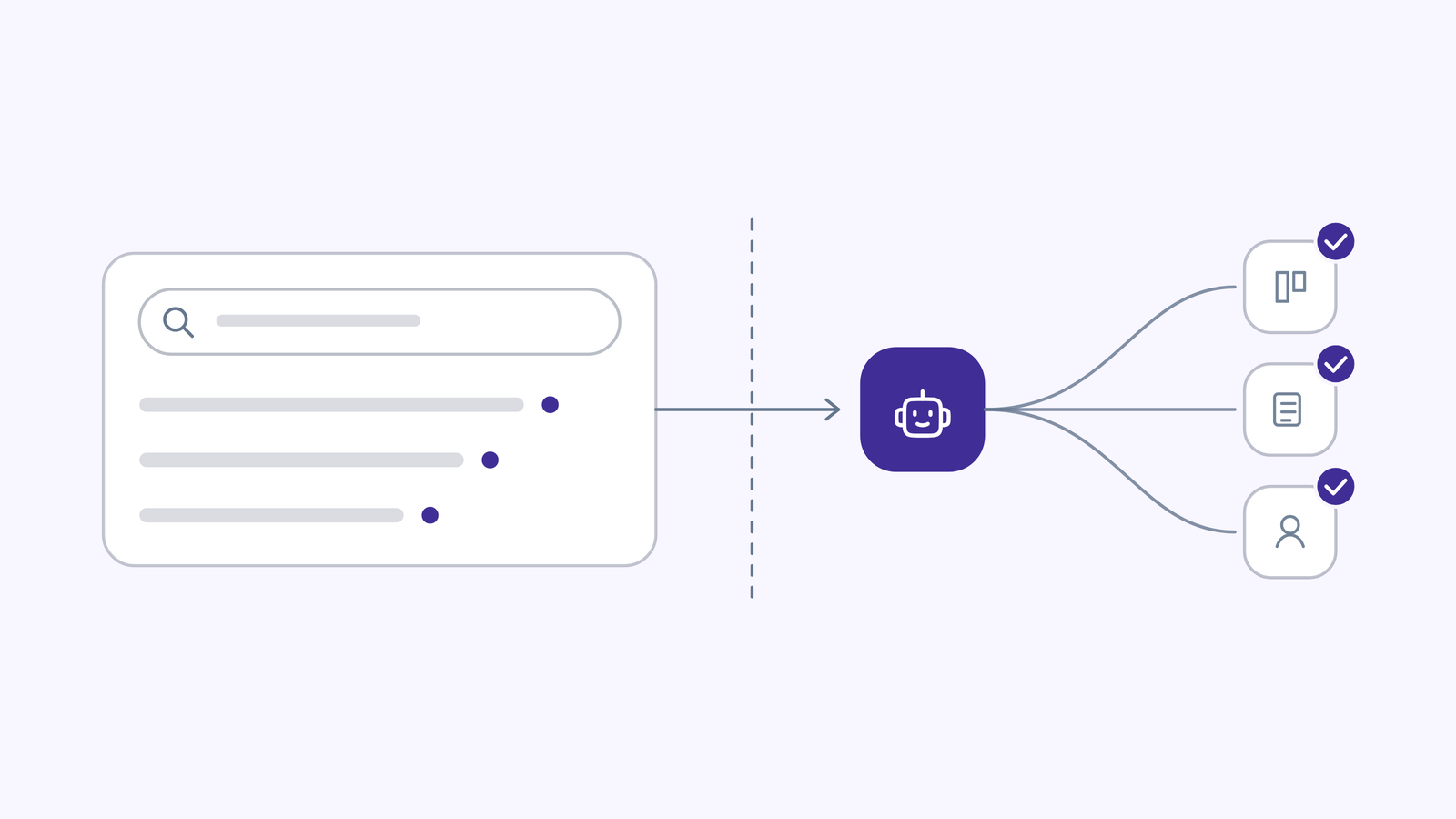
What is in dispute, increasingly, is whether that is the product enterprises still need to buy. Search answers questions. It does not do the work. And the bill for search-only capability has become difficult to defend when the platform sits next to tools that both answer and act.
This guide covers why teams evaluate alternatives, what to compare, and the five options worth shortlisting in 2026, with real pricing for every one of them.
All figures were verified against vendor sources on 4 September 2026. Glean does not publish list pricing, so every Glean number here is labelled as buyer-reported rather than official.
Four reasons come up repeatedly, and they are worth naming plainly because they determine which alternative fits.
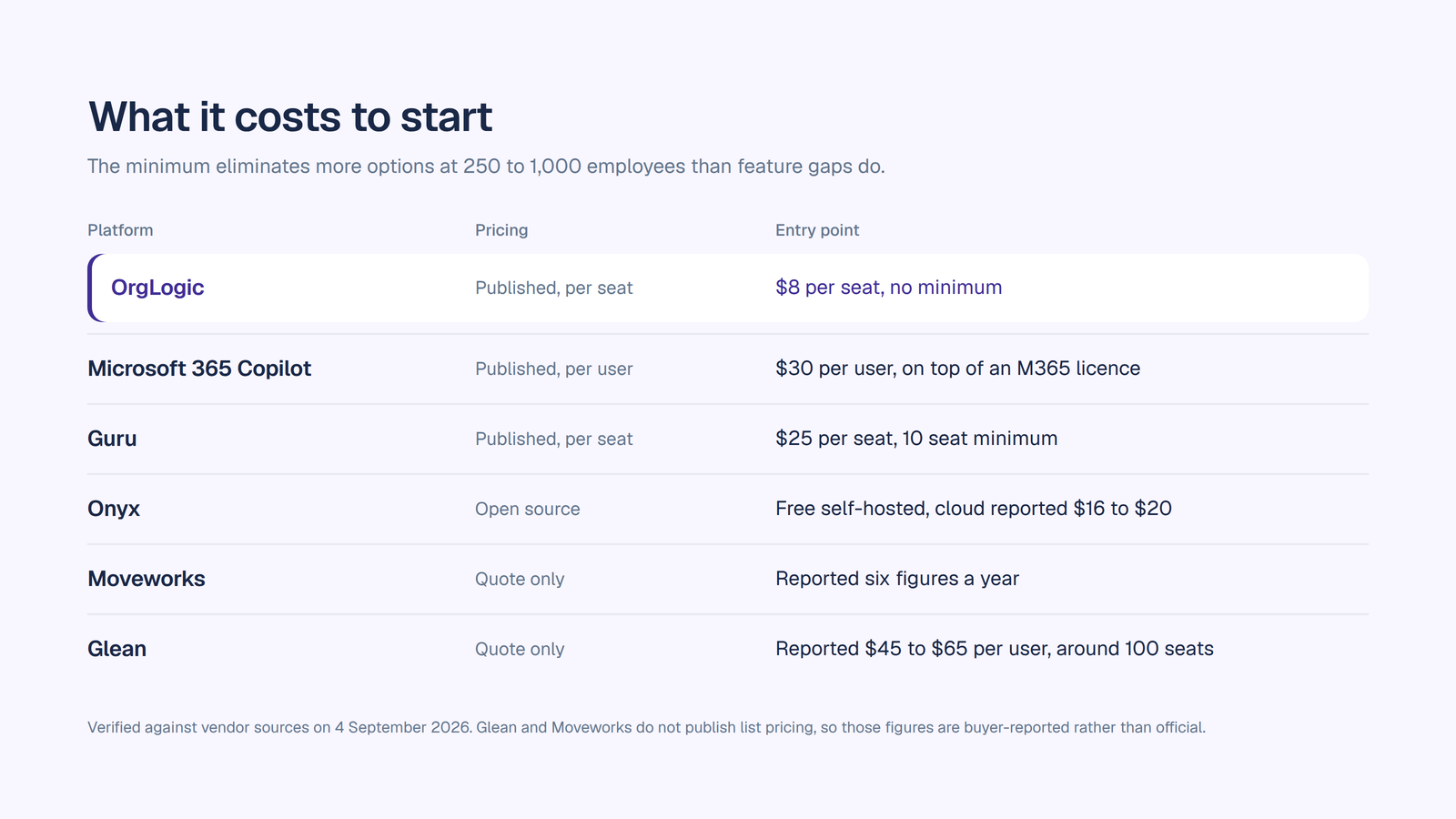
Cost at scale. Glean sells through a quote process with no published price. Buyer and analyst reports in 2026 put the base licence around $45 to $65 per user per month, with an AI add-on reported around $15 on top, seat minimums commonly around 100, and minimum annual contracts reported near $50,000 to $60,000. That math works for a knowledge-heavy team of 200. It gets hard to defend when someone asks to extend it to 5,000 people, most of whom search occasionally.
Deployment constraints. Glean runs as SaaS with a virtual private cloud option. Organizations that need fully self-hosted or air-gapped deployment, which is a live requirement in defence, parts of healthcare and some financial services, have to look elsewhere.
Model flexibility. Enterprises increasingly want to choose models per task and bring their own provider keys rather than accept one vendor’s model decisions. Glean’s Enterprise Flex does discount seats and credits for customers who supply their own model keys or self-host, so this is not a binary, but model choice is not the organizing principle of the product.
The bigger one: search is no longer the whole job. The question that ends most Glean renewals is not “can it find the document.” It is “and then what.” Finding the contract is a fraction of the work. Reviewing it, flagging the risk, and filing the outcome in the system of record is the rest, and that requires agents with permissions, not retrieval with citations.
Worth saying, because it saves everyone time. If your central problem is genuinely discovery, you have a decade of documents scattered across many systems, thousands of employees who cannot find anything, and the budget for it, Glean’s ranking maturity and connector depth are real and hard to replicate. If it is deployed and working, remapping connectors, permissions and habits to save money is often a worse trade than it looks on a spreadsheet. The alternatives below matter most when the job has grown past search.
Six criteria, ordered by how often they turn out to be the thing that decides it.
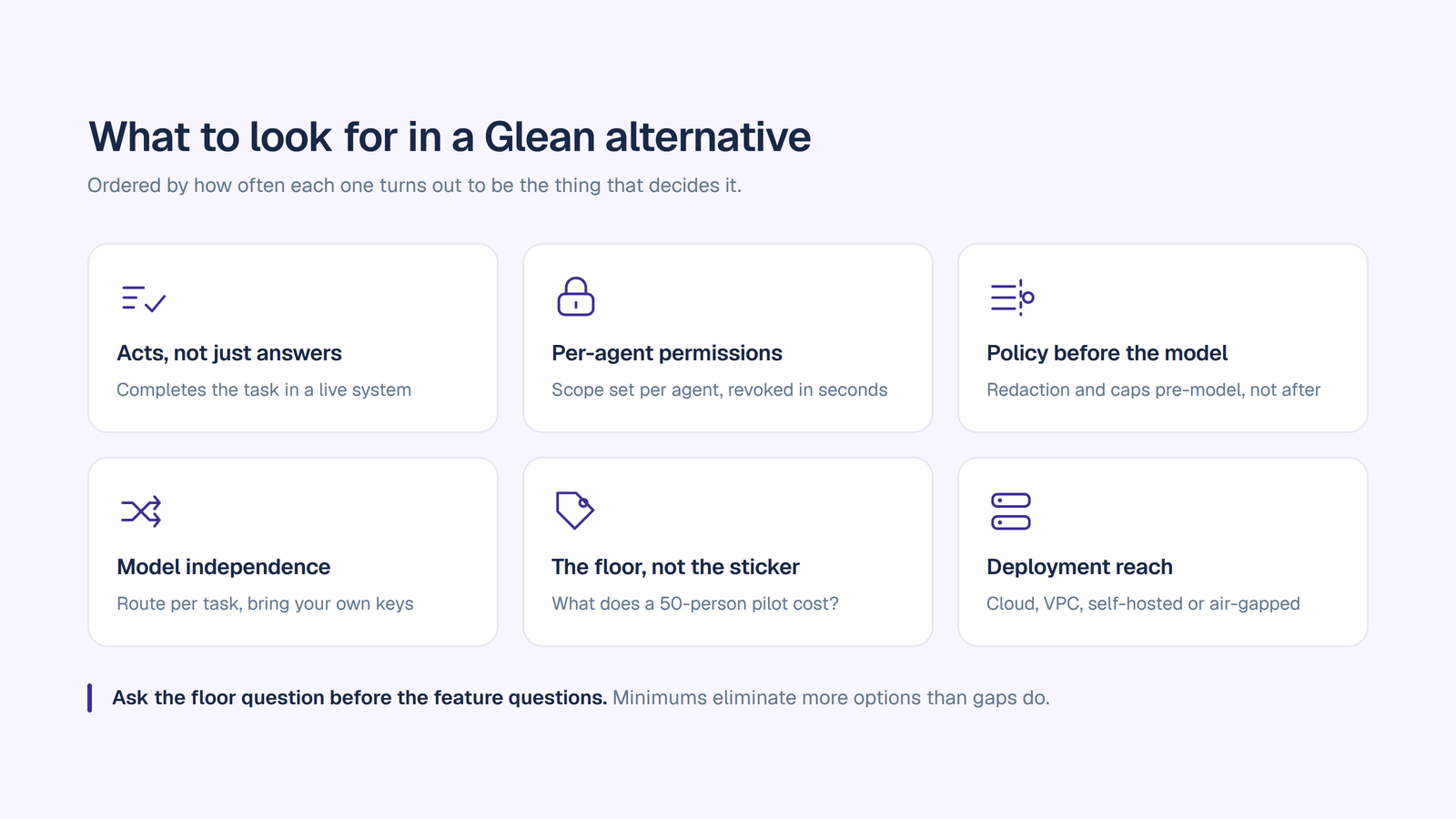
1. Does it act, or only answer? This is the fault line in the category. Ask whether the platform can complete a task end to end in a live system, not just cite where the answer lives. Then ask the follow-up that matters: when it acts, whose credential does it use, and what is recorded.
2. Per-agent permissions, not per-platform. Security should be able to grant one agent read-only access to one system and write access to another, and revoke either in seconds. Platform-level connector access is the most common reason an agent rollout stalls in security review.
3. Where policy runs relative to the model. If PII redaction, model rules and budget checks execute before the prompt reaches a model, the platform is built for governance. If they run afterwards, that is reporting.
4. Model independence and key ownership. Ask two separate questions: can we route different tasks to different models and switch mid-conversation, and can we bring our own provider keys. Then ask whether there is a surcharge for doing so, because the answers to those two questions are often priced differently.
5. Pricing shape and the floor. Published or quote-only, per seat or per usage, and critically the minimum. Seat minimums and minimum annual contract values eliminate more options at the 250 to 1,000 employee range than feature gaps do. Ask what a 50-person pilot costs before you ask what the platform does.
6. Deployment and compliance reach. Cloud, VPC, self-hosted or air-gapped, plus SOC 2 Type II, ISO 27001, a HIPAA BAA where relevant, and GDPR. In regulated industries this is a filter applied before the demo, not after.
If you want these as a working evaluation document, our enterprise AI workspace checklist turns them into questions you can take into a vendor call.
OrgLogic is the closest thing in this list to a direct replacement for what most companies actually wanted when they bought enterprise search, which is one governed place where the company’s knowledge is available and something can be done with it.
The grounding layer does the Glean job: answers cite the source document and its last-synced date, and the system says it does not know when retrieval comes back thin rather than guessing. Personal indexing runs under each user’s own credentials, so an index cannot contain a document that user’s token could not fetch.
Then it goes past search. Named agents act inside Salesforce, Jira, Confluence, GitHub, ServiceNow, SharePoint and Google Workspace, on demand, on a schedule, or triggered by an event. Each has an accountable manager, its own connections, and read or write scope set per agent per connector that security can revoke in seconds. Skills package expertise in plain language, versioned and reusable, so the way your company does a job is defined once.
Chat sits above every leading model with switching mid-conversation and smart routing per task, running on your own provider keys through BYOK at zero surcharge, with data flowing directly to the model providers.
Governance is on every plan including Free: PII redaction pre-model, model availability controls per team, per-team budget caps with hard stops, cost analytics per agent, and a full audit trail logging user, agent, accountable manager, connector, model, inputs and outputs, searchable and exportable. SOC 2 Type II, ISO 27001, HIPAA with a BAA available, GDPR. SSO and SCIM, single-tenant VPC and on-premise on Enterprise.
Where it wins against Glean: cost and floor, by a wide margin. Model independence. Agents that act with per-agent permissions rather than retrieval alone. Governance available on the plan you pilot on rather than gated behind an enterprise contract.
Where Glean still wins: broad ranked discovery across a very large, very messy document estate. Glean has been building that specific capability longer.
Pricing: Free up to 25 users with governance included. $8 per seat per month on annual billing, $10 monthly. No seat minimum on Free or Standard. Model usage separate: BYOK at zero surcharge, or OrgLogic-provisioned at cost plus 6%. Enterprise custom with a 100-seat minimum. See pricing, or the direct head-to-head in OrgLogic vs Glean. If a frontier assistant is already embedded alongside search in your stack, OrgLogic vs Claude Enterprise covers how that coexistence works.
A publicly traded autonomous vehicle company with ~1,500 employees consolidated 12 AI tools into OrgLogic, cut AI spend 70%, and reduced shadow AI by 91%, with engineers adopting in 2 weeks.
For companies that run on Microsoft, this is the most common Glean alternative considered, and often the most economically rational one, because much of the capability is adjacent to licences you already hold.
Copilot is grounded in Microsoft Graph, respects existing Microsoft 365 permissions, and puts AI inside Word, Excel, PowerPoint, Outlook and Teams in a way no external platform can replicate. Copilot Studio extends it into custom agents, and the surrounding compliance posture is already approved in most Microsoft shops, which removes a security review that a new vendor would trigger.
Where it wins against Glean: cost consolidation on an existing licence, unmatched depth inside Office applications, and a procurement path that is already open.
Where it does not fit: coverage outside Microsoft. Copilot governs what happens inside Microsoft and gives no visibility into AI running anywhere else, which for most companies is several other places. It is also single-vendor by design, so model choice is not on the table.
Pricing: $30 per user per month for larger organizations, on top of a qualifying Microsoft 365 base licence such as E3 or E5, which is where the real cost sits. Around $21 per user per month for organizations of roughly 10 to 300 seats. Copilot Chat is included at no additional per-user charge with eligible Microsoft 365 plans but is not grounded in your organization’s data. Copilot Studio agent usage is metered separately through consumption credits.
Guru approaches the same problem from the opposite direction. Rather than indexing everything and ranking it, Guru builds a curated, verified knowledge base and grounds AI answers in content a human expert has approved, with verification workflows that flag content as it goes stale.
That trade is the entire point. You get higher confidence in what comes back and you accept the overhead of curation. For support organizations, customer-facing teams and anywhere a wrong answer has a direct cost, that trade is often correct.
Where it wins against Glean: answer confidence through verified content, a browser extension that surfaces knowledge in the flow of work, and a far lower entry price.
Where it does not fit: breadth. Guru is strongest on curated knowledge, not on federated discovery across every system in a large enterprise. Everyone who needs to read the content needs a paid seat, which drives the bill at scale.
Pricing: $25 per seat per month billed annually, $30 billed monthly, with a 10-seat minimum, so the practical floor is $250 per month. A sales-led Enterprise tier is not published and moves to usage-based billing, so confirm that number in writing.
Onyx is the credible open-source answer, and it belongs on this list specifically because it resolves the two objections nothing else here fully answers: cost floor and deployment control.
It is an open-source platform combining enterprise search, multi-model chat, deep research and custom agents, genuinely self-hostable, with configurable model support across providers and open-weight models. For a team with engineering capacity and a hard data-residency or air-gap requirement, it is the only option in this list that can run entirely inside your own perimeter at no licence cost.
Where it wins against Glean: self-hosting and air-gapped deployment, an auditable codebase, model configurability, and no per-seat licence on the community tier.
Where it does not fit: it costs engineering time instead of money. Deployment and maintenance are on you, the connector set is narrower than Glean’s, and the managed cloud offering is younger than the incumbents’. Treat the free tier as free of licence fees, not free of cost.
Pricing: Community tier free and self-hosted under an open-source licence. Onyx Cloud reported at roughly $16 to $20 per user per month depending on billing terms. Enterprise custom.
Moveworks pairs conversational AI and enterprise search with action, resolving internal IT and HR requests end to end rather than returning documents about them. For large organizations where the volume is repetitive internal support, that is a sharper fit than general search.
The decisive fact for any 2026 evaluation is ownership. ServiceNow completed its $2.85 billion acquisition of Moveworks on 15 December 2025, and the product is being folded into ServiceNow’s agentic portfolio, with ServiceNow EmployeeWorks launched in February 2026 combining Moveworks’ conversational AI with ServiceNow workflows. Existing standalone contracts are being honoured and non-ServiceNow integrations remain supported, but new deals increasingly route through ServiceNow’s commercial team.
Where it wins against Glean: resolution rather than retrieval for internal support, and a much stronger fit if you already run ServiceNow.
Where it does not fit: scale and independence. Pricing is quote-only and reported to land in six figures before services, with implementation reported at eight to sixteen weeks, which puts it out of reach below roughly 1,000 employees. If you valued Moveworks as a neutral overlay across a non-ServiceNow stack, that rationale is weaker than it was in 2025.
Pricing: quote-only, no published figures. Buyer and procurement-marketplace reports describe six-figure annual contracts tied to total headcount rather than active users, plus implementation services. Confirm post-acquisition packaging in writing.
Put the six criteria from earlier back in order and answer them one at a time. That is the fastest way to see where OrgLogic sits for an enterprise replacing or outgrowing search.
1. It acts, it does not only answer. The grounding layer does the search job, citing the source document and its last-synced date and saying it does not know when retrieval comes back thin. Then named agents finish the work inside Salesforce, Jira, Confluence, GitHub, ServiceNow, SharePoint and Google Workspace, on demand, on a schedule, or triggered by an event in a connected system. A contract review agent does not tell your legal team where the contract is. It reviews it, flags the risk against the clauses your business cares about, and records what it did. Our guide on how to build an AI agent walks through one end to end, and the AI agent platform page covers the builder, Skills and Workflows underneath it.
2. Permissions are set per agent, not per platform. Every agent has a named manager who is its only editor, its own connections, and read or write scope set per agent per connector, revocable in seconds. This is the control that decides whether a rollout clears security review, and it is the one most often missing when a search platform bolts agents onto a retrieval engine.
3. Policy runs before the model, not after. PII redaction fires before the prompt reaches a model. Model availability rules apply per team. Per-team budget caps hard-stop rather than alert. Every thread message and agent action is logged with the user, the agent, its accountable manager, the connector touched, the model and the cost, searchable and exportable. All of it is on every plan including Free, which matters more than it sounds: governance gated behind an enterprise contract means your evaluation runs ungoverned.
4. You are not married to one model vendor. Every leading model in one place, with switching mid-conversation and smart routing per task, running on your own provider keys through BYOK at zero surcharge, with data flowing directly to the model providers. Admin-configured, so end users are never prompted for keys. When model leadership rotates, that is a configuration change rather than a migration.
5. The floor is low enough to actually start. $8 per seat per month on annual billing, $10 monthly, free up to 25 users with governance included, and no seat minimum until Enterprise. Model usage is separate and visible rather than bundled into the seat: your own keys at zero surcharge, or OrgLogic-provisioned at cost plus 6%, with spend attributed per team, per model and per agent. Compare that against a 100-seat minimum and a five-figure annual floor and the difference is not the rate, it is whether a 40-person pilot is possible at all. Full detail on pricing.
6. It deploys where your risk posture requires. SOC 2 Type II, ISO 27001, HIPAA with a BAA available, GDPR. SSO and SCIM, single-tenant VPC and on-premise on Enterprise. For regulated buyers this is the filter applied before the demo, and AI implementation strategy covers sequencing the rollout once it clears.
And the AI your teams already run keeps working. Replacing search does not have to mean a migration project across every AI tool in the company. External agents and third-party AI clients can be registered in the External Agent Registry and routed through the OrgLogic AI Gateway, where each gets its own credential with one-click revoke and inherits your model rules, budget caps and PII redaction, producing a per-agent audit trail. Scope is the model traffic routed through the gateway. The assistants your teams already rely on keep working, and the traffic you previously could not see becomes an audit trail.
By role, if you are building the internal case. The Head of IT argument is consolidation and a defensible seat price. The CISO argument is BYOK, pre-model redaction, per-agent scope and an exportable audit trail. The CTO argument is agents acting in real systems with per-connector permissions, and model independence. The Head of AI argument is that context compounds in one grounded layer instead of every tool starting from zero. They are the same product, and they close in that order more often than not.
The honest summary is that “Glean alternative” has become the wrong search. Most teams typing it are not looking for better enterprise search. They are discovering that search alone does not finish the work, and the cost of search-only capability is hard to justify next to platforms that answer and act.
So the useful question is not which product indexes more. It is what happens after the answer. If the answer needs to become an action inside a real system, under permissions your security team sets and a record they can export, the shortlist narrows quickly and the economics change with it.
If that is the version you want, that is what OrgLogic was built for, at $8 a seat with governance on every plan including Free, and no minimum to start.
Start free with governance on from the first message, up to 25 users, no migration required. Or book a discovery call and we will map it against what you are running today.
The five worth shortlisting are OrgLogic for grounded answers plus agents that act with per-agent permissions at $8 a seat, Microsoft 365 Copilot for organizations already on Microsoft 365, Guru for verified curated knowledge where answer confidence matters most, Onyx for teams needing open-source and self-hosted or air-gapped deployment, and Moveworks, now part of ServiceNow, for large-scale internal IT and HR support automation.
Glean does not publish list pricing and sells through a quote process. Buyer and analyst reports in 2026 put the base licence around $45 to $65 per user per month, with an AI add-on reported around $15 per user on top, seat minimums commonly around 100, and minimum annual contracts reported near $50,000 to $60,000. Enterprise Flex adds consumption-based credits, discounted for customers who supply their own model keys or self-host. Treat all of these as reported figures and confirm in writing.
Four reasons recur: cost at scale once a deployment extends beyond a knowledge-heavy core team, deployment constraints for organizations needing fully self-hosted or air-gapped environments, a preference for choosing models per task and bringing their own provider keys, and the broader realization that finding a document is only part of the work. The last one is the most common, because retrieval with citations does not complete a task in a system of record.
Yes, at several price points. OrgLogic is $8 per seat per month on annual billing with a free tier up to 25 users and no seat minimum to start. Guru is $25 per seat per month annually with a 10-seat minimum. Onyx offers a free self-hosted community tier with cloud reported at roughly $16 to $20 per user per month. Compare the floor as well as the rate, since seat minimums and minimum contract values eliminate more options at mid-market scale than the per-seat number does.
Enterprise search indexes company content and returns ranked, cited answers to a person’s question. An AI workspace grounds answers the same way but adds agents that act inside connected systems under scoped permissions, multiple models with routing, and governance applied across all of it. The practical difference is whether the platform finishes the task or hands it back to you.
In part. Glean’s Enterprise Flex documentation states that seats and credits are discounted for customers who supply their own model keys or self-host in their own private cloud. It is not a binary yes or no, so confirm the specific terms and the commercial effect for your deployment. Verified 4 September 2026.

Single-model AI tools lock you into one provider at $25-60/seat. OrgLogic is a multi-model AI workspace with named Agents that act in your systems (Salesforce, Jira, Confluence, ServiceNow), packaged Skills for domain expertise, and full governance at $8/seat. You get every model, not just one.

Bring Your Own Key means you connect your own API keys from OpenAI, Anthropic, Google, or any provider. Your data flows directly to the model provider. OrgLogic never sees, stores, or processes your prompts or responses. Zero surcharge on your own keys. This is the #1 requirement for security teams evaluating enterprise AI platforms.
An Agent is a named AI worker with a defined job, connected to your systems via Connectors. A Skill is packaged expertise that teaches an Agent how to do specific work consistently. Unlike a generic chatbot, a Deal Prep Agent with a Salesforce Connector pulls real CRM data and produces structured call briefs. Skills are reusable across Agents, versioned, and authored in plain language.
Every Workspace includes per-Agent Connector permissions (each Agent gets scoped access, not blanket access), Agent-level audit trails, automatic PII redaction, per-team budget controls, model-level access controls, and configurable guardrails. Governance is the default environment on every plan, including Free. SOC 2 Type II, ISO 27001, HIPAA, and GDPR compliant.
The Free plan covers 25 users with $500 in credits ($20 per active user, pooled). The Business plan is $8/seat/month (annual) or $10 monthly. The seat fee covers the full platform: Agents, Skills, Connectors, governance dashboard, 5 surfaces, and all features. Model usage is separate: BYOK at zero surcharge, or OrgLogic-managed models at cost + 6%.
80% of employees already use AI tools without IT approval. OrgLogic replaces fragmented, ungoverned tools with one AI workspace employees actually want to use, available on web, Slack, Teams, Chrome, and API. One customer, a regulated tech company with 1,500 employees, reduced shadow AI by 91% within 6 weeks while cutting AI spend by 70%.
OrgLogic Connectors integrate with Salesforce, Jira, Confluence, ServiceNow, SharePoint, Google Workspace, Slack, SAP, and more via custom APIs. Each Connector has per-Agent permission scopes controlled by IT, so your Deal Prep Agent only accesses the Salesforce objects you approve. The Connector library is growing and new integrations ship regularly.
Self-serve signup takes 30 seconds. Connect your API keys in 2 minutes. Deploy pre-built Agents for sales, support, engineering, HR, and legal on day one. The Free plan (25 users, full governance) lets you pilot without procurement. One customer had engineers adopting within 2 weeks across Slack and Chrome. Enterprise plans add SSO/SCIM, VPC, and on-prem deployment.