Shadow AI is not one problem, which is why it is not one product. Employees use unsanctioned tools in a browser, grant AI apps OAuth access to company mailboxes, run assistants on personal devices, and build agents on raw API keys. Those are four different signals on four different surfaces, and no vendor sees all of them equally well.
IBM found 80% of employees use unsanctioned AI tools (IBM, 2025), and puts the additional cost of a breach involving shadow AI at $670K (IBM, 2025). This guide covers what to look for, five platforms worth shortlisting, and the distinction that determines whether a purchase actually reduces your exposure: detection identifies unsanctioned AI, control decides what happens next, and they are usually different products.
All figures verified against vendor documentation on 4 September 2026. Most vendors in this category quote rather than publish, so treat any number without a rate card as an estimate.
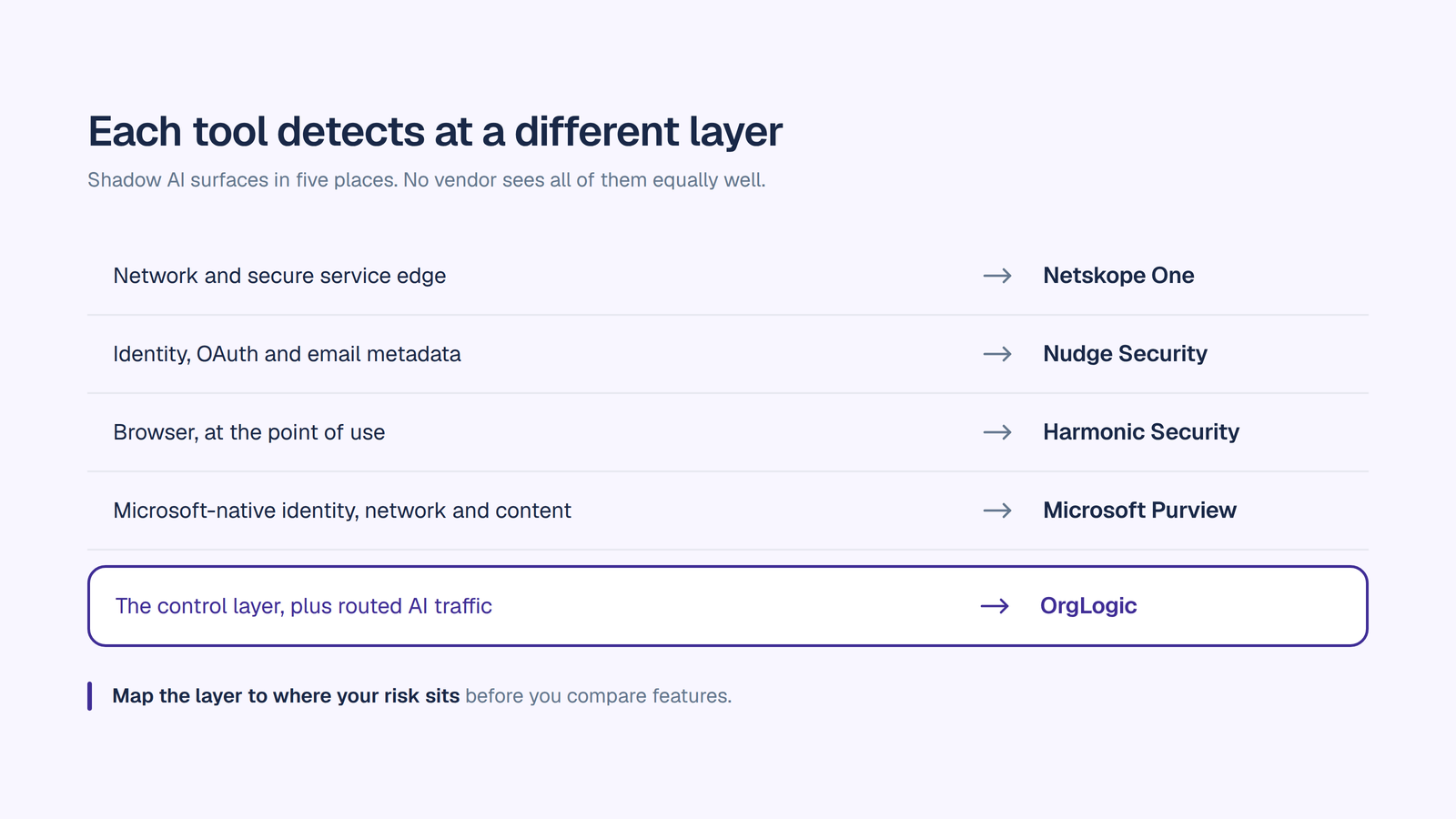
1. Which layer it actually detects at. This is the first and most decisive question. Shadow AI surfaces at five layers: network and secure web gateway, identity and OAuth grants, the browser, the endpoint, and the content of the prompt itself. Every product is strong at one or two and weaker elsewhere. A tool that watches network traffic will not see a personal device. A browser extension will not see a desktop application or an API call. Map the layer to where your risk actually sits before you compare features.
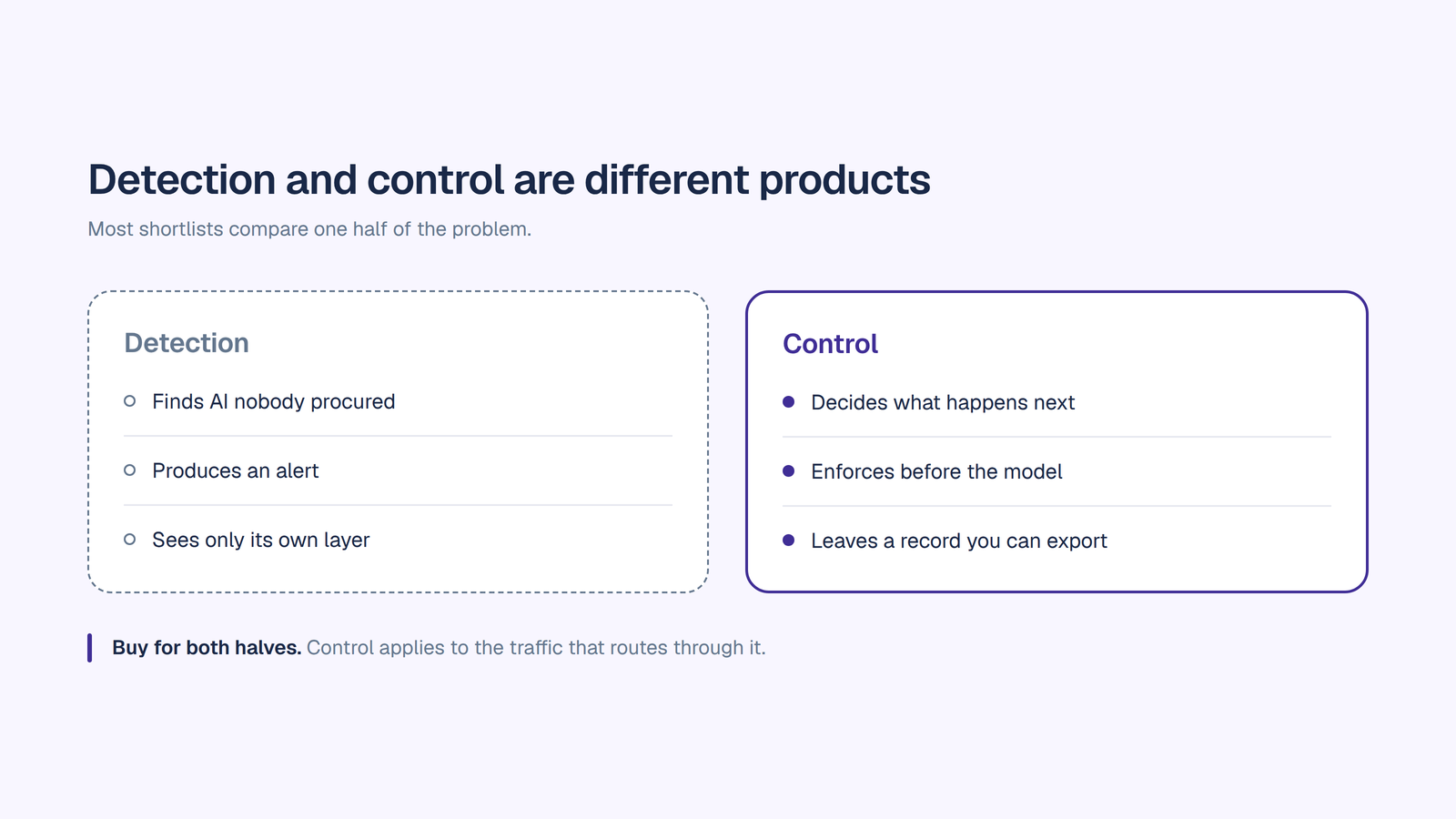
2. What it does with what it finds. Detection produces an alert. Ask what happens next. Can it block, can it redact, can it coach the user in the moment, and critically, does blocking simply push usage to a personal device where you lose the signal entirely.
3. Whether it sees AI inside sanctioned software. A large share of shadow AI is the assistant baked into a tool your company already approved and already allows through the gateway, from enterprise search platforms to your CRM and document repository. Domain-level detection reports a sanctioned app behaving normally. Ask specifically how the tool handles this case.
4. Whether it finds agents and API usage. Custom agents built on provider keys never appear in identity systems, rarely produce browser signal, and typically carry the broadest data access of anything you will find. Most detection tooling was built for humans in browsers, not for unattended agents.
5. Retrospective versus forward-looking discovery. Some tools only see usage from the day you deploy them. Others reconstruct historical footprint, for example from mailbox metadata showing every AI account ever created against a company address. The second kind gives you a baseline on day one.
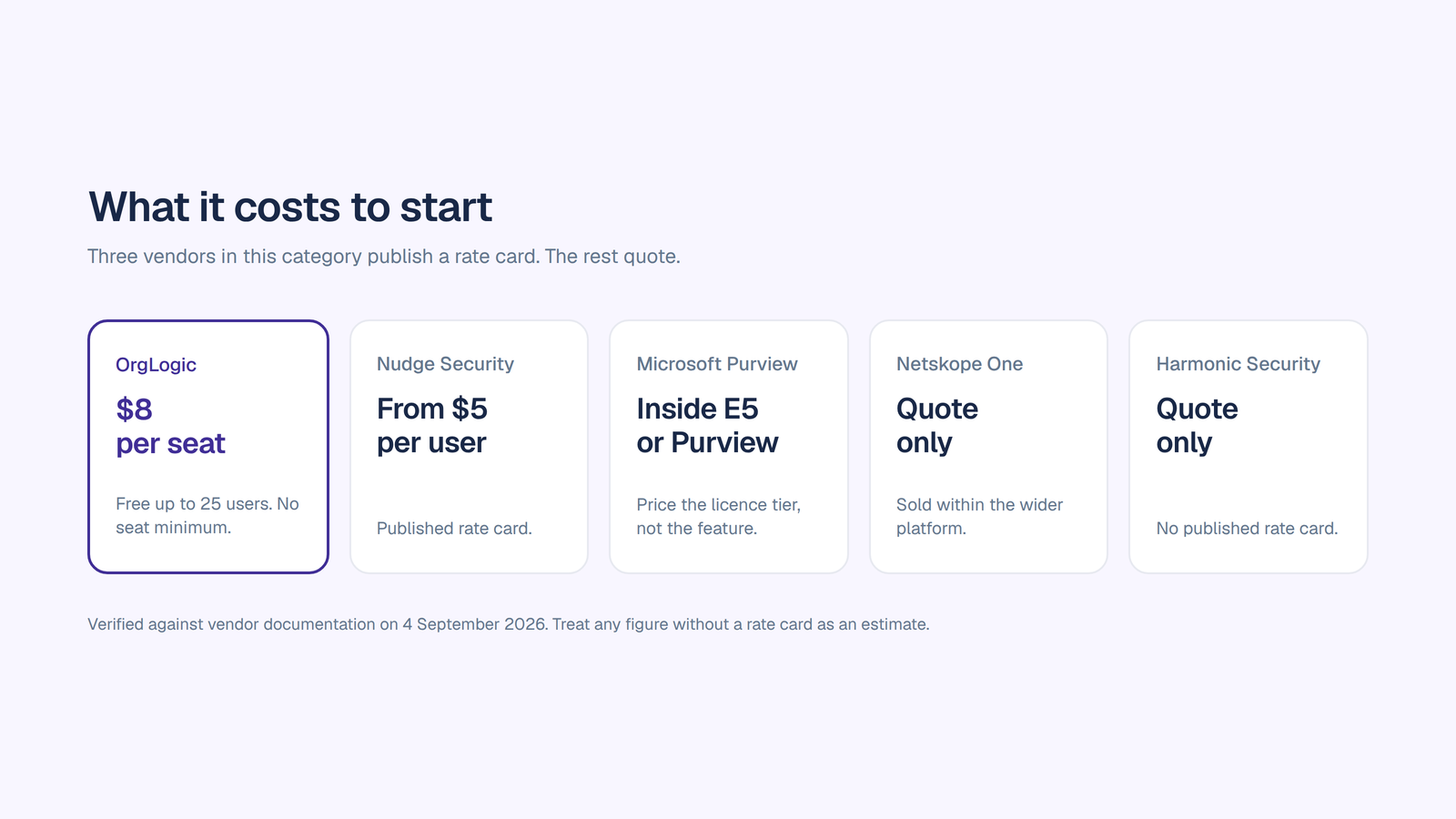
6. Pricing transparency and the floor. Three vendors in this category publish a rate card. Everyone else quotes. Ask for the all-in number including the licensing tier the AI features actually require, because in at least one major case the AI capability sits inside a suite licence that costs many times the headline.
7. What it costs you in trust. Detection programs announced as crackdowns return unusable data, because people hide usage the moment they think it is disciplinary. The tooling you choose shapes how the program is received. Coaching-in-the-moment lands differently from silent blocking.
Our shadow AI detection guide covers the methodology behind these criteria, including the signals you can pull this week from data you already hold before buying anything.
Layer: the control layer, plus visibility over routed AI traffic.
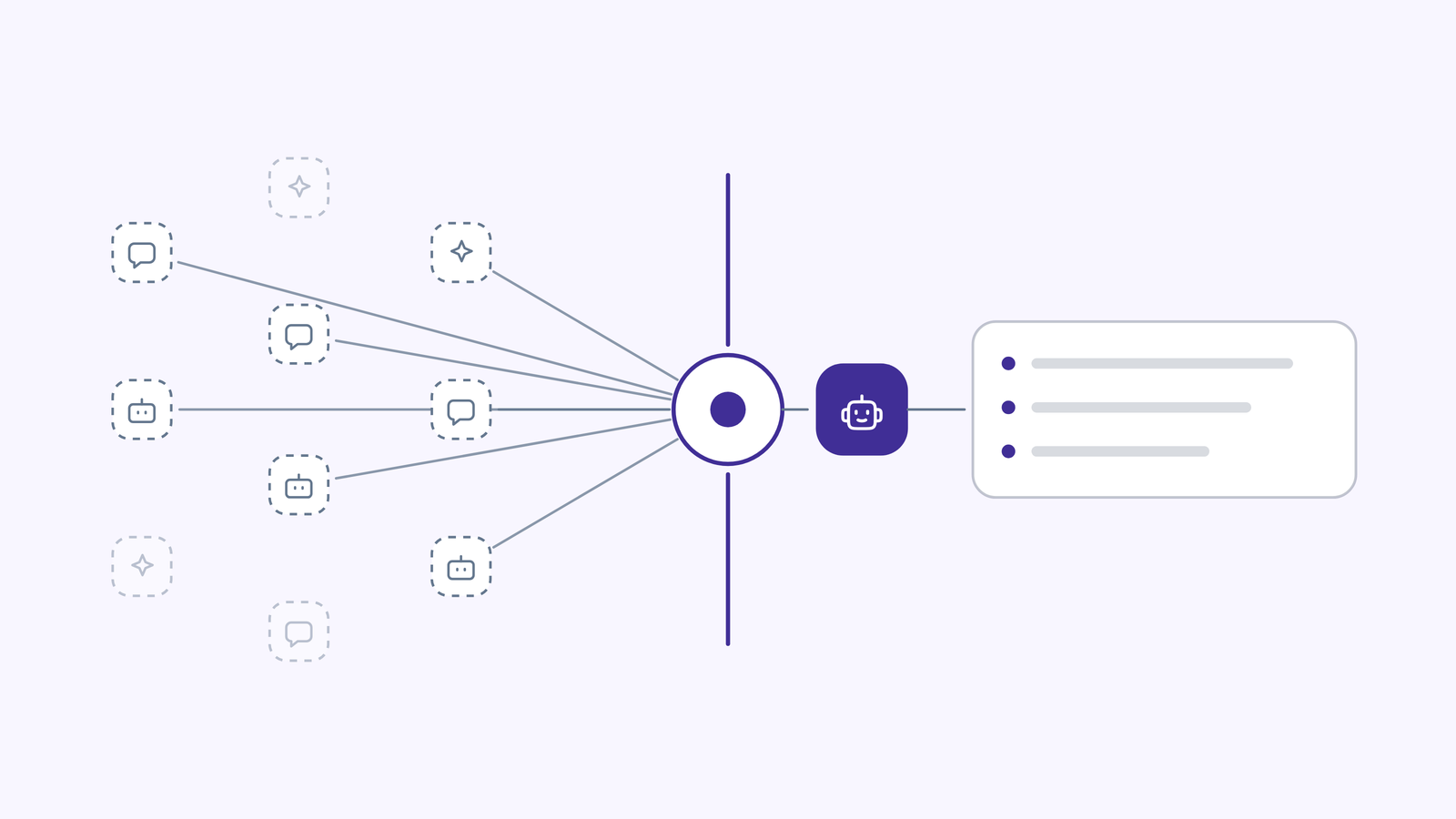
Being precise about scope matters more than positioning here, so plainly: OrgLogic is not a network scanner. It does not inspect DNS logs, crawl your SaaS estate or agent your endpoints, and governance is enforceable on traffic that flows through OrgLogic. It runs alongside a discovery product from the list below rather than replacing one. It is first here because it covers the half of the problem detection tools structurally cannot, and that half is where the number actually moves.
Visibility over AI you did not procure. Third-party AI clients and externally built agents are registered in the External Agent Registry and routed through the OrgLogic AI Gateway. Each receives its own credential with one-click revoke, and produces a per-agent audit trail plus observability on call volume, cost and error rate. For most organizations this is the first record they have had of AI nobody centrally bought. Where a frontier assistant is already embedded in the stack, OrgLogic vs Claude Enterprise covers how that coexistence works in practice.
Enforcement before the model. Routed traffic inherits your controls: PII redaction before the prompt reaches a model, model availability rules per team, per-team budget caps with hard stops rather than alerts, and guardrails at the organization level.
A complete evidence layer. Every thread message and agent action is logged with the user, the agent, its accountable manager, the connector touched, the model and the cost, searchable and exportable straight to an auditor.
Agent-level control. Every agent has a named accountable manager who is its only editor, its own connections, and read or write scope set per agent per connector, revocable in seconds. This is the direct answer to agents built on shared API keys, which most detection tooling never sees. See how to build an AI agent for what that looks like in practice, and best AI agent platforms for how the category compares.
The sanctioned destination. Every leading model in one governed place with switching mid-conversation and smart routing per task, BYOK at zero surcharge with data flowing directly to the model providers, and agents acting inside Salesforce, Jira, Confluence, GitHub, ServiceNow, SharePoint and Google Workspace. This is the AI workspace pattern applied to the shadow AI problem.
Pricing: free up to 25 users with governance included. $8 per seat per month annual, $10 monthly, no seat minimum until Enterprise. Model usage separate: BYOK at zero surcharge, or provisioned at cost plus 6%. SOC 2 Type II, ISO 27001, HIPAA with a BAA available, GDPR. SSO and SCIM, single-tenant VPC and on-premise on Enterprise. See pricing.
Layer: network and secure service edge.
Netskope extends its Security Service Edge platform with GenAI-specific detection, maintaining a large catalog of tracked GenAI SaaS applications for network-layer discovery. Detection runs through CASB integration, applying real-time data loss prevention policy to information moving toward AI tools, and an AI Command Center provides centralized management of AI security across the enterprise. It holds Leader status in the 2026 Gartner Magic Quadrant for both SASE Platforms and Security Service Edge, and for organizations already running Netskope for cloud security, AI visibility arrives without deploying an additional product.
Pricing: quote-only, sold as part of the wider platform.
Layer: Microsoft-native identity, network and content.
Purview implements a four-stage shadow AI model: discover AI usage, block unsanctioned tools, prevent sensitive data exposure, and govern through audit and retention. Discovery draws on Defender for Cloud Apps and its cloud application catalog, surfacing AI tool usage across the Microsoft 365 environment from managed devices. DSPM for AI discovers AI interactions, protects sensitive data and detects risks in AI usage, while DLP policies extend to AI interactions including restrictions on prompts containing sensitive information. Controls integrate across Purview, Defender for Cloud Apps, Entra and Intune. At RSAC 2026 Microsoft announced shadow AI protection in Microsoft Edge, adding browser-level control over how AI is used and preventing enterprise data from reaching unsanctioned consumer AI tools.
Pricing: DSPM for AI ships inside Microsoft 365 E5 or the Purview suite. That licensing tier is the real cost, so price the tier rather than the feature.
Layer: identity, OAuth and email metadata.
Nudge takes an approach nothing else here replicates. It reconstructs an organization’s historical AI footprint from mailbox metadata, surfacing AI accounts created against company addresses in the past rather than only watching forward from deployment day. That produces a usable baseline almost immediately, including tools that agent-based and network-based products do not see. It also surfaces OAuth grants, which matter more than logins, because a grant against a mailbox or a document store is a live data pipeline rather than a sign-in event. Coverage extends across shadow IT as well as shadow AI, and deployment requires no endpoint agent or network change.
Pricing: publishes a rate card, listing from $5 per user per month, which makes it one of the few vendors in this category you can budget for without a sales cycle.
Layer: browser.
Harmonic operates in the browser, the layer that sees the action most security teams are actually concerned about: sensitive text pasted into a web interface. It inspects prompts for sensitive data in flight and applies policy at the point of use. Its distinguishing design choice is behavioural. Rather than blocking silently, it nudges the user in the moment, guiding them away from the risky action, which lowers false-positive friction on conversational prompts and tends to preserve the goodwill a detection program depends on. The vendor has described capabilities beyond the browser, so confirm current coverage against documentation.
Pricing: quote-only.
Work through these in order. The first question eliminates most of the market.
1. Where does your risk actually sit? If it is employees in browsers, start at the browser layer. If it is OAuth grants against company accounts, start at identity. If you are a Microsoft shop, start with what your licence already includes. If you already run an SSE platform, open that vendor’s GenAI line before adding a console. Buying the wrong layer is the most expensive mistake available here, and it is common.
2. Do you need a baseline or a monitor? These are different purchases. If you need to walk into a board meeting next month with a number, retrospective discovery from mailbox metadata gets you there fastest. If you need continuous enforcement, that is a network, browser or endpoint product.
3. What is the licensing floor underneath the feature? Ask what tier the AI capability requires. At least one major option in this category delivers AI governance only inside a premium suite, so the headline feature price is not the number that lands in your budget.
4. What happens after the alert? Push hard here. A tool that only reports leaves you with a list and no mechanism. A tool that blocks without an alternative moves usage to personal devices, which reduces your visibility rather than your risk. The strongest programs pair detection with a sanctioned destination good enough that people stop going around IT.
5. Can it see agents, not just people? If your engineers build on provider APIs, most of this category will miss it. Ask specifically about API key usage and unattended agents, and check whether an agent platform with per-agent credentials solves it more directly than detection does.
6. Will the program survive contact with employees? Announce discovery, not enforcement. Choose tooling whose default behaviour matches that message, because the reasons behind the usage are the most valuable output of the whole exercise and you only get them if people are willing to tell you.
Most mature programs end up running two or three layers plus a control plane, not one product. Budget for that shape from the start. Our enterprise AI workspace checklist and AI implementation strategy guide cover sequencing the rollout.
Detection answers one question: what is out there. It does not answer the harder one, which is what you do on Monday. This is where OrgLogic fits, and it fits in three places.
It turns previously invisible AI into a record. Register external agents and route third-party AI clients through the AI Gateway, and traffic that generated no audit trail at all starts producing one: per agent, per model, with call volume, cost, error rate, and a credential you can revoke in one click. Scope is the model traffic routed through the gateway rather than everything those clients do outside it, and being precise about that boundary is the difference between a governance claim your CISO trusts and one they stop reading.
It enforces policy before the model sees anything. PII redaction runs pre-model on every call. Model availability is controlled per team. Per-team budget caps hard-stop rather than alert. Every thread message and agent action is logged with the user, the agent, its accountable manager, the connector, the model and the cost, searchable and exportable straight to an auditor. All of it is available on every plan including Free, which matters specifically here: a shadow AI pilot that runs without audit logging is itself shadow AI.
It removes the reason people went around IT. This is the part detection cannot do at any price. Employees adopt unsanctioned AI because the approved path is worse, which makes shadow AI a product gap rather than a discipline problem. Every leading model in one governed place at $8 a seat, with agents that act inside Salesforce, Jira, Confluence, GitHub, ServiceNow, SharePoint and Google Workspace under per-agent permissions, is a sanctioned option people choose on the merits. Our comparison of the best enterprise AI workspaces for teams covers how the options differ. That is what makes the number fall and stay down.
A publicly traded autonomous vehicle company with ~1,500 employees consolidated 12 AI tools into OrgLogic, cut AI spend 70%, and reduced shadow AI by 91%, with engineers adopting in 2 weeks. That reduction came from consolidation, not from a crackdown.
The right tool depends on which layer your risk sits at, because no product covers all of them. Netskope One is strongest at the network and secure service edge layer. Microsoft Purview with DSPM for AI is the natural choice for Microsoft-standardized organizations. Nudge Security leads on identity and OAuth discovery and reconstructs historical AI footprint from mailbox metadata. Harmonic Security covers the browser with an in-the-moment coaching model. OrgLogic covers the control layer, giving visibility over routed AI traffic and providing the governed destination that reduces shadow AI rather than relocating it.
Detection identifies unsanctioned AI usage and produces an alert. Governance decides what happens next: what gets redacted, which models are permitted, what spend is capped, and what record is kept. They are usually different products. Detection tells you the size of the problem; governance is how you shrink it.
No. Shadow AI appears at five layers: network, identity and OAuth, browser, endpoint, and prompt content. Every vendor is strong at one or two and weaker elsewhere, and none can see usage on personal devices outside your management. A credible program runs two or three layers plus a control plane rather than relying on a single product.
Most vendors quote rather than publish. Nudge Security lists from $5 per user per month. Microsoft Purview’s DSPM for AI ships inside Microsoft 365 E5 or the Purview suite, so the licence tier is the real cost rather than the feature. Netskope and Harmonic are quote-only and typically sold as part of a wider platform. OrgLogic is $8 per seat per month annual with governance on every plan including a free tier up to 25 users.
Rarely on its own. Blocking detected tools improves the dashboard while usage migrates to personal devices and home networks where you have no visibility at all, which reduces observability rather than risk. The durable pattern is to detect, understand why people went around IT, provide a sanctioned option they genuinely prefer, then govern what routes through it.
Most detection tooling misses them, because an agent authenticating with a provider API key never appears in identity systems and produces little browser signal. Scan source control for provider endpoints and key patterns to find them, then prevent recurrence by giving engineers a platform where each agent has its own credential, an accountable owner, scoped connector permissions and an audit trail, rather than a shared key in an environment variable.

Single-model AI tools lock you into one provider at $25-60/seat. OrgLogic is a multi-model AI workspace with named Agents that act in your systems (Salesforce, Jira, Confluence, ServiceNow), packaged Skills for domain expertise, and full governance at $8/seat. You get every model, not just one.

Bring Your Own Key means you connect your own API keys from OpenAI, Anthropic, Google, or any provider. Your data flows directly to the model provider. OrgLogic never sees, stores, or processes your prompts or responses. Zero surcharge on your own keys. This is the #1 requirement for security teams evaluating enterprise AI platforms.
An Agent is a named AI worker with a defined job, connected to your systems via Connectors. A Skill is packaged expertise that teaches an Agent how to do specific work consistently. Unlike a generic chatbot, a Deal Prep Agent with a Salesforce Connector pulls real CRM data and produces structured call briefs. Skills are reusable across Agents, versioned, and authored in plain language.
Every Workspace includes per-Agent Connector permissions (each Agent gets scoped access, not blanket access), Agent-level audit trails, automatic PII redaction, per-team budget controls, model-level access controls, and configurable guardrails. Governance is the default environment on every plan, including Free. SOC 2 Type II, ISO 27001, HIPAA, and GDPR compliant.
The Free plan covers 25 users with $500 in credits ($20 per active user, pooled). The Business plan is $8/seat/month (annual) or $10 monthly. The seat fee covers the full platform: Agents, Skills, Connectors, governance dashboard, 5 surfaces, and all features. Model usage is separate: BYOK at zero surcharge, or OrgLogic-managed models at cost + 6%.
80% of employees already use AI tools without IT approval. OrgLogic replaces fragmented, ungoverned tools with one AI workspace employees actually want to use, available on web, Slack, Teams, Chrome, and API. One customer, a regulated tech company with 1,500 employees, reduced shadow AI by 91% within 6 weeks while cutting AI spend by 70%.
OrgLogic Connectors integrate with Salesforce, Jira, Confluence, ServiceNow, SharePoint, Google Workspace, Slack, SAP, and more via custom APIs. Each Connector has per-Agent permission scopes controlled by IT, so your Deal Prep Agent only accesses the Salesforce objects you approve. The Connector library is growing and new integrations ship regularly.
Self-serve signup takes 30 seconds. Connect your API keys in 2 minutes. Deploy pre-built Agents for sales, support, engineering, HR, and legal on day one. The Free plan (25 users, full governance) lets you pilot without procurement. One customer had engineers adopting within 2 weeks across Slack and Chrome. Enterprise plans add SSO/SCIM, VPC, and on-prem deployment.