
Finance teams run on deadlines, controls and evidence. Month-end close, reconciliations, accounts payable, variance commentary and audit requests all compete for the same small team, and much of the work is repetitive: gather data from several systems, check it against a rule, explain the difference, and hand it to someone for approval. That is exactly the kind of work AI agents for finance teams now take on.
This guide explains why AI agents matter for finance, how they are applied, and ranks and compares the 10 best AI agents for finance teams, starting with OrgLogic. It closes with the finance use cases where agents deliver the most, and how to adopt them without weakening the controls finance depends on.
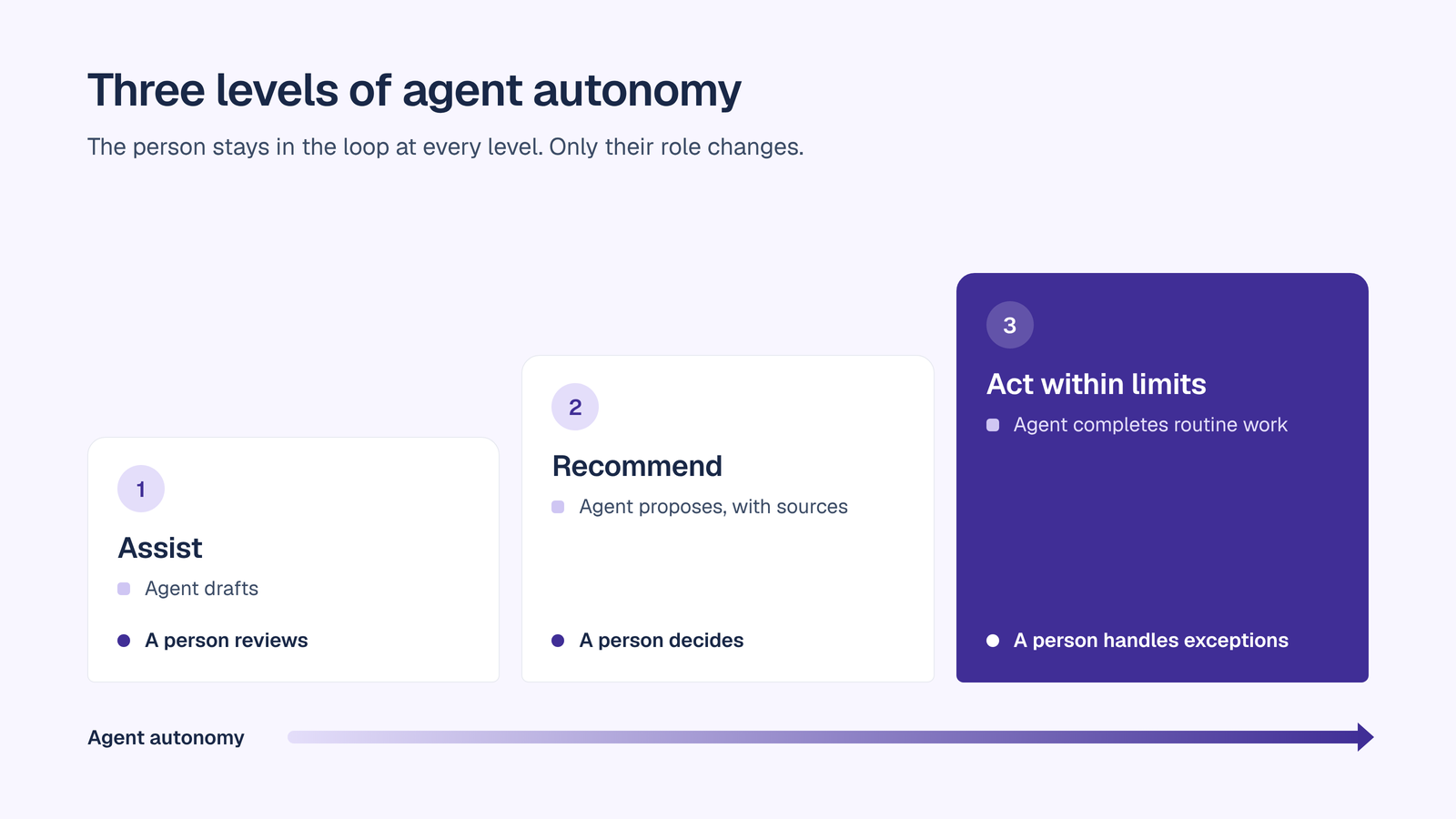
AI agents in finance work at three levels of autonomy:
They also sit in three places in the finance stack:
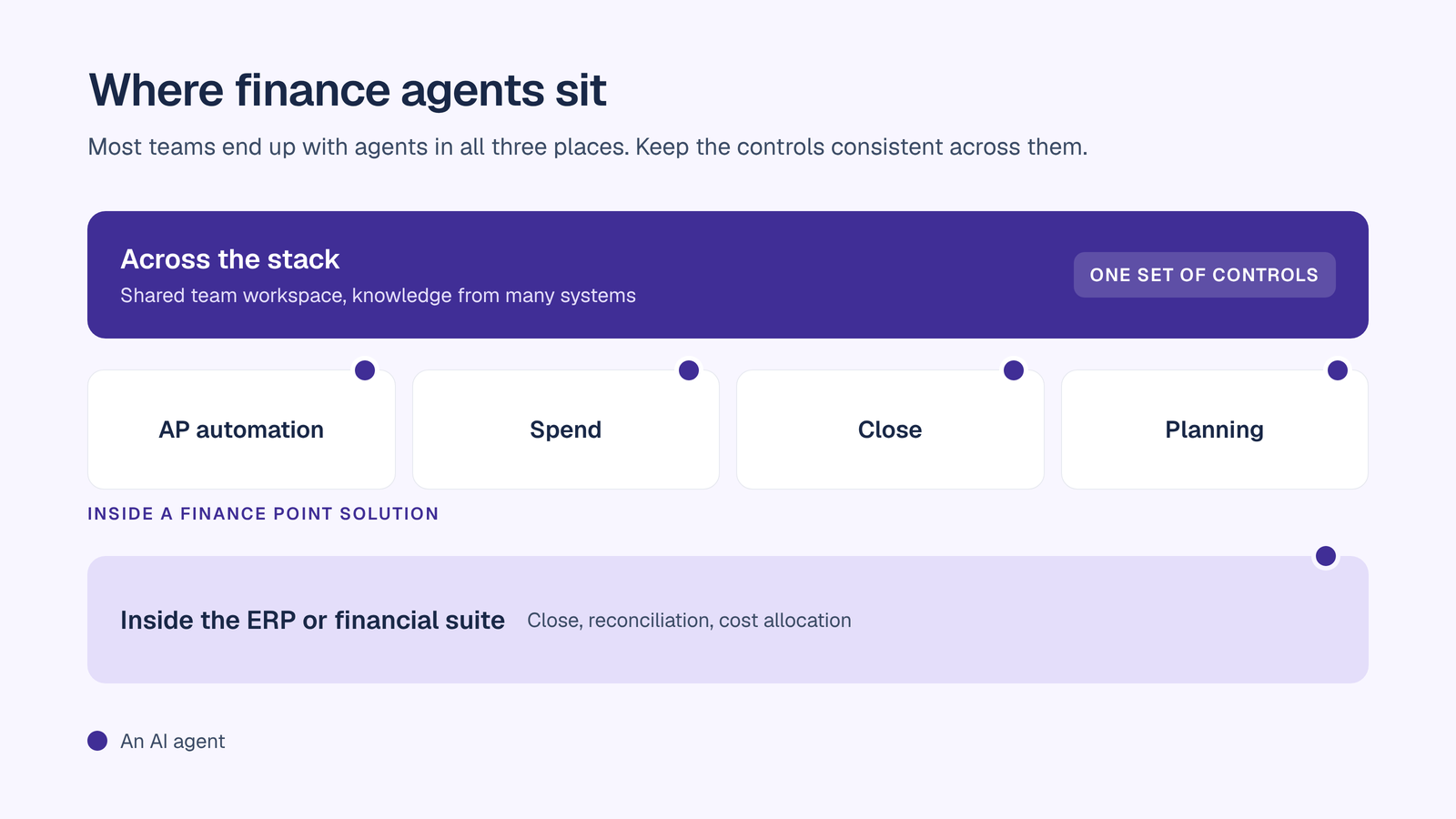
Most finance teams end up with agents at all three. The governance question is how to keep ownership, permissions, approvals and evidence consistent across them. For a broader view, read how to build an AI agent and the best AI agent platforms.
OrgLogic is listed first. Each entry describes the vendor’s agents and AI capabilities as stated by the vendor or in the cited news source.
OrgLogic is the governed AI workspace where finance teams and their AI agents work together on shared company knowledge. Instead of living inside one finance system, OrgLogic agents work across the systems finance already uses, under one set of controls.
See the AI agent platform and the no-code AI agent builder for how agents are created and governed.

Microsoft has added accounting capabilities to Copilot in Excel and Cowork. They cover account reconciliation, comparing balances and transactions, identifying discrepancies and preparing reconciling items for review; drafting journal entries, including accruals, reclassifications, allocations, reversals and recurring entries, with checks for required inputs and balanced entries; and performance and variance analysis against plan. They require a Microsoft Copilot license, and Microsoft has announced general availability from 13 November 2026.
NetSuite’s 2026.1 release adds AI across close and cash. The NetSuite Intelligent Close Manager monitors close progress and surfaces AI insights on trends and errors. GenAI flux analysis detects balance fluctuations and drafts plain-language explanations. An Account Reconciliation AI assistant automates reconciliation setup, and an AI-powered transaction matching assistant suggests likely matches with confidence scores. An AI-driven agent for Profitability and Cost Management generates cost allocation models and explains how costs flow through allocations.
Workday announced three finance agents under Workday Illuminate in September 2025, for availability in 2026. The Financial Close Agent streamlines the close with automation and real-time visibility. The Financial Test Agent continuously tests financials to help detect fraud and support compliance. The Cost and Profitability Agent lets users define cost allocation logic in everyday language.
BlackLine made Verity Prepare generally available in July 2026. It is a multi-agent system for reconciliation preparation. Its agents analyze supporting documentation, match transactions, identify reconciling items, isolate anomalies, write variance explanations and compile an audit-ready reconciliation package for human sign-off. BlackLine states that every recommendation comes with transparent reasoning, confidence scoring and a complete audit trail.
FloQast AI Agents automate recurring accounting workflows across close management, compliance and reporting. They include a Journal Entry Agent, which creates and posts accrual entries, a Data Transformation Agent, which standardizes unstructured data for reconciliations and reporting, and custom agents that accountants build in natural language in the FloQast Transform hub. FloQast cites ISO 42001 certification as part of its governance approach.
HighRadius offers AI-driven autonomous finance software across order to cash, treasury, record to report and accounts payable. Its modules cover collections, cash application, credit and deductions management, cash forecasting, financial close, anomaly management, account and bank reconciliations, consolidation, SOX compliance, and AP invoice capture, matching, approvals and GL coding.
Ramp’s agents work inside its spend management platform. The Policy Agent reads your expense policy, reviews card transactions and reimbursements, and recommends approval, rejection or escalation, citing the policy text behind each recommendation. The AP Agent handles invoices from ingestion through payment, auto-codes GL fields and flags potential invoice fraud before approval routing. The Accounting Agent auto-codes transactions and marks routine, high-confidence ones ready to sync to the ERP, leaving exceptions for review.
Vic.ai focuses on accounts payable. Its VicAgents are task-specific agents that work inside existing systems and approval flows. The Inbox agent sorts AP emails by intent and urgency, drafts replies using real-time data, and flags account changes, duplicates and exceptions. The Contracts agent, in beta, monitors invoices and payments against contract terms, and the Analytics agent is also in beta.
Pigment is an AI-native planning platform for FP&A. Its Analyst Agent analyzes operating expenses against budget, flags material deviations and explains root causes by department and vendor. It also runs weekly health checks to align P&L and cash flow and flag liquidity risks. Users start a conversation from anywhere in their model, and the agent retrieves the data, runs the analysis and produces a report. Pigment also offers a Modeler Agent.
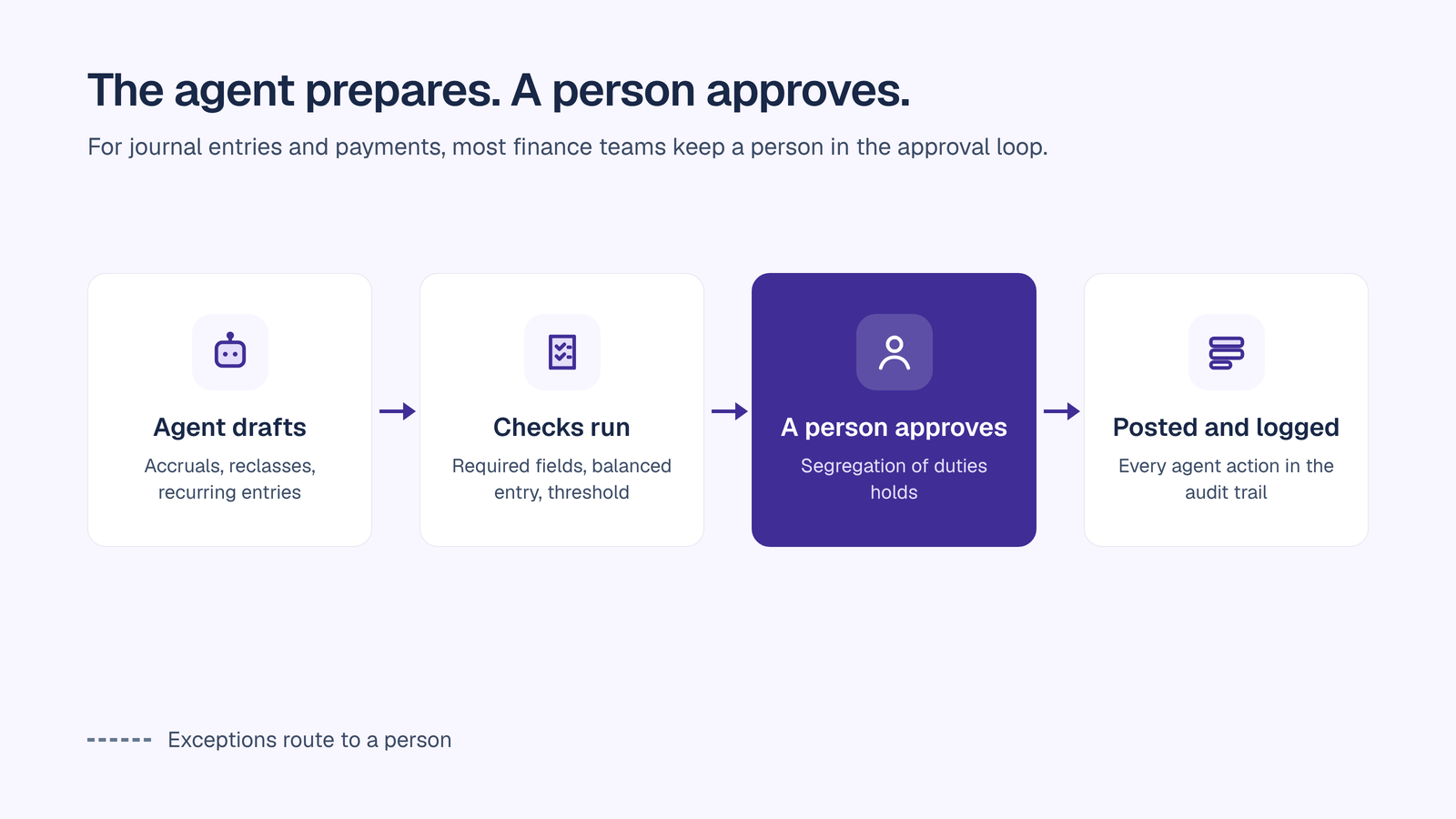
AI agents for finance teams are moving from pilots to production. The best results come from matching the agent to the process: specialist agents inside the ERP, close, AP, spend and planning platforms go deep on one workflow, while finance teams also need a governed place where people and agents work across all of those systems together. Whatever mix you choose, keep four controls constant: every agent has an accountable owner, permissions match the job, a person approves what matters, and every action is logged.
OrgLogic gives finance that governed place:
A publicly traded autonomous vehicle company with ~1,500 employees consolidated 12 AI tools into OrgLogic, cut AI spend 70%, and reduced shadow AI by 91%, with engineers adopting in 2 weeks.
Seats are $8 per month on annual billing, and up to 25 users are free. See pricing.
Further reading:
AI agents for finance teams are AI systems that carry out finance work, such as reconciliations, journal entries, invoice processing, variance analysis and policy checks, by gathering data from finance systems, applying rules and either drafting, recommending or completing the work within set limits.
Leading options include OrgLogic for governed finance agents across the stack, Microsoft 365 Copilot in Excel, Oracle NetSuite, Workday, BlackLine, FloQast, HighRadius, Ramp, Vic.ai and Pigment. The right mix depends on which processes you want to automate and which systems you already run.
Some can complete routine, high-confidence work within limits, such as syncing coded transactions to the ERP, while routing exceptions to people. For journal entries and payments, most finance teams keep a person in the approval loop, set approval thresholds and require an audit trail for every agent action.
They can be, with the right controls: a named owner for every agent, permissions limited to what each agent needs, PII redaction before data reaches a model, human approval for material actions, and an exportable audit trail. OrgLogic applies these controls on every plan.
Agents monitor close tasks, match transactions, prepare reconciliations, draft journal entries and explain flux and variances, so accountants spend less time gathering data and more time reviewing and analyzing results.
Pricing varies by vendor and is often bundled into ERP, close or spend platforms. OrgLogic costs $8 per seat per month on annual billing, with up to 25 users free, and model usage billed separately at zero surcharge with your own keys.
No. AI agents take on repetitive preparation and first drafts, while finance professionals review, approve, investigate exceptions and advise the business. Finance controls keep human judgment as the final authority for material decisions.

Single-model AI tools lock you into one provider at $25-60/seat. OrgLogic is a multi-model AI workspace with named Agents that act in your systems (Salesforce, Jira, Confluence, ServiceNow), packaged Skills for domain expertise, and full governance at $8/seat. You get every model, not just one.

Bring Your Own Key means you connect your own API keys from OpenAI, Anthropic, Google, or any provider. Your data flows directly to the model provider. OrgLogic never sees, stores, or processes your prompts or responses. Zero surcharge on your own keys. This is the #1 requirement for security teams evaluating enterprise AI platforms.
An Agent is a named AI worker with a defined job, connected to your systems via Connectors. A Skill is packaged expertise that teaches an Agent how to do specific work consistently. Unlike a generic chatbot, a Deal Prep Agent with a Salesforce Connector pulls real CRM data and produces structured call briefs. Skills are reusable across Agents, versioned, and authored in plain language.
Every Workspace includes per-Agent Connector permissions (each Agent gets scoped access, not blanket access), Agent-level audit trails, automatic PII redaction, per-team budget controls, model-level access controls, and configurable guardrails. Governance is the default environment on every plan, including Free. SOC 2 Type II, ISO 27001, HIPAA, and GDPR compliant.
The Free plan covers 25 users with $500 in credits ($20 per active user, pooled). The Business plan is $8/seat/month (annual) or $10 monthly. The seat fee covers the full platform: Agents, Skills, Connectors, governance dashboard, 5 surfaces, and all features. Model usage is separate: BYOK at zero surcharge, or OrgLogic-managed models at cost + 6%.
80% of employees already use AI tools without IT approval. OrgLogic replaces fragmented, ungoverned tools with one AI workspace employees actually want to use, available on web, Slack, Teams, Chrome, and API. One customer, a regulated tech company with 1,500 employees, reduced shadow AI by 91% within 6 weeks while cutting AI spend by 70%.
OrgLogic Connectors integrate with Salesforce, Jira, Confluence, ServiceNow, SharePoint, Google Workspace, Slack, SAP, and more via custom APIs. Each Connector has per-Agent permission scopes controlled by IT, so your Deal Prep Agent only accesses the Salesforce objects you approve. The Connector library is growing and new integrations ship regularly.
Self-serve signup takes 30 seconds. Connect your API keys in 2 minutes. Deploy pre-built Agents for sales, support, engineering, HR, and legal on day one. The Free plan (25 users, full governance) lets you pilot without procurement. One customer had engineers adopting within 2 weeks across Slack and Chrome. Enterprise plans add SSO/SCIM, VPC, and on-prem deployment.
