.fs-cmsfilter_active span { color: black; }
table of contents

Transform complex support workflows

Deploy AI inside your existing support stack and prove business impact quickly.
Book a demo

What is BYOK (bring your own key) and why does it matter?

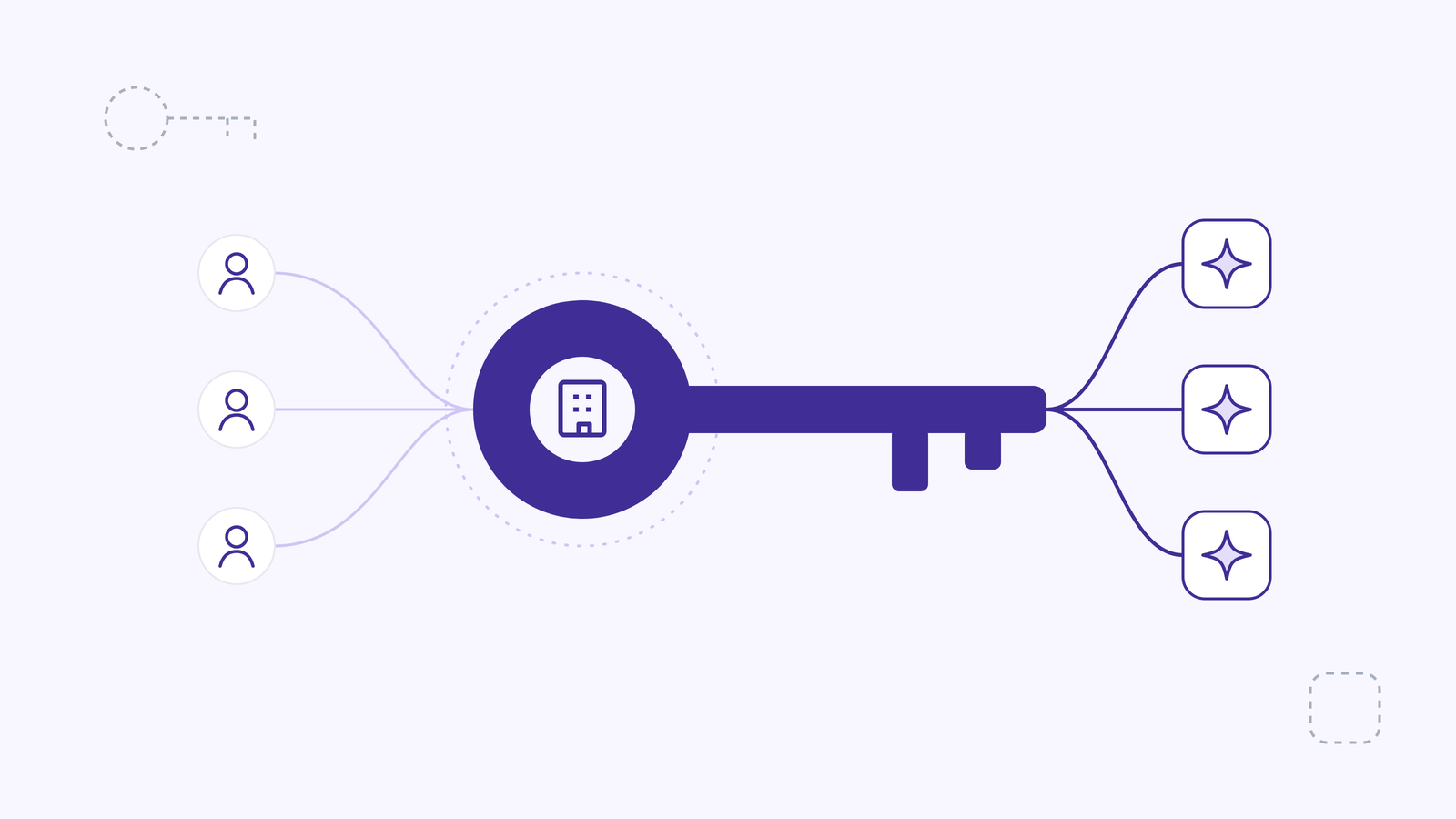
Every cloud service and AI platform your company uses runs on keys. Encryption keys protect data at rest, and API keys decide whose account an AI model runs under. Whoever holds those keys holds a large share of the control. BYOK, short for bring your own key, moves that control back to you.
AI Support Agents

This guide explains what BYOK means in both of its common senses, how it works, why organizations use it, the benefits and the ongoing work it creates, and how it compares with HYOK (hold your own key). It is written for CTOs, CISOs, IT leaders and AI teams deciding how much of their data path they want to own.

What is BYOK (bring your own key)?

BYOK (bring your own key) is a security model in which an organization supplies and controls its own keys for a cloud or SaaS service, instead of relying on keys the provider creates and holds. The organization decides how keys are created, who can use them, when they rotate, and when they are revoked.

The term is used in two related ways.

BYOK for encryption keys

In cloud security, BYOK means the customer generates an encryption key, usually in its own hardware security module (HSM), and imports it into the cloud provider’s key management service. The provider then uses that customer-supplied key to encrypt and decrypt the customer’s data. The customer keeps a copy of the key and can disable or delete it inside the service.

BYOK for AI models

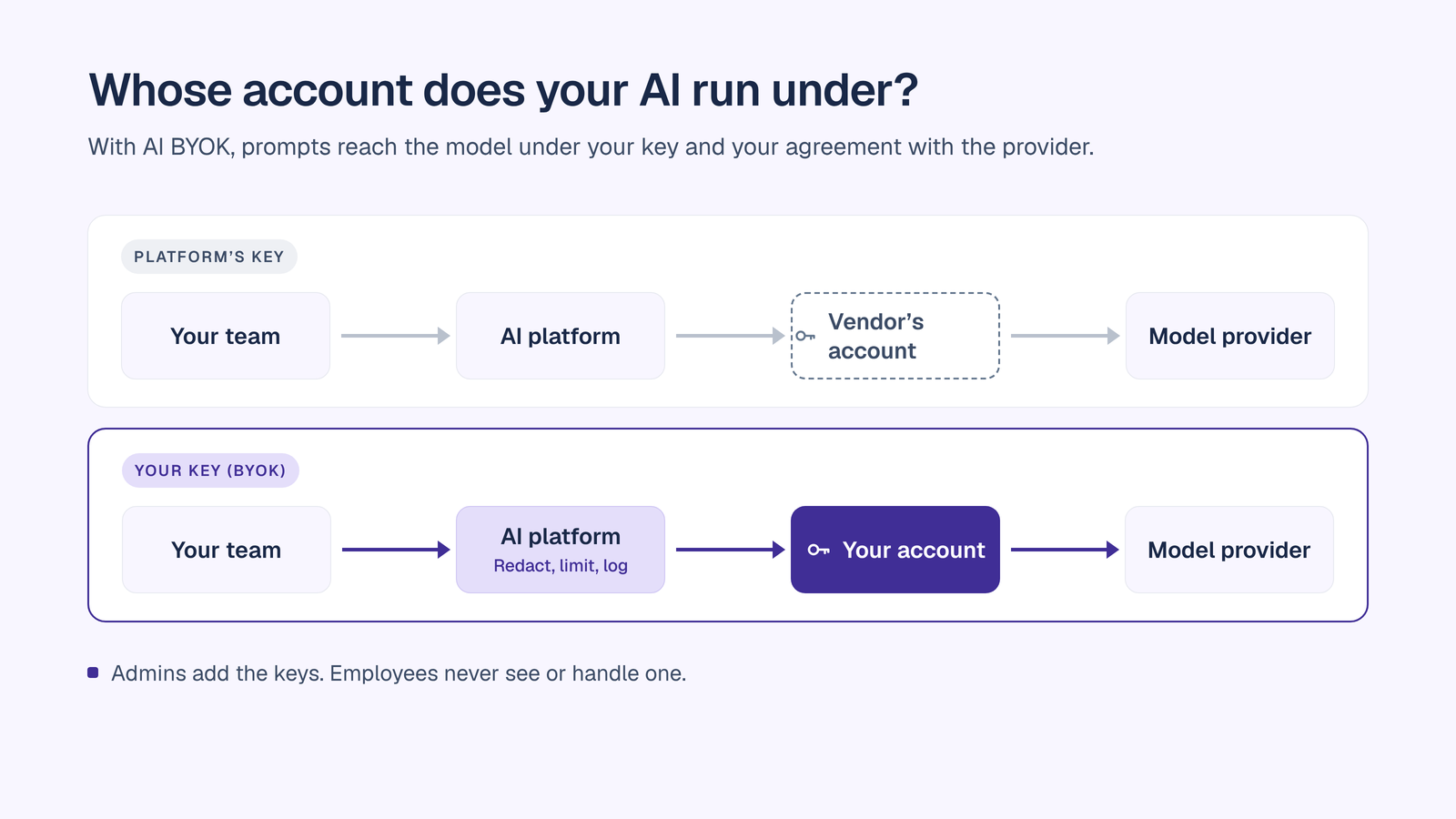
In AI platforms, BYOK means the organization connects its own API keys from model providers. Requests then run under the organization’s own account and agreements with each provider, rather than under the platform vendor’s account. This is the form of BYOK most relevant to AI governance, because it decides where your prompts and data go and on whose terms. It is sometimes called bring your own key AI, BYOK AI or BYOK LLM.

Both forms answer the same question: who controls the key that unlocks your data or your AI usage?
How does BYOK work?

How encryption BYOK works

  1. Generate the key. The organization creates key material in its own environment, typically in an HSM it controls.
  2. Import it securely. The key is wrapped and imported into the cloud provider’s key management service.
  3. Use it for encryption. The provider’s services use the imported key to encrypt and decrypt the customer’s data.
  4. Keep control of the lifecycle. The customer can disable, rotate or delete the key. Deleting it makes the data it protects unreadable.
  5. Keep a backup. Because the customer generated the key, the customer is responsible for keeping a recoverable copy. AWS, for example, notes that it does not persist imported key material to storage, so customers must keep their own backup for recovery.

How AI BYOK works

  1. An admin adds the key. An administrator connects the organization’s API key for each model provider in the AI platform’s admin settings.
  2. Users work as normal. Employees and agents use AI chat and agents without ever seeing or handling a key.
  3. Requests go to the provider under your account. Prompts are sent to the model provider using your key, so usage runs under your account and your agreement with that provider.
  4. Governance still applies. In a well-built platform, PII redaction, model availability rules, budgets and audit logging apply to every request, whichever key it uses.
  5. Billing stays with the provider. Model usage is billed by the provider at its own rates, separately from the platform’s seat fee.

Why organizations use BYOK

  • Control over sensitive data. Regulated and trust-sensitive companies want to decide who can unlock their data and who sits in the path between their employees and an AI model.
  • Regulatory and contractual obligations. Customers, auditors and regulators increasingly ask who holds the keys, where data is processed, and how access can be revoked.
  • Vendor risk reduction. When you hold the key or the provider relationship, a SaaS vendor is one fewer party with standing access to your data or your model usage.
  • Fast revocation. Disabling a key cuts off access in one step, whether the concern is a vendor, an integration or a leaked credential.
  • Existing provider agreements. With AI BYOK, the data processing terms and committed spend your procurement and operations teams have already agreed with a model provider apply to your AI platform usage too.
  • Cost transparency. AI BYOK shows exactly what each model costs at the provider’s own rates, with no hidden markup bundled into a seat price.
  • Model choice. Bringing keys for several providers lets teams pick the right model for each task without buying another single-model tool.

Benefits of BYOK

  • Stronger control. You decide who can use a key, and you can disable it at any time.
  • Clear accountability. Key usage is logged, so security teams can show which systems used which keys, and when.
  • Easier compliance evidence. Key ownership, rotation records and revocation procedures answer common audit and security questionnaire questions directly.
  • Data path clarity. With AI BYOK, data flows from your platform to the model provider under your agreement, which is simpler to explain to a CISO, a customer or an auditor.
  • No markup on model usage. With AI BYOK, you pay the model provider’s rates directly. Some platforms resell model usage with a margin. BYOK removes that layer.
  • Less lock-in. Your keys and provider relationships stay yours if you change platforms, which keeps switching costs low.
  • One governed place for many models. Combined with a multi-model AI chat platform, BYOK lets teams use every major model under one set of controls.

Ongoing tasks for BYOK

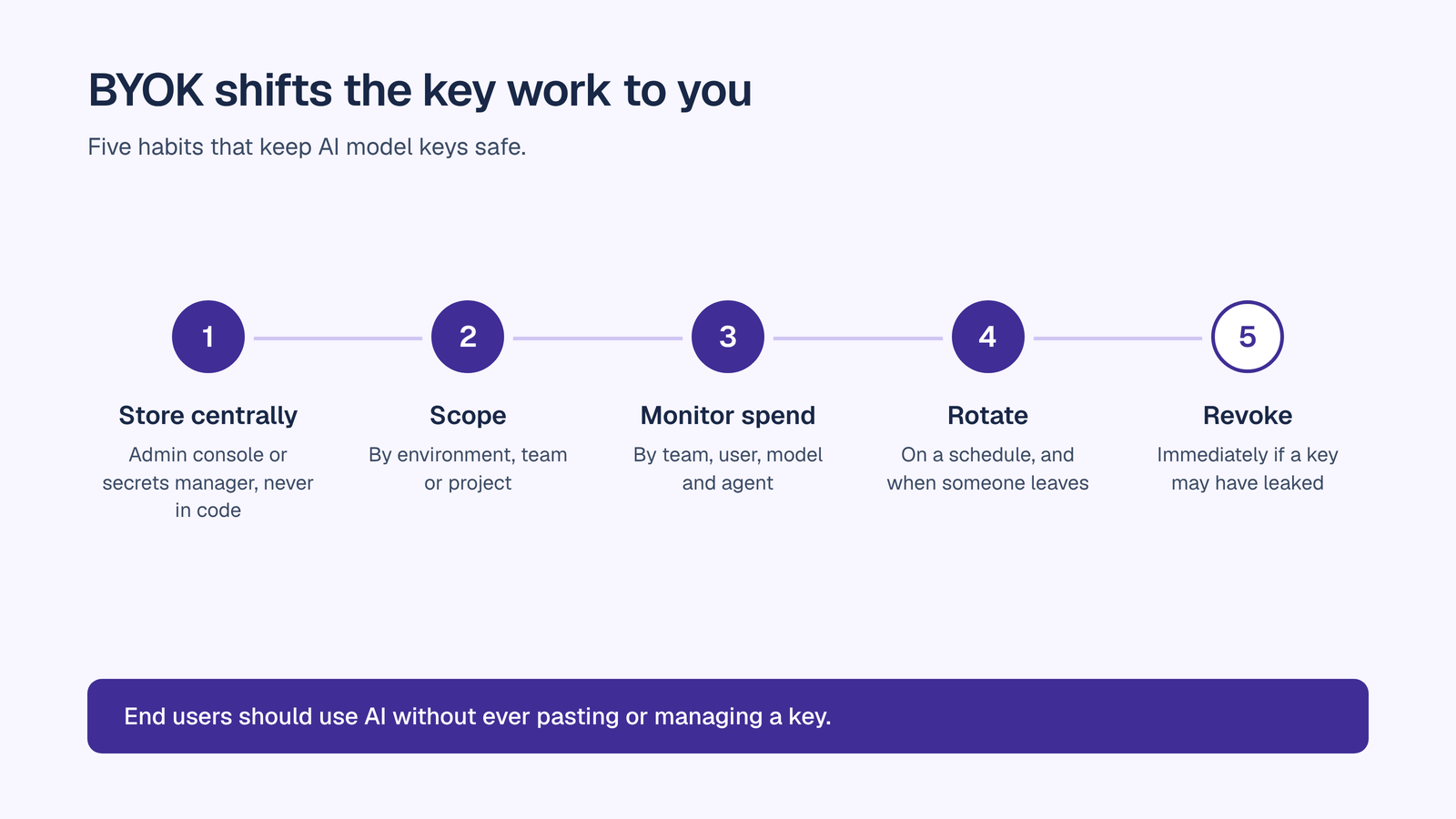
BYOK shifts responsibility to you. Plan for the work it creates.
For encryption keys

  • Rotate keys on a schedule, and after any suspected compromise.
  • Back up key material in a secure, recoverable location. If you lose an imported key, you can lose the data it protects.
  • Control key access with least privilege, and separate the people who manage keys from the people who use the data.
  • Monitor key usage logs for unexpected access patterns.
  • Plan deletion carefully. Deleting a key makes the data it protects unreadable, so treat deletion as a deliberate, approved action.
  • Design for availability. Keys held in an external system become a dependency for every workload that uses them.


For AI model API keys

  • Store keys centrally, in a secrets manager or the AI platform’s admin console, never in code, documents or individual laptops.
  • Keep end users away from keys. Employees should use AI without ever being asked to paste or manage a key.
  • Scope keys by environment, team or project where the provider allows it.
  • Rotate keys on a schedule and whenever someone with access leaves.
  • Set provider-side limits and alerts on usage, as a second line behind your platform’s budgets.
  • Monitor spend by team, user, model and agent with AI cost management, so a spike shows up the same day.
  • Revoke immediately if a key may have leaked, then issue a new one.
  • Review provider terms for data retention and training use on a regular cycle.
  • Keep an inventory of every key, its owner, its scope and where it is used.

For the controls that sit around your keys, see the AI governance platform and the enterprise AI security guide.

BYOK versus HYOK

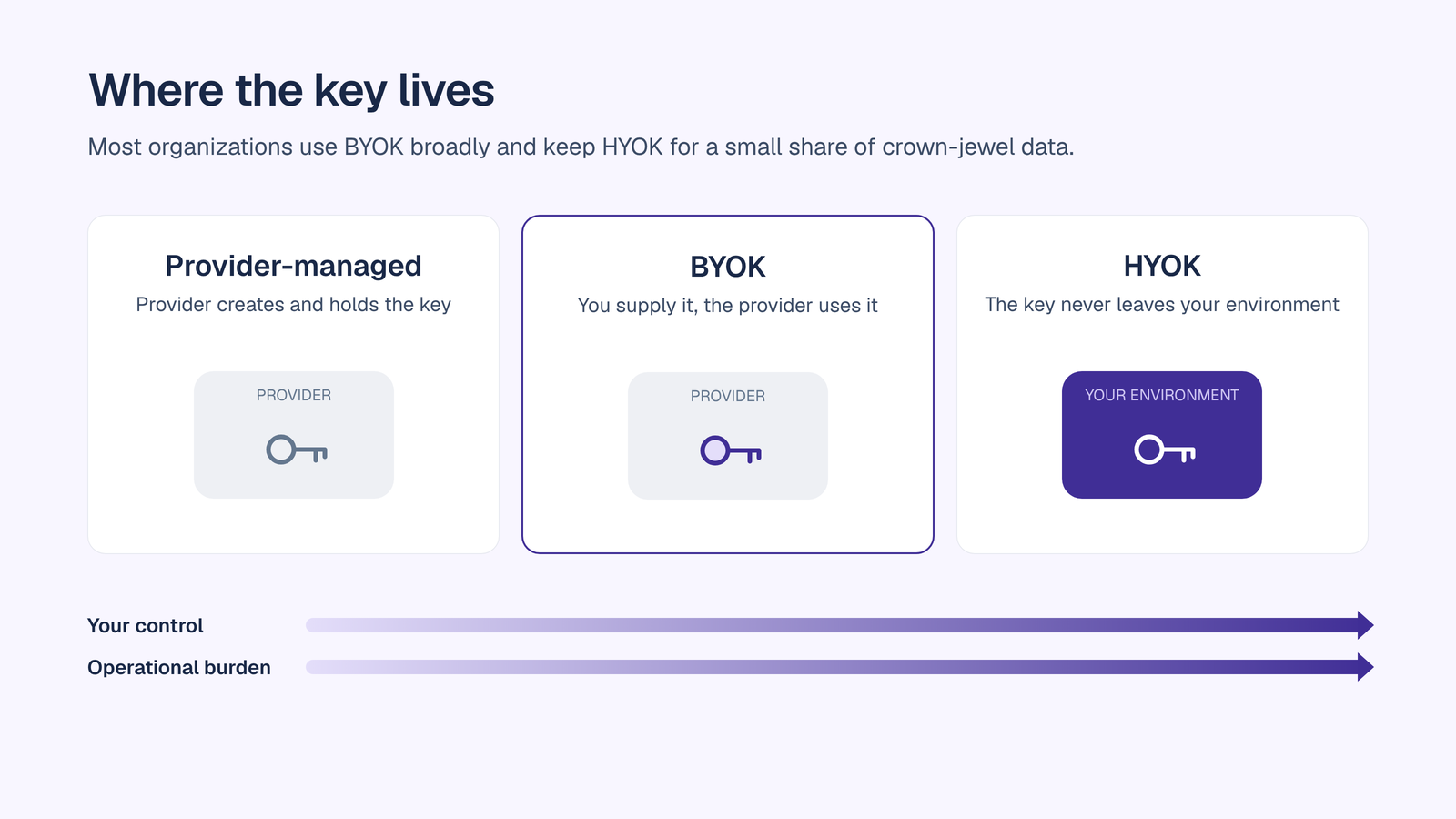
HYOK, short for hold your own key, goes a step further than BYOK. With BYOK, you supply the key and the provider uses it inside its own service. With HYOK, the key stays in your own environment, and the provider never holds it.
Two real-world examples show the difference:

  • AWS External Key Store (XKS). AWS describes it as a model where customers manage their keys outside AWS in an external key management system, and AWS KMS delegates cryptographic operations to that system. AWS also notes that the availability of those external keys becomes a limiting factor for the workloads that rely on them.
  • Microsoft Double Key Encryption (DKE). DKE protects content with two keys: one in your control and one stored in Microsoft Azure. Viewing protected content requires both. Microsoft states that DKE-encrypted data is not accessible at rest to Microsoft 365 services, including Copilot, and says DKE is not meant for all of your data, positioning it for highly sensitive content of roughly 5% of an organization’s data.


How they compare:

  • Where the key lives. BYOK: imported into the provider’s key service. HYOK: in your own environment.
  • Who performs cryptographic operations. BYOK: the provider, using your key. HYOK: your own key system, or a service you run.
  • Provider access. BYOK: the provider’s service can use the key while it is enabled. HYOK: the provider cannot use the key without your system.
  • Operational burden. BYOK: moderate, covering rotation, backup and access. HYOK: high, because you also run the key infrastructure and keep it available.
  • Availability risk. BYOK: low, because the provider runs the key service. HYOK: higher, because your key system becomes a runtime dependency.
  • Feature impact. BYOK: most provider features keep working. HYOK: features that need to read the content, such as search, co-authoring and AI assistants, may not work on protected data.
  • Best use. BYOK: broad protection for sensitive data. HYOK: a small set of crown-jewel data where maximum control outweighs lost features.

Most organizations use BYOK broadly and reserve HYOK for a small share of their most sensitive data.

What this means for AI. A model has to read a prompt to answer it, so encryption alone cannot keep data hidden from the model that processes it. For AI, the control questions become: which provider processes the data, under whose agreement, what is removed before it leaves, and what is logged. AI BYOK answers the first two. PII redaction before every model call and a complete audit trail answer the rest.

Conclusion

BYOK puts the keys, and the control that comes with them, back in your hands. For encryption, it lets you decide who can unlock your data and how fast you can cut off access. For AI, it decides whose account and agreement your prompts run under, and whether anyone adds a margin on top. Either way, it comes with ongoing work: rotation, backup, access control, monitoring and revocation. HYOK goes further for the small share of data that needs it, at a real cost in features and availability.

OrgLogic is the governed AI workspace where teams and their AI agents work together on shared company knowledge, with BYOK built in on every plan, including Free:

  • Your keys, your provider agreements. BYOK means data flows directly to model providers and OrgLogic never sees it.
  • Admin-configured. Admins add keys centrally, and end users are never prompted for keys.
  • Zero surcharge. Model usage with your own keys is billed by the provider at its rates, with no OrgLogic markup. If you prefer not to bring keys, OrgLogic-provisioned usage is billed at cost plus 6%.
  • Every model. All frontier models are available in multi-model AI chat, plus anything you bring via BYOK, with model availability set per organization and per team.
  • No training on your data. A contractual guarantee that applies to BYOK and OrgLogic-provisioned models alike.
  • Governance on every request. PII is redacted before every model call, and every thread message, agent action and Company Brain retrieval over MCP is logged with the model and cost in an exportable AI audit trail.
  • Spend under control. Per-team budgets with alerts and hard caps, and cost visible by team, user, model and agent. See AI cost management.
  • Beyond OrgLogic. External agents and AI clients routed through the AI Gateway inherit BYOK routing, PII redaction, model controls and budget caps, with a per-agent credential you can revoke in one click.
  • Enterprise readiness. SSO, SCIM, VPC and on-prem deployment on Enterprise. SOC 2 Type II, ISO 27001, HIPAA with a BAA, and GDPR.

A publicly traded defense and transportation technology company with 8,000+ employees consolidated 12 AI tools into one governed workspace with BYOK and a dedicated single-tenant VPC.

Seats are $8 per month on annual billing, and up to 25 users are free. See pricing.
Further reading:

FAQ

What is BYOK?

BYOK, or bring your own key, is a security model in which an organization supplies and controls its own keys for a cloud or SaaS service. In cloud security, it means importing your own encryption keys. In AI platforms, it means connecting your own model provider API keys, so AI usage runs under your account and agreements.

What does bring your own key mean for AI?

For AI, bring your own key means an AI platform sends requests to model providers using your organization’s own API keys. Usage runs under your account and your agreement with each provider, and is billed at the provider’s rates. In OrgLogic, admins configure keys centrally, and end users never handle them.

Is BYOK more secure?

BYOK gives you more control: you decide who can use a key and can revoke it at any time. It also adds responsibility for rotation, backup, access control and monitoring. Its security value depends on running those tasks well and pairing BYOK with controls such as PII redaction and audit logging.

What is the difference between BYOK and HYOK?

With BYOK, you supply the key and the provider uses it inside its own service. With HYOK, hold your own key, the key stays in your own environment and the provider never holds it. HYOK gives more control but adds operational burden and can disable features that need to read the content.

Does BYOK cost more?

BYOK can cost less for AI, because you pay the model provider’s own rates with no platform markup. OrgLogic charges zero surcharge on usage with your own keys. For encryption BYOK, the cost is mainly the operational work of managing keys.

Who manages the keys in BYOK?

Your organization does. For AI BYOK, an administrator adds and rotates provider API keys in the platform’s admin settings. For encryption BYOK, a security or key management team generates, imports, backs up and rotates keys.

Is BYOK available on OrgLogic’s free plan?

Yes. BYOK is available on every OrgLogic plan, including Free, with zero surcharge. Admins configure keys, data flows directly to model providers, and OrgLogic never sees it.

‍

table of contents

Common questions

How is OrgLogic different from ChatGPT Enterprise or Microsoft Copilot?

Single-model AI tools lock you into one provider at $25-60/seat. OrgLogic is a multi-model AI workspace with named Agents that act in your systems (Salesforce, Jira, Confluence, ServiceNow), packaged Skills for domain expertise, and full governance at $8/seat. You get every model, not just one.

What does BYOK mean and how does it work?

Bring Your Own Key means you connect your own API keys from OpenAI, Anthropic, Google, or any provider. Your data flows directly to the model provider. OrgLogic never sees, stores, or processes your prompts or responses. Zero surcharge on your own keys. This is the #1 requirement for security teams evaluating enterprise AI platforms.

What are Agents and Skills? How are they different from a chatbot?

An Agent is a named AI worker with a defined job, connected to your systems via Connectors. A Skill is packaged expertise that teaches an Agent how to do specific work consistently. Unlike a generic chatbot, a Deal Prep Agent with a Salesforce Connector pulls real CRM data and produces structured call briefs. Skills are reusable across Agents, versioned, and authored in plain language.

What AI governance controls does OrgLogic provide?

Every Workspace includes per-Agent Connector permissions (each Agent gets scoped access, not blanket access), Agent-level audit trails, automatic PII redaction, per-team budget controls, model-level access controls, and configurable guardrails. Governance is the default environment on every plan, including Free. SOC 2 Type II, ISO 27001, HIPAA, and GDPR compliant.

How does pricing work? What does $8/seat cover?

The Free plan covers 25 users with $500 in credits ($20 per active user, pooled). The Business plan is $8/seat/month (annual) or $10 monthly. The seat fee covers the full platform: Agents, Skills, Connectors, governance dashboard, 5 surfaces, and all features. Model usage is separate: BYOK at zero surcharge, or OrgLogic-managed models at cost + 6%.

How do you solve the shadow AI problem?

80% of employees already use AI tools without IT approval. OrgLogic replaces fragmented, ungoverned tools with one AI workspace employees actually want to use, available on web, Slack, Teams, Chrome, and API. One customer, a regulated tech company with 1,500 employees, reduced shadow AI by 91% within 6 weeks while cutting AI spend by 70%.

What systems does OrgLogic connect to?

OrgLogic Connectors integrate with Salesforce, Jira, Confluence, ServiceNow, SharePoint, Google Workspace, Slack, SAP, and more via custom APIs. Each Connector has per-Agent permission scopes controlled by IT, so your Deal Prep Agent only accesses the Salesforce objects you approve. The Connector library is growing and new integrations ship regularly.

How fast can we deploy OrgLogic?

Self-serve signup takes 30 seconds. Connect your API keys in 2 minutes. Deploy pre-built Agents for sales, support, engineering, HR, and legal on day one. The Free plan (25 users, full governance) lets you pilot without procurement. One customer had engineers adopting within 2 weeks across Slack and Chrome. Enterprise plans add SSO/SCIM, VPC, and on-prem deployment.